
嵌入式学习——Linux系统——文件编程(3)
1][] ------------------> [硬盘 ]--hello.c。/* total size, in bytes */(*文件的大小)// long unsigned int。/* time of last status change */(*最后的状态改变的时间)if ((st_mode & S_IFMT) == S_IFSOCK ) //注意 优先级 & 低于 ==fd --->
文件操作:
标准IO 文件IO
1.打开文件 FILE *fp int fd
2.读写文件 fgetc/fputc read/write
fgets/fputs
fread/fwrite
3.关闭文件 fclose close
目录也是文件:
类似标准IO
目录文件 ----> 目录流指针 ----> 提供给相关函数操作
目录文件 -----> 流 (目录流指针)
//FILE //struct _IO_FILE
FILE *fp ----->[缓存|fd]
|
【用户】 |
-----------------------------------------
【内核】 |
V
fd --->[0] ---> 文件的状态 / 偏移量
[1] [ ] ------------------> [硬盘 ]--hello.c
[2]
....
------------------------------------------------------------
01-打开目录 -- opendir
02-读目录 -- readdir
03-关闭目录 -- closedir
inode --- index node
文件属性,目录 inode,name ls 123
1.打开目标目录
2.读取目录
3.关闭目录
目录 当文件看,只不过操作函数和操作文件函数不一样。
1.opendir
DIR *opendir(const char *name);
功能:
打开一个目录获得一个目录流指针
参数:
name:目录名
返回值:
成功 返回目录流指针
失败 返回NULL
#include <stdio.h>
#include <dirent.h>

int main(int argc, const char *argv[])
{

	DIR *dir = opendir(argv[1]);

	if (dir == NULL)
	{
		perror("opendir fail");
		return -1;
	}

	printf("success\n");
	return 0;
}
2.readdir
struct dirent *readdir(DIR *dirp);
功能:
从目录流中读取文件信息并将保存信息的结构体
地址返回
参数:
dirp:目录流指针
返回值:
包含文件信息的结构体
出错或者读到目录流末尾返回 NULL
On Linux, the dirent structure is defined as follows:
struct dirent {
ino_t d_ino; /* inode number * 索引节点号/
off_t d_off; /* offset to the next dirent */
unsigned short d_reclen; /* length of this record */
unsigned char d_type; /* type of file;
not supported
by all file system types */
char d_name[256]; /* filename */
};
index node --- 索引节点
练习: ls -i
.
..
读取目录下的所有文件,打印起inode编号 和名字
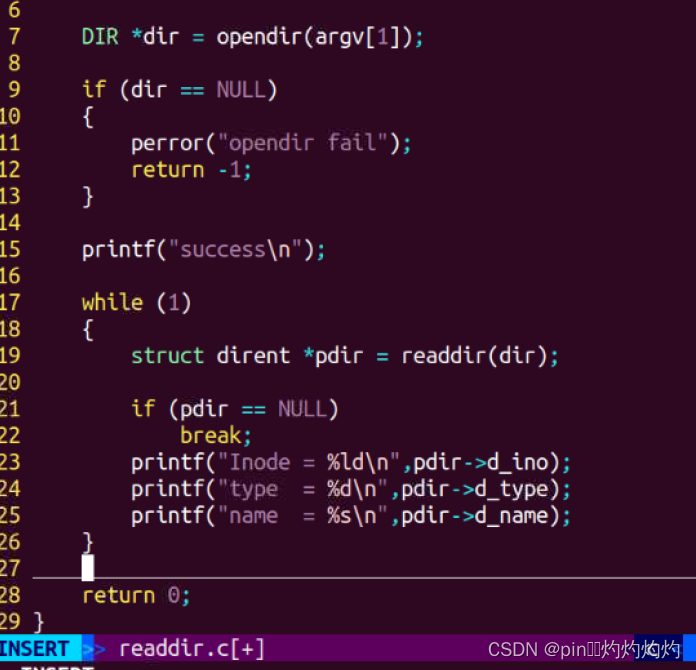
#include <stdio.h>
#include <dirent.h>

int main(int argc, const char *argv[])
{

	DIR *dir = opendir(argv[1]);

	if (dir == NULL)
	{
		perror("opendir fail");
		return -1;
	}

	printf("success\n");

	while (1)
	{
		struct dirent *pdir = readdir(dir);

		if (pdir == NULL)
			break;
		printf("Inode = %ld\n",pdir->d_ino);
		printf("type  = %d\n",pdir->d_type);
		printf("name  = %s\n",pdir->d_name);
	}

	closedir(dir);
	//closedir(dir);

	return 0;
}
练习:
打印 指定目录下的所有文件的文件名
不包括 .
..
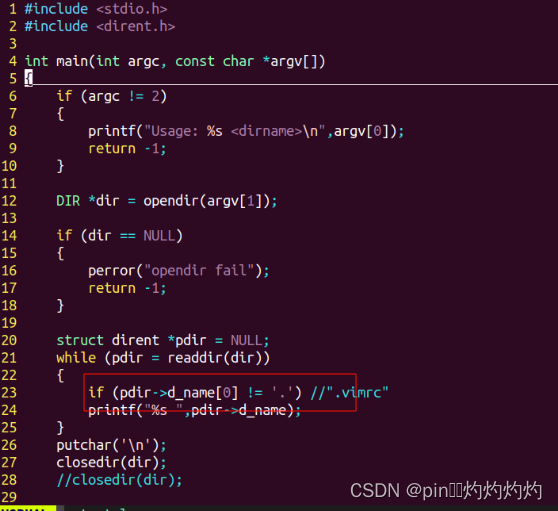
#include <stdio.h>
#include <dirent.h>

int main(int argc, const char *argv[])
{
	if (argc != 2)
	{
		printf("Usage: %s <dirname>\n",argv[0]);
		return -1;
	}

	DIR *dir = opendir(argv[1]);

	if (dir == NULL)
	{
		perror("opendir fail");
		return -1;
	}

	struct dirent *pdir = NULL;
	while (pdir = readdir(dir))
	{
		if (pdir->d_name[0] != '.') //".vimrc"
		printf("%s ",pdir->d_name);
	}
	putchar('\n');
	closedir(dir);
	//closedir(dir);

	return 0;
}
3、关闭目录
int closedir(DIR *dirp);
功能:关闭之前已经打开的目录流对象
参数:
opendir的返回结果中目录流对象
返回值:
成功 0
失败 -1;
练习:
打开一个目录
统计该目录下的普通文件的个数
及
目录文件个数
普通
DT_REG
DT_DIR
DT_BLK This is a "block device".
DT_CHR This is a "character device".
DT_DIR This is a "directory".
DT_FIFO This is a named "pipe (FIFO)". //管道文件
DT_LNK This is a "symbolic link".//软链接 ---相当于是windows的快捷方式
DT_REG This is a regular file.//普通文件
DT_SOCK This is a UNIX domain socket. //socket --- 套接字文件
DT_UNKNOWN The file type is unknown. //
目录:
cd
mkdir
rmdir
3.chdir
chdir ("/home/linux"); "../../"
fopen("1.mp4")
int chdir(const char *path);// /home/linux
功能:
改变当前程序的工作路径
参数:
path:改变到的路径
返回值:
成功返回0
失败返回-1
/home/linux/Desktop/Music
"file.txt"
chdir("/root");
"file.txt"
#include <stdio.h>
#include <unistd.h>

int main(int argc, const char *argv[])
{
	char buf[100];
	getcwd(buf,sizeof(buf));
	printf("buf = %s\n",buf);

	if (chdir("/home/linux")  < 0)
	{
		perror("chdir fail");
		return -1;
	}

	getcwd(buf,sizeof(buf));
	printf("buf = %s\n",buf);
	return 0;
}
4.getcwd //pwd
char *getcwd(char *buf, size_t size);
功能:
获得当前的工作路径
参数:
buf:保存工作路径空间的首地址
size:保存路径空间的长度
返回值:
成功返回包含路径空间的字符串首地址
失败返回NULL
5.mkdir
int a =200;
int mkdir(const char *pathname, mode_t mode);//777 666 --x--x--x
功能:
创建一个目录
666-
参数:
pathname:路径
mode:
mode & ~umask 0002
返回值:
成功返回0
失败返回-1
#include <stdio.h>
#include <sys/stat.h>
#include <sys/types.h>

int main(int argc, const char *argv[])
{
	if (mkdir(argv[1],0666) < 0)
	{
		perror("mkdir fail");
		return -1;
	}

	return 0;
}
6.rmdir rm -fr rmdir
int rmdir(const char *pathname);
功能:
删除一个空目录文件
参数:
pathname:目录文件的名字
返回值:
成功返回0
失败返回-1
//目录操作:
1.opendir
2.readdir
3.closedir
--------
4.chdir
5.getcwd
6.mkdir
7.rmdir
8.ls (stat/fstat/lstat)
【问题】
实现ls的功能?
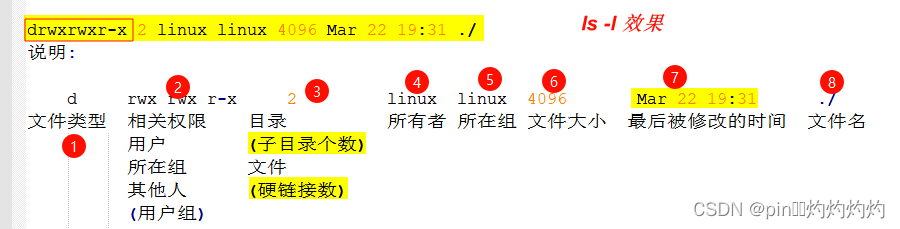
实现ls -l
drwxrwxr-x 2 linux linux 4096 Mar 22 19:31 ./
说明:
d rwx rwx r-x 2 linux linux 4096 Mar 22 19:31 ./
文件类型 相关权限 目录 所有者 所在组 文件大小 最后被修改的时间 文件名
用户 (子目录个数)
所在组 文件
其他人 (硬链接数)
(用户组)
---------------------------
硬链接:
同一个文件,多个名字。
软链接:
某一个文件的快捷方式。
---------------------------
ls ll
文件属性的获取
struct stat st;
struct stat*st;
#include <sys/types.h>
#include <sys/stat.h>
#include <unistd.h>
int stat(const char *path, struct stat *buf);
int fstat(int fd, struct stat *buf);
int lstat(const char *path, struct stat *buf);
//软链接 --- lstat 获取软链接这个链接文件本身的属性信息,而不是连接到的目标文件的属性信息。
eg:
struct stat buf;
stat("1.txt",&buf);
练习: 模仿 stat 命令
File: `a.c'
Size: 428 Blocks: 8 IO Block: 4096 regular file
Device: 801h/2049d Inode: 946751 Links: 1
Access: (0666/-rw-rw-rw-) Uid: ( 1000/ linux) Gid: ( 1000/ linux)
Access: 2021-12-15 19:33:05.788944240 -0800
Modify: 2021-12-15 19:33:05.788944240 -0800
Change: 2021-12-15 19:33:05.788944240 -0800
Birth: -
File: 1.txt
Size: 440 Blocks: 8 IO Block: 4096 regular file
Device: 803h/2051d Inode: 1177788 Links: 1
Access: (0664/-rw-rw-r--) Uid: ( 1000/ linux) Gid: ( 1000/ linux)
Access: 2022-08-11 17:42:14.252470019 +0800
Modify: 2022-08-11 17:07:59.280573531 +0800
Change: 2022-08-11 17:08:49.828570985 +0800
Birth: -
1.stat
int stat(const char *path, struct stat *buf);
功能:
获得文件的属性
参数:
path: 文件的路径
buf: 属性存放空间的首地址
返回值:
成功返回0
失败返回-1
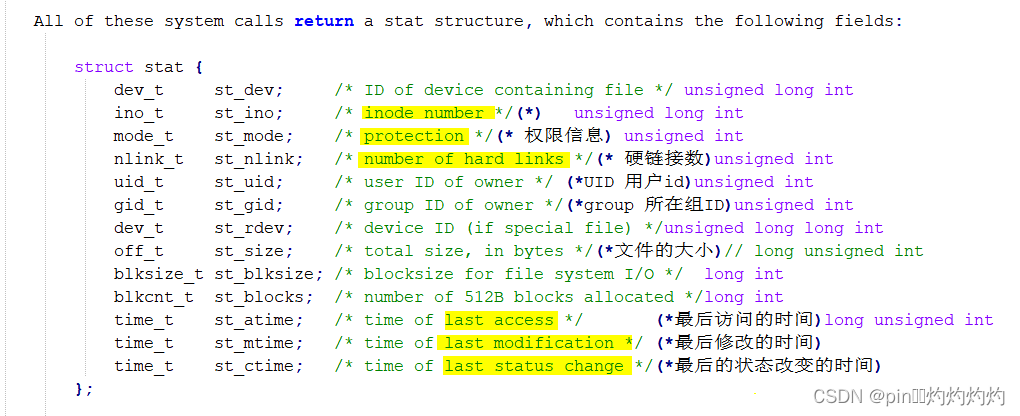
All of these system calls return a stat structure, which contains the following fields:
struct stat {
dev_t st_dev; /* ID of device containing file */ unsigned long int
ino_t st_ino; /* inode number */(*) unsigned long int
mode_t st_mode; /* protection */(* 权限信息) unsigned int
nlink_t st_nlink; /* number of hard links */(* 硬链接数)unsigned int
uid_t st_uid; /* user ID of owner */ (*UID 用户id)unsigned int
gid_t st_gid; /* group ID of owner */(*group 所在组ID)unsigned int
dev_t st_rdev; /* device ID (if special file) */unsigned long long int
off_t st_size; /* total size, in bytes */(*文件的大小)// long unsigned int
blksize_t st_blksize; /* blocksize for file system I/O */ long int
blkcnt_t st_blocks; /* number of 512B blocks allocated */long int
time_t st_atime; /* time of last access */ (*最后访问的时间)long unsigned int
time_t st_mtime; /* time of last modification */ (*最后修改的时间)
time_t st_ctime; /* time of last status change */(*最后的状态改变的时间)
};
st_mode --- 32位
1111 0000 0000 0000
S_IFMT 0170000 bit mask for the file type bit fields
S_IFSOCK 0140000 socket //s 1100
S_IFLNK 0120000 symbolic link //l 1010
S_IFREG 0100000 regular file //- 1000
S_IFBLK 0060000 block device //b 110
S_IFDIR 0040000 directory //d 100
S_IFCHR 0020000 character device //c 010
S_IFIFO 0010000 FIFO //p 001
S_ISUID 0004000 set UID bit
S_ISGID 0002000 set-group-ID bit (see below)
S_ISVTX 0001000 sticky bit (see below)
//user
S_IRWXU 00700 mask for file owner permissions
S_IRUSR 00400 owner has read permission
S_IWUSR 00200 owner has write permission
S_IXUSR 00100 owner has execute permission
//group
S_IRWXG 00070 mask for group permissions
S_IRGRP 00040 group has read permission
S_IWGRP 00020 group has write permission
S_IXGRP 00010 group has execute permission
//others //掩码
S_IRWXO 00007 mask for permissions for others (not in group)
S_IROTH 00004 others have read permission
S_IWOTH 00002 others have write permission
S_IXOTH 00001 others have execute permission
15
0 0 0 0 0 0 0 0|0 0 0 0 0 0 0 0 |0 0 0 0 0 0 0 0 |0 0 0 0 0 0 0 0
@ @ @ @ * * * R W X R W X R W X
-user-- -group- -others-
|1111 0000 |0000 0000
st_mode&S_IFMT
-rw-rw-r-- 1 linux linux 440 8月 12 09:54 1.txt
1.文件类型 及 权限 (*)
st_mode
st_mode & S_IFMT ==
0140000 & 0170000
0140000 --> 1100
0170000 --> 1111 &
----
1100
if ((st_mode & S_IFMT) == S_IFSOCK ) //注意 优先级 & 低于 ==
{
putchar('s');
}
S_IFSOCK 0140000 socket // s
S_IFLNK 0120000 symbolic link // l
S_IFREG 0100000 regular file // -
S_IFBLK 0060000 block device // b
S_IFDIR 0040000 directory // d
S_IFCHR 0020000 character device // c
S_IFIFO 0010000 FIFO // p
st.st_mode&S_IXOTH?putchar('x'):putchar('-');
2.硬链接数
st_nlink
3.用户名 (*) --getpwuid()
st_uid
4.组名 (*) --getgrgid()
st_gid
5.大小
st_size
6.最后修改的时间 (*) --ctime /localtime
st_mtime //time
7.文件名
readdir
struct dirent
getpwuid

openvela 操作系统专为 AIoT 领域量身定制,以轻量化、标准兼容、安全性和高度可扩展性为核心特点。openvela 以其卓越的技术优势,已成为众多物联网设备和 AI 硬件的技术首选,涵盖了智能手表、运动手环、智能音箱、耳机、智能家居设备以及机器人等多个领域。
更多推荐



 16
16 0
0- 0


 已为社区贡献3条内容

所有评论(0)