
嵌入式学习的第二十五天-系统编程-文件相关函数-标准I0+文件IO
操作系统为了方便用户使用系统功能而对外提供的一组系统函数。称之为 系统调用其中有个文件IO;一般都是对设备文件操作,当然也可以对普通文件进行操作。注:一个基于Linux内核的没有缓存的IO机制。
一、文件的读和写
1.fwrite(读)
size_t fread(void *ptr, size_t size, size_t nmemb, FILE *stream);
功能:从指定的stream流对象中获取nmemeb个大小为size字节的数据块到ptr所在的本地内存中。
参数:ptr 要存储数据的本地内存一般是数组或者结构体指针
size 单个数据块的元数据大小。最小单元的大小
nmemb 要获取的数据块的个数,拷贝的数据块个数。
stream 要获取数据的源文件流对象,如果是stdin表示从键盘获取数据,如果是fp文件则表示
从普通文件获取。
返回值:成功 小于等于nemeb的整数,表示获取的数据长度;失败 小于0,结尾 0;
#include <stdio.h>
#include<stdlib.h>
#include<string.h>

typedef struct
{
    char name[10];
    int age;
    char addr[50];
}PER;

int	main(int argc, char **argv)
{
    FILE*fp = fopen("1.txt", "w");
    if(NULL == fp)
    {
        fprintf(stderr, "fopen error\n");
        return 1;
    }
    PER  per;
    strcpy(per.name,"zhang");
    per.age=20;
    strcpy(per.addr, "科技二路");

    fwrite(&per,sizeof(PER),1,fp);
    fclose(fp);
    return 0;
}
2.fread
size_t fwrite(const void *ptr, size_t size,size_t nmemb, FILE *stream);
功能:从ptr所在本地内存中取出nmemb个大小为size的数据块写入到stream流对应的文件流对象 中。
参数:ptr 要写的数据块地址,一般是数组或者结构体指针
size 要写的数据块元数据大小,单位是字节
nmemb 要写的数据块的个数
stream 要写的目标文件流对象。如果是stdout则表示数据会写到终端屏幕显示,如果是fp的
普通文件则会写入到文件中。
返回值:成功 小于等于nmemb 的个数。失败 <0
#include <stdio.h>
#include<stdlib.h>
#include<string.h>
#include <strings.h>

typedef struct
{
    char name[10];
    int age;
    char addr[50];
}PER;

int	main(int argc, char **argv)
{
    FILE*fp = fopen("1.txt", "r");
    if(NULL == fp)
    {
        fprintf(stderr, "fopen error\n");
        return 1;
    }
    PER  per;
    //memset(&per,0,sizeof(per));
    bzero(&per, sizeof(per));

    size_t ret = fread(&per, sizeof(per), 2, fp);
    if(ret>0)
    {
        printf("ret:%ld %s %d %s",ret,per.name,per.age,per.addr);
    }
    fclose(fp);
    return 0;
}
3.cp_fwrite
#include <stdio.h>
#include<stdlib.h>
#include<string.h>
#include <strings.h>

int main(int argc, char **argv)
{
    FILE* src = fopen("1.txt", "r");
    FILE* dst = fopen("2.txt", "w");
    if (NULL == src || NULL == dst)
    {
      fprintf(stderr, "fopen error\n");
      return 1;
    }
    int size = 68;
    char *data=(char*)malloc(size);
    size_t ret=fread(data, size, 1, src);
    if(1==ret)
    {
        fwrite(data, size, 1, dst);
    }

    fclose(src);
    fclose(dst);
    free(data);
    return 0;
}
二、文件定位的相关函数
1.feek
int fseek(FILE *stream, long offset, int whence);
功能:将stream流文件中的文件指针从whence位置开始偏移offset字节的长度。
参数:stream 要移动文件指针的目标文件流对象。
注意:
- 不支持设备文件,一般用于普通文件。
- offset 要在文件内偏移的距离,单位字节。
- 如果值为整数,则向文件末尾偏移
- 如果值为负数,则向文件开头偏移
- whence 偏移的起始位置,由系统定义的三个宏开始。
- SEEK_SET 文件的开头位置
- SEEK_CUR 文件的当前位置
- SEEK_END 文件的末尾位置
返回值:成功: 返回 0;失败: -1;
如果从文件的指定位置向后偏移过程中已经超过了文件的当前末尾位置,则会自动以'\0'来填充文
件内容,从而形成一种被称为"空洞文件" 的特殊文件。
#include <stdio.h>

int	main(int argc, char **argv)
{
    FILE*fp = fopen("2.txt", "r");
    if(NULL == fp)
    {
        fprintf(stderr, "fopen error\n");
        return 1;
    }
    fseek(fp,5,SEEK_SET);

    char buf[1024]={0};
    fgets(buf,sizeof(buf),fp);
    printf("%s",buf);
    fclose(fp);
    return 0;
}
2.ftell
long ftell(FILE *stream);rewind(fp);
功能:获取当前文件流指针的具体位置,一般以文件开头到当前指针的字节数为返回值。
参数:stream 要返回指针距离的文件流对象
返回值:成功 获取到的距离长度,单位是字节;失败 -1;
#include <stdio.h>

int	main(int argc, char **argv)
{
    FILE*fp = fopen("2.txt", "r");
    if(NULL == fp)
    {
        fprintf(stderr, "fopen error\n");
        return 1;
    }

    fseek(fp,0,SEEK_END);
    long size=ftell(fp);
    printf("size:%ld\n",size);
    fclose(fp);
    return 0;
}
3.rewind
rewind() 等效于:fseek(stream,0L,SEEK_SET);
#include <stdio.h>

int	main(int argc, char **argv)
{
    FILE*fp = fopen("2.txt", "r");
    if(NULL == fp)
    {
        fprintf(stderr, "fopen error\n");
        return 1;
    }
    fseek(fp,0,SEEK_END);
    long size=ftell(fp);
    printf("size:%ld\n",size);

    rewind(fp);
    char buf[1024]={0};
    fgets(buf,sizeof(buf),fp);
    printf("%s",buf);
    fclose(fp);
    return 0;
}
三、标准I0
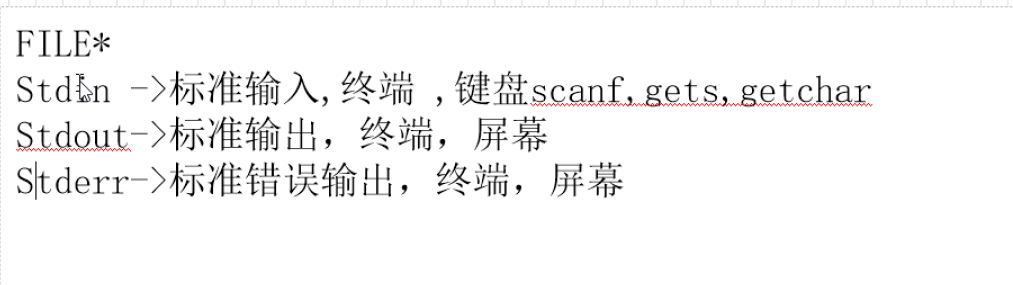
#include<stdio.h>

int	main(int argc, char **argv)
{
    char buf[100]={0};
    fgets(buf,sizeof(buf),stdin);
    fputs(buf,stdout);
    fprintf(stderr,"%s 123",buf);
    return 0;
}
四、缓冲区
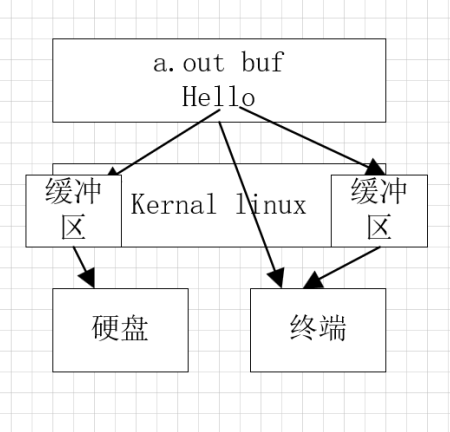
解决内存和硬件设备传输速录不匹配的问题,由此产生缓冲区。一般都是对普通文件操作是
一种有缓存的IO 在文件IO和用户程序之间,加入缓冲区,可以有效减少系统调用的效率,节省系
统IO调度资源。
1.行缓冲
1k, terminal(终端),主要用于人机交互stdout;缓存区满或者遇到\n刷新 1024
行缓存多是关于终端的一些操作:
- 遇到\n刷新
- 缓存区满刷新
- 程序结束刷新
- 4fflush刷新 fflush(stdout); FILE*fp stdin stdout stderr
#include<stdio.h>
#include<stdlib.h>
#include<unistd.h>

 int main(int argc, char *argv[])
 {
    printf("hello");
    fflush(stdout);
    while(1)sleep(1);//验证缓冲区的条件
    return 0;
 }
2.全缓冲
4k,主要用于文件的读写;缓存区满刷新缓存区 4096;对普通文件进行标准IO操作,建立的缓
存一般为全缓存。
刷新条件(从缓冲区到硬盘):
- 缓存区满刷新
- 程序结束刷新
- fflush来刷新 fflush(fp);
#include <stdio.h>
#include<unistd.h>
int	main(int argc, char **argv)
{
    FILE*fp=fopen("1.txt", "w");
    if(NULL==fp)
    {
        fprintf(stderr, "fopen error\n");
        return 1;
    }

    fputs("hello",fp);
    fflush(fp);
    while(1)sleep(1);

    fclose(fp);
    return 0;
}
3.无缓冲
0k 主要用于出错处理信息的输出 stderr ;不对数据缓存直接刷新
- printf();==>>stdout
- fprintf(strerr,"fopen error %s",filename);
界面交互 出错处理;使用gdb查看,FILE结构体,或使用写入数据测试缓冲区。缓冲区的大小
是可以设置。
#include<stdio.h>
#include<unistd.h>

 int main(int argc, char *argv[])
 {
    fprintf(stderr,"aaa");
    while(1)sleep(1);
    return 0;
 }
五、系统调用-文件IO
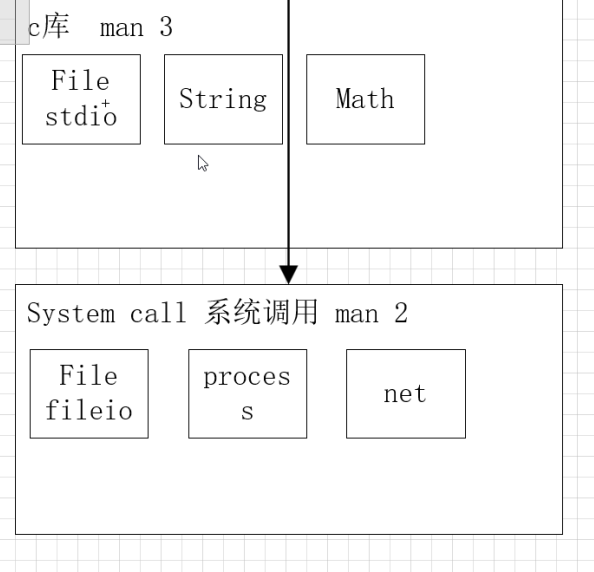
1.标准IO(C库)和文件IO(系统调用)的区别
- 标准IO跨平台,更通用,带缓冲区
- 文件IO,不带缓冲区;
- C库封装了系统调用(文件IO);
2. 文件IO的定义
操作系统为了方便用户使用系统功能而对外提供的一组系统函数。称之为 系统调用 其中有
个文件IO;一般都是对设备文件操作,当然也可以对普通文件进行操作。
注:一个基于Linux内核的没有缓存的IO机制
3.文件IO的特性
(1) 没有缓存区
(2)操作对象不在是流,而是文件描述符
(3)文件描述符:很小的非负的整数 int 0-1023
(4)内核每打开一个文件就会获得一个文件 描述符
注:每个程序在启动的时候操作系统默认为其打开
三个描述符与流对象匹配:
- 0 ==>STDIN_FILENO (宏)=== stdin
- 1 ==>STDOUT_FILENO == stdout
- 2 ==>STDERR_FILENO == stderr
4.相关函数
1.open
open("1.c",O_WRONLY|O_CREAT,0666 );
int open(const char *pathname, int flags,int mode);
功能:获得一个文件描述符
参数:pathname:文件名
flags:O_RDONLY |O_WRONLY|O_RDWR|O_CREAT, 创建文件
O_EXCL,需要和O_CREAT同时使用,表示新建的文件不能存在,成功,否则open就会失败
O_NOCTTY,不是终端设备;O_TRUNC文件内容清空;O_APPEND追加
O_ASYNC异步io,什么时候io不确定,;O_NONBLOCK非阻塞
返回值:成功返回文件描述符失败返回-1
#include <fcntl.h>
#include <sys/stat.h>
#include <sys/types.h>
#include <stdio.h>

int main(int argc, char **argv)
{
  int a = 12312;
  int fd = open("1.txt", O_WRONLY | O_CREAT | O_TRUNC, 0666);
  if (-1 == fd)
    {
      fprintf(stderr, "open error\n");
      return 1;
    }

  return 0;
}
2.write
char buf[1024];
ssize_t write(int fd, const void *buf, size_t count);
功能:通过文件描述符向文件中写一串数据
参数:fd:文件描述符;buf:要写入文件的字符串的首地址;count:要写入字符的个数
返回值:成功返回实际写入的个数;失败返回-1
#include <fcntl.h>
#include <sys/stat.h>
#include <sys/types.h>
#include <stdio.h>
#include<unistd.h>
#include<string.h>

int main(int argc, char **argv)
{
  int fd = open("1.txt", O_WRONLY | O_CREAT | O_TRUNC, 0666);
  if (-1 == fd)
    {
      fprintf(stderr, "open error\n");
      return 1;
    }
  char buf[1024]="hello";
  size_t ret= write(fd, buf, strlen(buf));
  printf("write ret :%ld\n",ret);

  close(fd);
  return 0;
}
3.read
ssize_t read(int fd, void *buf, size_t count);
功能:通过文件描述符读取文件中的数据
参数:fd:文件描述符;buf:存放数据空间的首地址;count:要读到数据的个数
返回值:成功返回读到数据的个数;失败返回-1;读到文件结尾返回0
#include <fcntl.h>
#include <stdio.h>
#include <string.h>
#include <sys/stat.h>
#include <sys/types.h>
#include <unistd.h>

int main(int argc, char **argv)
{
  int fd = open("1.txt", O_RDONLY);
  if (-1 == fd)
    {
      fprintf(stderr, "open error\n");
      return 1;
    }

  char buf[1024] = {0};
  ssize_t ret=read(fd, buf, sizeof(buf));
  printf("readret:%ld %s\n",ret,buf);

  close(fd);
  return 0;
}
注:一些小命令
1.file +文件名 产看文件类型 data默认为二进制文
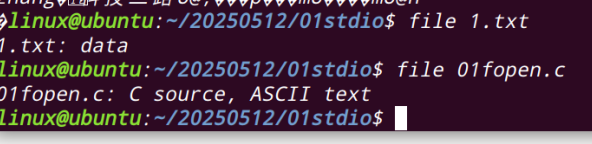
2. stat +文件名 查看文件大小
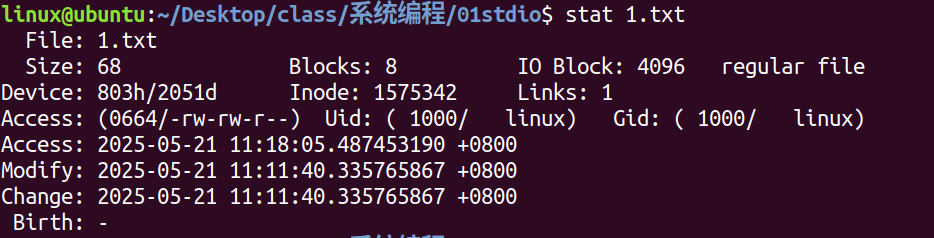
3.去除换行
PER per;
memset(&per,0,sizeof(per));
bzero(&per, sizeof(per));
4. - 作者 组里的人 其他人
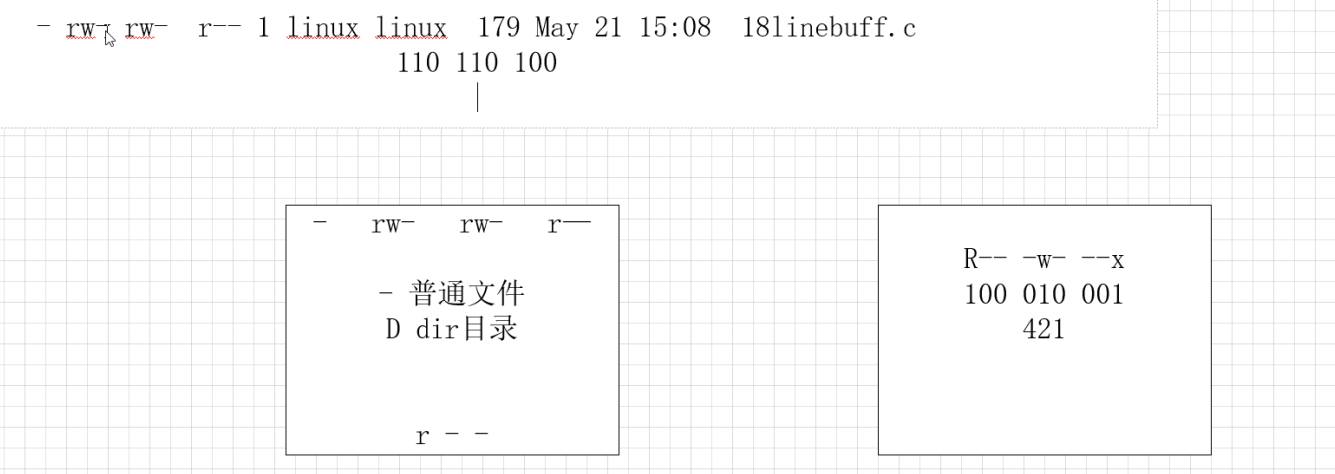
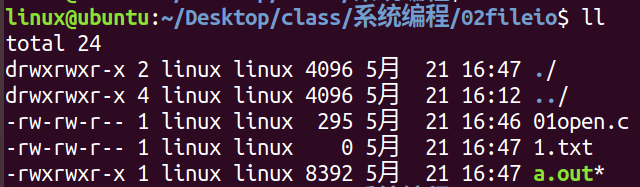
5. umask 延码 与文件创建相关 权限 相减


openvela 操作系统专为 AIoT 领域量身定制,以轻量化、标准兼容、安全性和高度可扩展性为核心特点。openvela 以其卓越的技术优势,已成为众多物联网设备和 AI 硬件的技术首选,涵盖了智能手表、运动手环、智能音箱、耳机、智能家居设备以及机器人等多个领域。
更多推荐



 42
42 0
0- 0


 已为社区贡献7条内容

所有评论(0)