
HarvardX TinyML小笔记3(番外7:手势)(TODO)
本文介绍了基于IMU传感器的手势识别技术,重点讨论了时间序列数据处理和栅格化方法。文章首先回顾了时间序列分析在异常检测中的应用,对比了监督学习和无监督学习范式。然后详细阐述了IMU传感器(加速度计、陀螺仪、磁力计)的工作原理及其在手势识别中的不同作用。核心内容展示了如何通过栅格化技术将IMU时序数据转换为32×32RGB图像,以便使用CNN模型进行处理,包括轨迹图法、热力图法和相关矩阵法等转换方法
1 时间序列处理原理
Recap: Time Series
In this reading, we will do a quick recap of the time series from Course 2 as we will be leveraging that knowledge for a slightly different application than what we discussed previously (i.e., anomaly detection): gesture recognition with a custom-built magic wand.
Supervised vs. Unsupervised Learning
So far, we have tackled many interesting machine learning tasks that cover a variety of sensory modalities (e.g., vision, audition). All of these tasks required a labeled dataset - a known output value for a given set of inputs - and were thus comfortably situated within the supervised learning paradigm, which we first discussed in Course 1.
However, frequently, we encounter datasets in which our output variable is unknown. Whether because we do not have access to the output variable, or we are merely interested in the internal structure of our dataset, we cannot resort to our standard machine learning framework, which relies on training and test sets. Instead, we must adopt an alternative, equally useful, a paradigm known as unsupervised learning to approach these tasks, which we discussed in Course 2.
There are still similarities between the supervised and unsupervised learning paradigms. Firstly, both assume the existence of a dataset that is used to train our machine learning algorithm. The performance of both generally improves as more data becomes available. Nevertheless, unsupervised learning is distinct in that we do not require the existence of a predictor variable. Unsupervised learning looks at the internal structure of a dataset and attempts to either group this data systematically, known as clustering, or look for abnormalities within the dataset, known as outlier analysis, or anomaly detection.
Anomaly Detection
In course 2, we were mostly interested in anomaly detection, predominantly due to its potential for predictive maintenance (i.e., noticing abnormalities in machines that can be resolved before catastrophic events). Anomaly detection can be performed spatially or temporally, either looking at associations between different physical locations, or the same location at different points in time.
Most sensory devices are fixed in discrete locations, such as those monitoring the temperature and vibrational characteristics of a piece of machinery. Inherently, these devices output a temporal signal that can be monitored and used to look for anomalies over time. These anomalies manifest in myriad ways: a sudden temperature change, a sudden increase in vibration or sound, or a sudden drop in pressure. Given sufficient explanatory variables, anomaly detection algorithms allow us to detect outliers and perform corrective actions in a timely manner to mitigate the possibility of catastrophic events, such as an error, a machine breakdown, or even an explosion.
Many algorithms exist for the detection of anomalies in time series data. One algorithm that was discussed in the previous course was k-means, which looks at the distance of a data point in feature space from a set of discrete clusters that represent the majority of data points. We saw that one drawback of k-means was its poor performance on high-dimensional data due to the curse of dimensionality. However, we were able to improve performance by reducing the dimensionality of the data with t-SNE. Anomaly detection can also be achieved using neural network structures known as autoencoders, which attempt to collapse knowledge of the dataset in a small set of neurons located at the mid-layer of the autoencoder (this formulation is very similar to principal component analysis). Autoencoders tend to have superior performance to traditional methods due to their ability to capture complex non-linear associations.
Magic Wand
In the remainder of this section, we will leverage this prior knowledge for a slightly different purpose: building in gesture recognition using a custom-built magic wand.
动作识别的传统流程,首先采集IMU数据,然后将IMU做栅格化,之后和标准手势对比RMSE,最后输出结果。
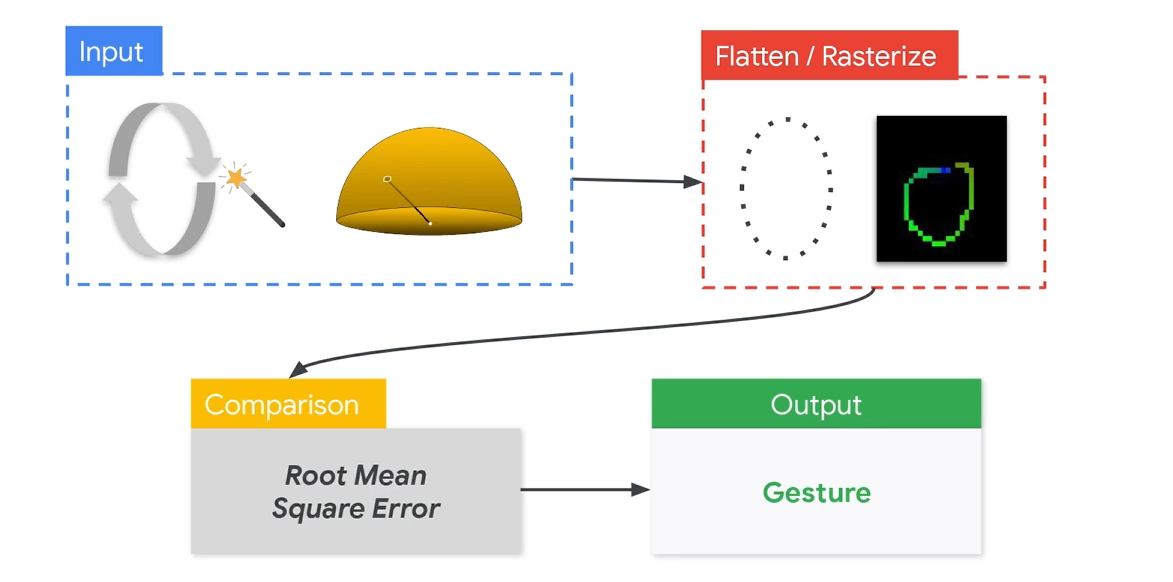
将IMU转换成手势涉及到的算法有Flattern和Rasterize。其中Rasterize是将手势转换为二维图像,这样可以用来做CNN学习。Flattern是将特征进行学习。
手部关键点检测(例如MediaPipe Hands)
↓
关键点坐标 → [Rasterize] → 关键点热力图 (for CNN输入)
↓
CNN特征提取
↓
Flatten(展平特征图)
↓
分类/回归层(识别具体手势)
在做手势识别的时候,其实可以用图像,也可以用IMU(inertial measurement unit)的传感器。为什么这里用IMU呢。首先是IMU目前比较成熟,几乎每个智能手机都是标配。包括了加速度,地磁,陀螺仪。这些传感器几乎是嵌入式独有的。所以也能很多趣的应用。
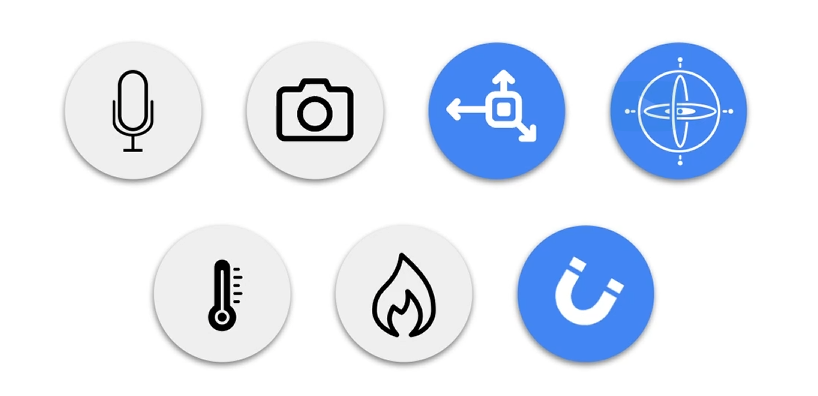
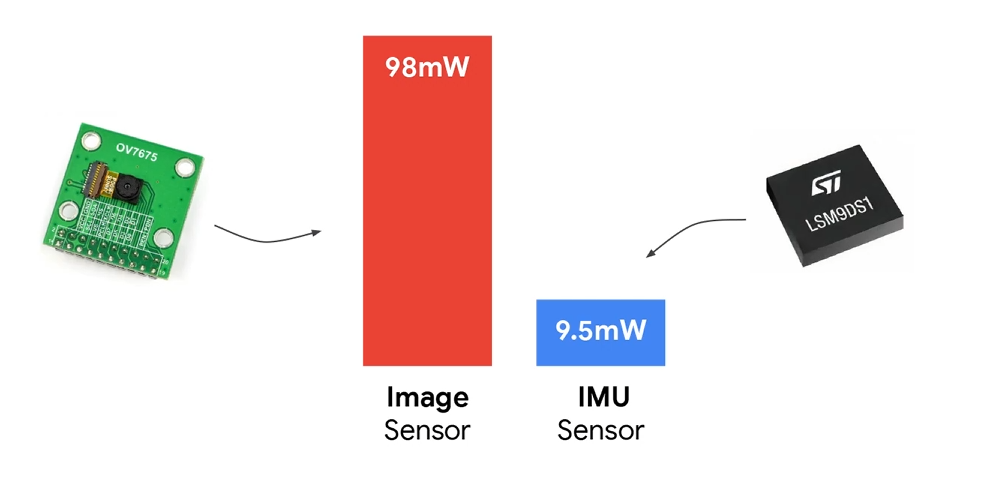
此外,在嵌入式中,IMU在功耗上也有一定的优势。适合长时间低功耗运转。
不过在使用IMU的时候,也有几个问题。
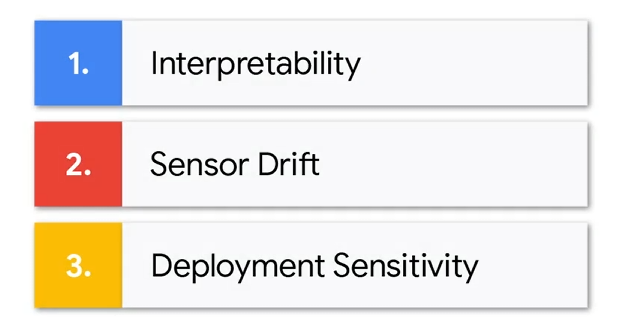
分别是可解释性,传感器便宜,部署的敏感性。
可解释性就是IMU的数据直接观察基本上无法理解,传感器漂移其实就是误差,貌似IMU随着时间推移误差相对较大。最后就是部署,在安装的时候调试和安装的位置,都可能导致数据不准确。
2 IMU
在常规的IMU中,有以下几种传感器,加速度计、陀螺仪、磁力计。作用如下:
| 传感器 | 输出量 | 单位 | 代表意义 |
|---|---|---|---|
| Accelerometer 加速度计 (a) | (ax, ay, az) | g | 线性加速度 + 重力方向 |
| Gyroscope 陀螺仪 (g) | (gx, gy, gz) | deg/s | 角速度(旋转速率) |
| Magnetometer 磁力计 (m) | (mx, my, mz) | µT | 地磁方向(绝对方位) |
加速度计(Accelerometer)
检测线性运动(加速、减速、静止),主要反映“位移”、“抖动”、“方向变化”。上挥手 → z 轴加速度变大,向右滑动 → x 轴有一段持续正加速度,静止 → 只有重力方向信号(约 1g)。好处是不会便宜,但是噪声较大。
加速度是“手势开始/结束”的核心判据。
陀螺仪(Gyroscope)
检测自身的旋转运动(角速度),用于捕捉旋转动作(角速度),比如画圈、旋转、翻转。手画“圆圈” → gx/gy/gz 呈周期性波动,翻转手掌 → 某个轴角速度急变。好处是响应快,稳定。但是有漂移问题,长时间会累计误差。
磁力计(Magnetometer)
用于获取“绝对方向”(相对地磁北方向)。用于获取“绝对方向”(相对地磁北方向),常用于航向(heading)校正。
不同手势识别涉及到的传感器。
| 任务类型 | 加速度 | 陀螺仪 | 磁力计 | 说明 |
|---|---|---|---|---|
| 快速滑动、拍击手势 | ✅ | ⚪ | ❌ | 加速度足够 |
| 旋转、画圈、翻转 | ✅ | ✅ | ❌ | 需捕捉角速度 |
| 姿态(方向)估计 | ✅ | ✅ | ✅ | 方向稳定要求高 |
| 手势识别(TinyML Demo) | ✅ | ✅ | ❌ | 性能和复杂度平衡最好 |
所以在这次的手势识别中,用到的就是加速度+陀螺仪。
3 栅格化
栅格化目前是IMU做深度学习的核心算法之一。
根据上面IMU所说,用到的是不同时间的加速度和陀螺仪。
time, ax, ay, az, gx, gy, gz
这样的时序数据,直接输入LSTM、RNN、Transformer是可以的。但是如果想用CNN处理,是需要转换成图像或二维矩阵。
方法有这些:
| 方法 | 主要思路 | 输出形式 | 适合场景 |
|---|---|---|---|
| 1. 轨迹图法(Trajectory Plot) | 将加速度积分为位移,画出 X-Y 或 X-Z 轨迹 | 灰度/彩色图像 | 手势识别 |
| 2. 热力图法(Channel-Stack Heatmap) | 每个传感器通道按时间堆叠成二维矩阵 | 6×N 数组 | 动作分类 |
| 3. 相关矩阵法(Correlation Map) | 各通道间相关性矩阵 | 对称矩阵图像 | 特征提取/静态识别 |
总的来说第一种用的最多。
处理流程是:获取 IMU 数据 -> 去噪与归一化 -> 加速度积分为轨迹(位移)-> 绘制轨迹图并转换成图像矩阵。下面是官方流程图:
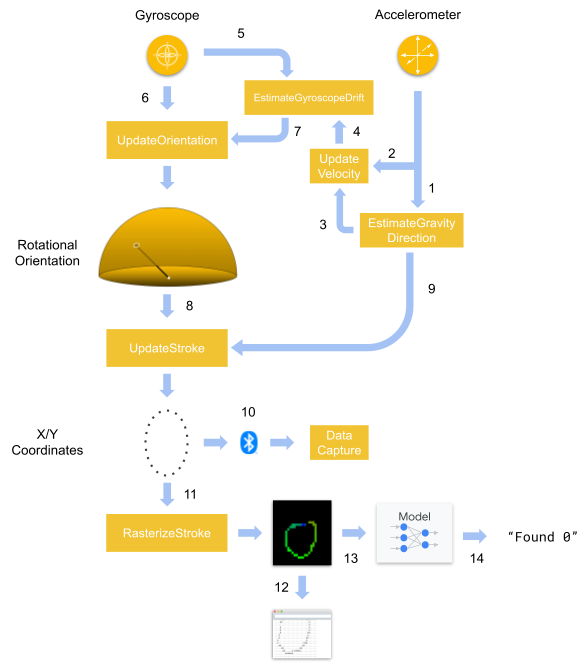
具体代码如下:
/* Copyright 2020 The TensorFlow Authors. All Rights Reserved.
Licensed under the Apache License, Version 2.0 (the "License");
you may not use this file except in compliance with the License.
You may obtain a copy of the License at
    http://www.apache.org/licenses/LICENSE-2.0
Unless required by applicable law or agreed to in writing, software
distributed under the License is distributed on an "AS IS" BASIS,
WITHOUT WARRANTIES OR CONDITIONS OF ANY KIND, either express or implied.
See the License for the specific language governing permissions and
limitations under the License.
==============================================================================*/

#include "rasterize_stroke.h"

namespace {
constexpr int kFixedPoint = 256;

int32_t MulFP(int32_t a, int32_t b) {
  return (a * b) / kFixedPoint;
}

int32_t DivFP(int32_t a, int32_t b) {
  if (b == 0) {
    b = 1;
  }
  return (a * kFixedPoint) / b;
}

int32_t FloatToFP(float a) {
  return static_cast<int32_t>(a * kFixedPoint);
}

int32_t NormToCoordFP(int32_t a_fp, int32_t range_fp, int32_t half_size_fp) {
  const int32_t norm_fp = DivFP(a_fp, range_fp);
  return MulFP(norm_fp, half_size_fp) + half_size_fp;
}

int32_t RoundFPToInt(int32_t a) {
  return static_cast<int32_t>((a + (kFixedPoint / 2)) / kFixedPoint);
}

int32_t Gate(int32_t a, int32_t min, int32_t max) {
  if (a < min) {
    return min;
  } else if (a > max) {
    return max;
  } else {
    return a;
  }
}

int32_t Abs(int32_t a) {
  if (a > 0) {
    return a;
  } else {
    return -a;
  }
}

}  // namespace

void RasterizeStroke(
    int8_t* stroke_points,
    int stroke_points_count,
    float x_range,
    float y_range,
    int width,
    int height,
    int8_t* out_buffer) {
  //Convert stroke (2d coordinates of the gesture) into a 2d color image
  constexpr int num_channels = 3;
  const int buffer_byte_count = height * width * num_channels;

  //initialize all pixels to black
  for (int i = 0; i < buffer_byte_count; ++i) {
    out_buffer[i] = -128;
  }

  const int32_t width_fp = width * kFixedPoint;
  const int32_t height_fp = height * kFixedPoint;
  const int32_t half_width_fp = width_fp / 2;
  const int32_t half_height_fp = height_fp / 2;
  const int32_t x_range_fp = FloatToFP(x_range);
  const int32_t y_range_fp = FloatToFP(y_range);

  const int t_inc_fp = kFixedPoint / stroke_points_count;

  const int one_half_fp = (kFixedPoint / 2);

  for (int point_index = 0; point_index < (stroke_points_count - 1); ++point_index) {
    //Iterate through the stroke and select two sequential start and end coordinate pairs
    // to form the a line segment
    //example: Stroke points = [a,b,c...] then we would iterate start=a end=b, start=b end=c...
    const int8_t* start_point = &stroke_points[point_index * 2];
    const int32_t start_point_x_fp = (start_point[0] * kFixedPoint) / 128;
    const int32_t start_point_y_fp = (start_point[1] * kFixedPoint) / 128;

    const int8_t* end_point = &stroke_points[(point_index + 1) * 2];
    const int32_t end_point_x_fp = (end_point[0] * kFixedPoint) / 128;
    const int32_t end_point_y_fp = (end_point[1] * kFixedPoint) / 128;

    const int32_t start_x_fp = NormToCoordFP(start_point_x_fp, x_range_fp, half_width_fp);
    const int32_t start_y_fp = NormToCoordFP(-start_point_y_fp, y_range_fp, half_height_fp);
    const int32_t end_x_fp = NormToCoordFP(end_point_x_fp, x_range_fp, half_width_fp);
    const int32_t end_y_fp = NormToCoordFP(-end_point_y_fp, y_range_fp, half_height_fp);
    const int32_t delta_x_fp = end_x_fp - start_x_fp;
    const int32_t delta_y_fp = end_y_fp - start_y_fp;

    //assign the color of the pixels of this line segment
    // the color shifts from red->green->blue as we get later in the gesture
    const int32_t t_fp = point_index * t_inc_fp;
    int32_t red_i32;
    int32_t green_i32;
    int32_t blue_i32;
    if (t_fp < one_half_fp) {
      const int32_t local_t_fp = DivFP(t_fp, one_half_fp);
      const int32_t one_minus_t_fp = kFixedPoint - local_t_fp;
      red_i32 = RoundFPToInt(one_minus_t_fp * 255) - 128;
      green_i32 = RoundFPToInt(local_t_fp * 255) - 128;
      blue_i32 = -128;
    } else {
      const int32_t local_t_fp = DivFP(t_fp - one_half_fp, one_half_fp);
      const int32_t one_minus_t_fp = kFixedPoint - local_t_fp;
      red_i32 = -128;
      green_i32 = RoundFPToInt(one_minus_t_fp * 255) - 128;
      blue_i32 = RoundFPToInt(local_t_fp * 255) - 128;
    }
    const int8_t red_i8 = Gate(red_i32, -128, 127);
    const int8_t green_i8 = Gate(green_i32, -128, 127);
    const int8_t blue_i8 = Gate(blue_i32, -128, 127);

    int line_length;
    int32_t x_inc_fp;
    int32_t y_inc_fp;
    if (Abs(delta_x_fp) > Abs(delta_y_fp)) {
      line_length = Abs(RoundFPToInt(delta_x_fp));
      if (delta_x_fp > 0) {
        x_inc_fp = 1 * kFixedPoint;
        y_inc_fp = DivFP(delta_y_fp, delta_x_fp);
      } else {
        x_inc_fp = -1 * kFixedPoint;
        y_inc_fp = -DivFP(delta_y_fp, delta_x_fp);
      }
    } else {
      line_length = Abs(RoundFPToInt(delta_y_fp));
      if (delta_y_fp > 0) {
        y_inc_fp = 1 * kFixedPoint;
        x_inc_fp = DivFP(delta_x_fp, delta_y_fp);
      } else {
        y_inc_fp = -1 * kFixedPoint;
        x_inc_fp = -DivFP(delta_x_fp, delta_y_fp);
      }
    }
    for (int i = 0; i < (line_length + 1); ++i) {
      //iterate through the line segment and assign the pixel values
      const int32_t x_fp = start_x_fp + (i * x_inc_fp);
      const int32_t y_fp = start_y_fp + (i * y_inc_fp);
      const int x = RoundFPToInt(x_fp);
      const int y = RoundFPToInt(y_fp);
      if ((x < 0) or (x >= width) or (y < 0) or (y >= height)) {
        continue;
      }
      const int buffer_index = (y * width * num_channels) + (x * num_channels);
      out_buffer[buffer_index + 0] = red_i8;
      out_buffer[buffer_index + 1] = green_i8;
      out_buffer[buffer_index + 2] = blue_i8;
    }
  }
}
4 代码
main的核心流程相应的代码:
/* Copyright 2020 The TensorFlow Authors. All Rights Reserved.
Licensed under the Apache License, Version 2.0 (the "License");
you may not use this file except in compliance with the License.
You may obtain a copy of the License at
http://www.apache.org/licenses/LICENSE-2.0
Unless required by applicable law or agreed to in writing, software
distributed under the License is distributed on an "AS IS" BASIS,
WITHOUT WARRANTIES OR CONDITIONS OF ANY KIND, either express or implied.
See the License for the specific language governing permissions and
limitations under the License.
==============================================================================*/
#include <TensorFlowLite.h>
#include "tensorflow/lite/micro/micro_error_reporter.h"
#include "tensorflow/lite/micro/micro_interpreter.h"
#include "tensorflow/lite/micro/micro_mutable_op_resolver.h"
#include "tensorflow/lite/schema/schema_generated.h"
#include "tensorflow/lite/version.h"
#include "magic_wand_model_data.h"
#include "rasterize_stroke.h"
#include "imu_provider.h"
#define BLE_SENSE_UUID(val) ("4798e0f2-" val "-4d68-af64-8a8f5258404e")
namespace {
const int VERSION = 0x00000000;
// Constants for image rasterization
constexpr int raster_width = 32;
constexpr int raster_height = 32;
constexpr int raster_channels = 3;
constexpr int raster_byte_count = raster_height * raster_width * raster_channels;
int8_t raster_buffer[raster_byte_count];
// BLE settings
BLEService service (BLE_SENSE_UUID("0000"));
BLECharacteristic strokeCharacteristic (BLE_SENSE_UUID("300a"), BLERead, stroke_struct_byte_count);
// String to calculate the local and device name
String name;
// Create an area of memory to use for input, output, and intermediate arrays.
// The size of this will depend on the model you're using, and may need to be
// determined by experimentation.
constexpr int kTensorArenaSize = 30 * 1024;
uint8_t tensor_arena[kTensorArenaSize];
tflite::ErrorReporter* error_reporter = nullptr;
const tflite::Model* model = nullptr;
tflite::MicroInterpreter* interpreter = nullptr;
// -------------------------------------------------------------------------------- //
// UPDATE THESE VARIABLES TO MATCH THE NUMBER AND LIST OF GESTURES IN YOUR DATASET //
// -------------------------------------------------------------------------------- //
constexpr int label_count = 10;
const char* labels[label_count] = {"0", "1", "2", "3", "4", "5", "6", "7", "8", "9"};
} // namespace
void setup() {
// Start serial
Serial.begin(9600);
Serial.println("Started");
// Start IMU
if (!IMU.begin()) {
Serial.println("Failed to initialized IMU!");
while (1);
}
SetupIMU();
// Start BLE
if (!BLE.begin()) {
Serial.println("Failed to initialized BLE!");
while (1);
}
String address = BLE.address();
// Output BLE settings over Serial
Serial.print("address = ");
Serial.println(address);
address.toUpperCase();
name = "BLESense-";
name += address[address.length() - 5];
name += address[address.length() - 4];
name += address[address.length() - 2];
name += address[address.length() - 1];
Serial.print("name = ");
Serial.println(name);
BLE.setLocalName(name.c_str());
BLE.setDeviceName(name.c_str());
BLE.setAdvertisedService(service);
service.addCharacteristic(strokeCharacteristic);
BLE.addService(service);
BLE.advertise();
// Set up logging. Google style is to avoid globals or statics because of
// lifetime uncertainty, but since this has a trivial destructor it's okay.
static tflite::MicroErrorReporter micro_error_reporter; // NOLINT
error_reporter = µ_error_reporter;
// Map the model into a usable data structure. This doesn't involve any
// copying or parsing, it's a very lightweight operation.
model = tflite::GetModel(g_magic_wand_model_data);
if (model->version() != TFLITE_SCHEMA_VERSION) {
TF_LITE_REPORT_ERROR(error_reporter,
"Model provided is schema version %d not equal "
"to supported version %d.",
model->version(), TFLITE_SCHEMA_VERSION);
return;
}
// Pull in only the operation implementations we need.
// This relies on a complete list of all the ops needed by this graph.
// An easier approach is to just use the AllOpsResolver, but this will
// incur some penalty in code space for op implementations that are not
// needed by this graph.
static tflite::MicroMutableOpResolver<4> micro_op_resolver; // NOLINT
micro_op_resolver.AddConv2D();
micro_op_resolver.AddMean();
micro_op_resolver.AddFullyConnected();
micro_op_resolver.AddSoftmax();
// Build an interpreter to run the model with.
static tflite::MicroInterpreter static_interpreter(
model, micro_op_resolver, tensor_arena, kTensorArenaSize, error_reporter);
interpreter = &static_interpreter;
// Allocate memory from the tensor_arena for the model's tensors.
interpreter->AllocateTensors();
// Set model input settings
TfLiteTensor* model_input = interpreter->input(0);
if ((model_input->dims->size != 4) || (model_input->dims->data[0] != 1) ||
(model_input->dims->data[1] != raster_height) ||
(model_input->dims->data[2] != raster_width) ||
(model_input->dims->data[3] != raster_channels) ||
(model_input->type != kTfLiteInt8)) {
TF_LITE_REPORT_ERROR(error_reporter,
"Bad input tensor parameters in model");
return;
}
// Set model output settings
TfLiteTensor* model_output = interpreter->output(0);
if ((model_output->dims->size != 2) || (model_output->dims->data[0] != 1) ||
(model_output->dims->data[1] != label_count) ||
(model_output->type != kTfLiteInt8)) {
TF_LITE_REPORT_ERROR(error_reporter,
"Bad output tensor parameters in model");
return;
}
}
void loop() {
BLEDevice central = BLE.central();
// if a central is connected to the peripheral:
static bool was_connected_last = false;
if (central && !was_connected_last) {
Serial.print("Connected to central: ");
// print the central's BT address:
Serial.println(central.address());
}
was_connected_last = central;
// make sure IMU data is available then read in data
const bool data_available = IMU.accelerationAvailable() || IMU.gyroscopeAvailable();
if (!data_available) {
return;
}
int accelerometer_samples_read;
int gyroscope_samples_read;
ReadAccelerometerAndGyroscope(&accelerometer_samples_read, &gyroscope_samples_read);
// Parse and process IMU data
bool done_just_triggered = false;
if (gyroscope_samples_read > 0) {
EstimateGyroscopeDrift(current_gyroscope_drift);
UpdateOrientation(gyroscope_samples_read, current_gravity, current_gyroscope_drift);
UpdateStroke(gyroscope_samples_read, &done_just_triggered);
if (central && central.connected()) {
strokeCharacteristic.writeValue(stroke_struct_buffer, stroke_struct_byte_count);
}
}
if (accelerometer_samples_read > 0) {
EstimateGravityDirection(current_gravity);
UpdateVelocity(accelerometer_samples_read, current_gravity);
}
// Wait for a gesture to be done
if (done_just_triggered) {
// Rasterize the gesture
RasterizeStroke(stroke_points, *stroke_transmit_length, 0.6f, 0.6f, raster_width, raster_height, raster_buffer);
for (int y = 0; y < raster_height; ++y) {
char line[raster_width + 1];
for (int x = 0; x < raster_width; ++x) {
const int8_t* pixel = &raster_buffer[(y * raster_width * raster_channels) + (x * raster_channels)];
const int8_t red = pixel[0];
const int8_t green = pixel[1];
const int8_t blue = pixel[2];
char output;
if ((red > -128) || (green > -128) || (blue > -128)) {
output = '#';
} else {
output = '.';
}
line[x] = output;
}
line[raster_width] = 0;
Serial.println(line);
}
// Pass to the model and run the interpreter
TfLiteTensor* model_input = interpreter->input(0);
for (int i = 0; i < raster_byte_count; ++i) {
model_input->data.int8[i] = raster_buffer[i];
}
TfLiteStatus invoke_status = interpreter->Invoke();
if (invoke_status != kTfLiteOk) {
TF_LITE_REPORT_ERROR(error_reporter, "Invoke failed");
return;
}
TfLiteTensor* output = interpreter->output(0);
// Parse the model output
int8_t max_score;
int max_index;
for (int i = 0; i < label_count; ++i) {
const int8_t score = output->data.int8[i];
if ((i == 0) || (score > max_score)) {
max_score = score;
max_index = i;
}
}
TF_LITE_REPORT_ERROR(error_reporter, "Found %s (%d)", labels[max_index], max_score);
}
}
关键的部分:
初始化BLE,初始化模型,注册算子。确保输入的是 [1, 32, 32, 3],输出是 [1, 10],且类型为 int8。
循环。首先采集IMU数据。之后将IMU数据生成轨迹。
EstimateGyroscopeDrift(current_gyroscope_drift);
UpdateOrientation(...);
UpdateStroke(..., &done_just_triggered);
当检测到完整轨迹时,将轨迹转换成32×32RGB栅格。之后就是正常的检测图片的CNN流程。

openvela 操作系统专为 AIoT 领域量身定制,以轻量化、标准兼容、安全性和高度可扩展性为核心特点。openvela 以其卓越的技术优势,已成为众多物联网设备和 AI 硬件的技术首选,涵盖了智能手表、运动手环、智能音箱、耳机、智能家居设备以及机器人等多个领域。
更多推荐

 11
11 0
0- 0


 已为社区贡献3条内容

所有评论(0)