
内核展开设备树 & 转换device
内核通过接口实现early_dts(早期设备树)信息扫描接口,解析memory以及bootargs等一些启动早期需要使用的信息。后续通过将完整的device tree信息解析到结构体中。由于包含了设备树所有节点以及它们之间的关系,所以后续内核可通过快速索引设备节点内核解析设备树整体流程嵌入式系统硬件拓扑图设备模型在Linux内核驱动中具有关键作用通过提供统一的设备描述和管
内核展开设备树 & 转换device
一 设备树的内核解析过程
1.1 dtb展开流程
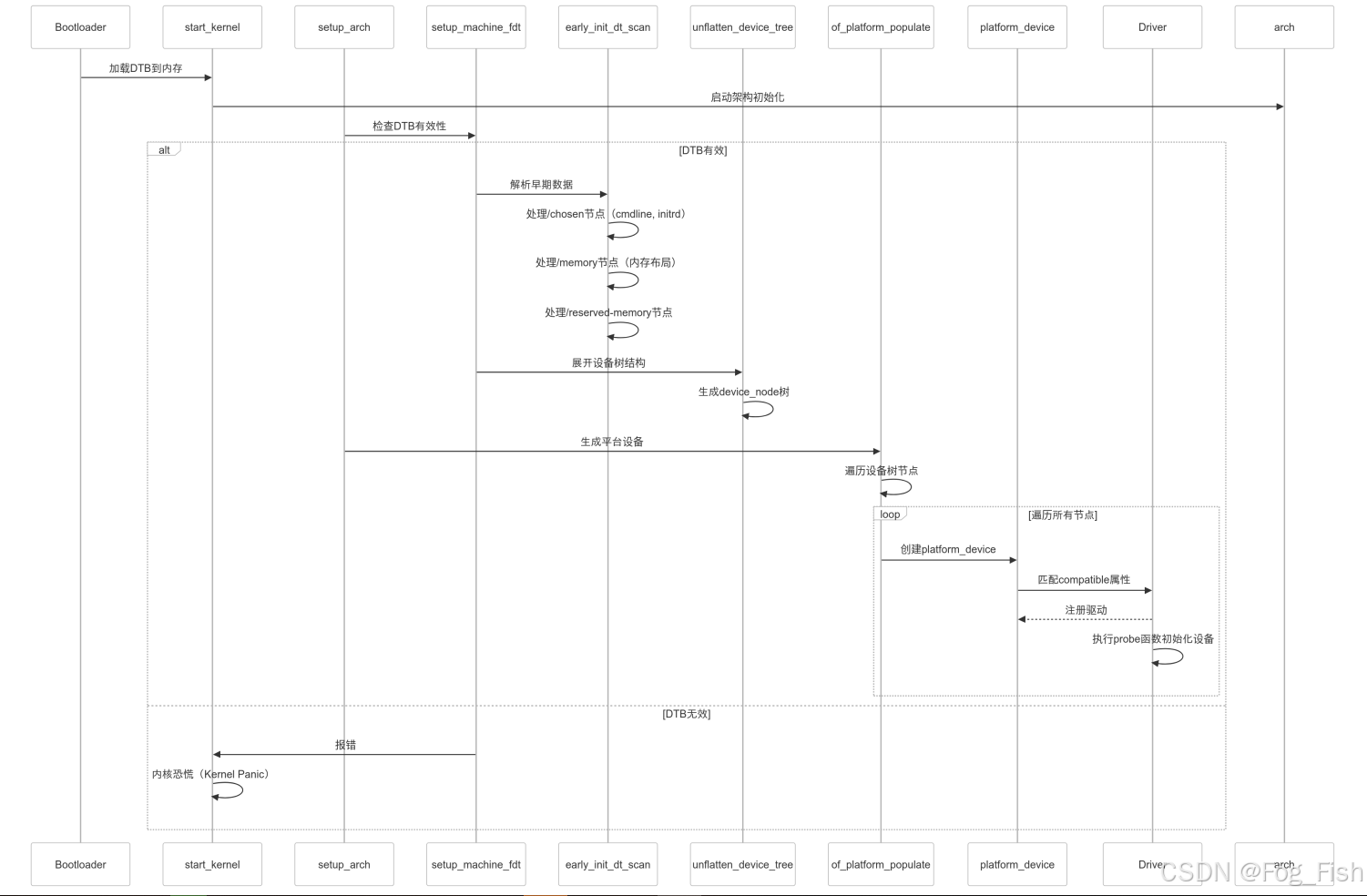
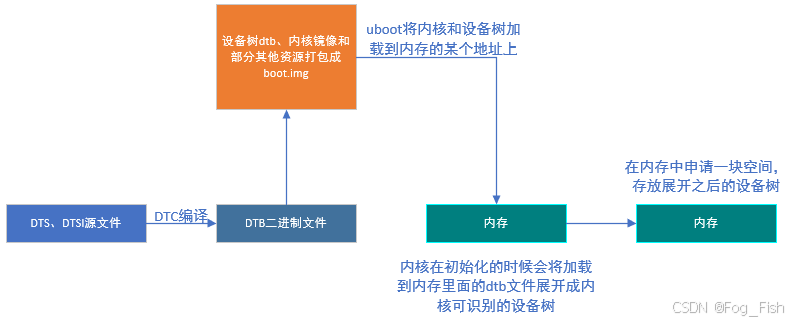
如上图所示,设备树的生效、展开流程包括以下部分:
-
U-Boot加载
在系统启动过程中,U-Boot会将boot.img中的内核设备树的二进制文件加载到系统内存的特定地址
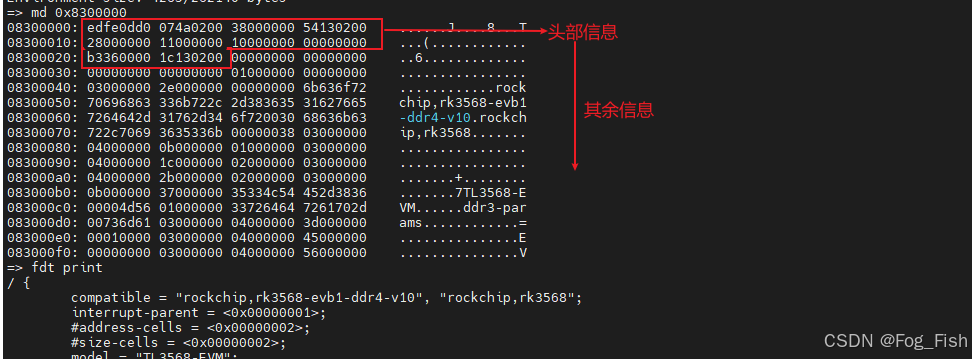
在uboot阶段,可使用md指令查看dtb二进制内容,或使用fdt指令dtc反编译的设备树文件



-
内核初始化
U-Boot将内核和设备树的二进制文件加载到系统内存的特定地址后,控制权会转交给内核
在内核初始化的过程中,会解析设备树的二进制文件,将其展开为内核可以识别的数据结构,以便正确初始化和管理硬件资源
-
设备树展开
设备树展开指将设备树二进制文件解析成内核中的设备节点device_node的过程内核会读取设备树二进制文件的内容,并根据设备树的描述信息,构建设备树数据结构,如设备节点、中断控制器、寄存器、时钟等
这些设备树数据结构在内核运行时用于管理和配置硬件资源
1.2 内核解析流程
1.2.1 关键结构体分析
1.2.1.1 结构体:struct property
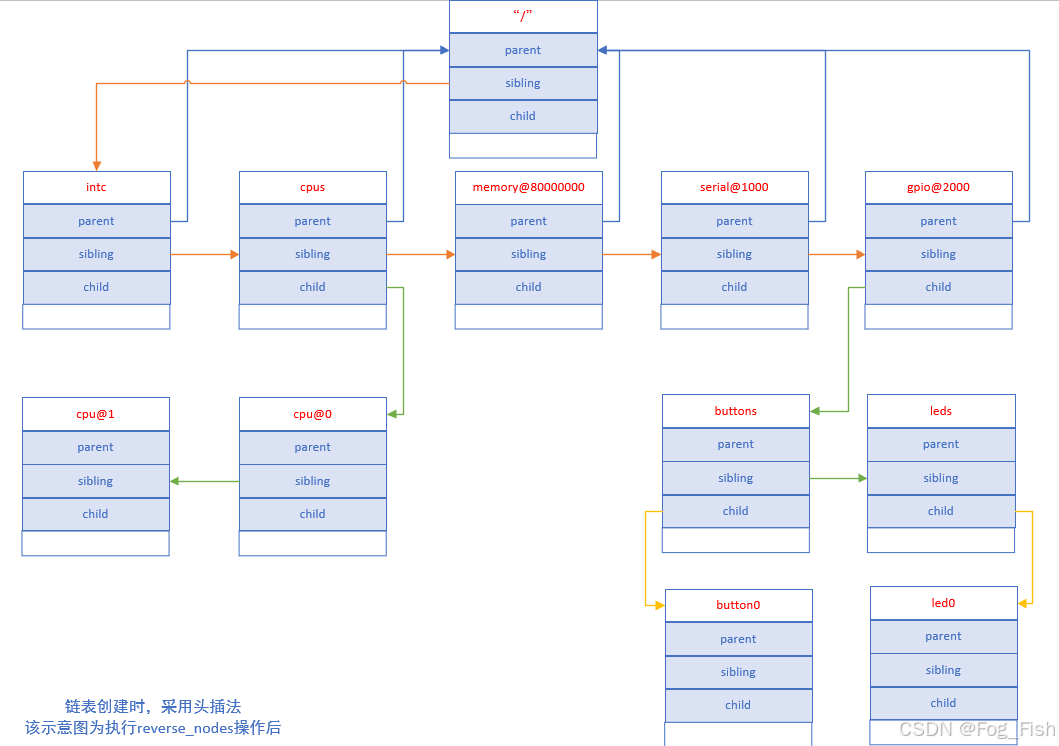
内核会根据设备树的结构,解析出Kernel能使用的struct property结构体,使用设备树中的属性填充struct property结构体,同一个node节点下的属性通过property.next指针进行链接,形成一个单链表
/*----- include/linux/of.h -----*/
struct property {
	char	*name;		//属性名称
	int	length;			//属性值的长度(字节数)
	void	*value;		//属性值的指针
	struct property *next;		//下一个属性节点指针
#if defined(CONFIG_OF_DYNAMIC) || defined(CONFIG_SPARC)
	unsigned long _flags;		//属性的标志位
#endif
#if defined(CONFIG_OF_PROMTREE)
	unsigned int unique_id;		//属性的唯一标识
#endif
#if defined(CONFIG_OF_KOBJ)
	struct bin_attribute attr;		//内核对象的二进制属性
#endif
};
1.2.1.2 结构体:device_node
Device Tree中的每个node节点经过kernel处理后都会生成一个struct device_node结构体,并最终被挂到具体的struct device结构体下
/*----- include/linux/of.h -----*/
struct device_node {
	const char *name;		//设备节点的名称,取最后一次“/”和“@”之间子串
	const char *type;		//设备节点的类型,没有则为<NULL>
	phandle phandle;		//设备节点的句柄
	const char *full_name;		//设备节点的完整名称
	struct fwnode_handle fwnode;		//设备节点的固件节点句柄

	struct	property *properties;		//设备节点的属性列表
	struct	property *deadprops;	/* removed properties 已删除的属性列表 */
	struct	device_node *parent;		//父设备节点指针
	struct	device_node *child;			//子设备节点指针
	struct	device_node *sibling;		//兄弟设备节点指针
#if defined(CONFIG_OF_KOBJ)
	struct	kobject kobj;		//内核对象(用于sysfs)
#endif
	unsigned long _flags;		//设备节点的标志位
	void	*data;				//与设备节点相关的数据指针
#if defined(CONFIG_SPARC)
	const char *path_component_name;		//设备节点的路径组件名称
	unsigned int unique_id;					//设备节点的唯一标识
	struct of_irq_controller *irq_trans;	//设备节点的中断控制器
#endif
};
name
设备节点的名称,设备节点的名称时在设备树中唯一标识该节点的字符串
通常用于在设备树中引用设备节点types
设备节点的类型,提供关于设备节点功能和所属设备类别的信息
可以用于识别设备节点的用途和特性properties
指向设备节点属性列表的指针,包含于设备节点相关联的配置和参数信息,属性值以键值对的形式存在
可以提供设备的特定属性、寄存器地址、中断信息等parent
指向父设备节点,设备树中的设备节点按照层次结构组织,父设备节点时当前设备节点的直接上级
通过parent字段,可以在设备树中遍历设备节点的父子关系child
指向子设备节点,在设备树中,一个设备节点可以拥有多个子设备节点
通过child字段,可以遍历设备节点的所有子设备节点sibling
指向兄弟设备节点,在设备树中,同一级别的兄弟设备节点共享相同的父设备节点
通过sibling字段,可以在同级设备节点之间进行遍历
1.2.2 代码流程分析
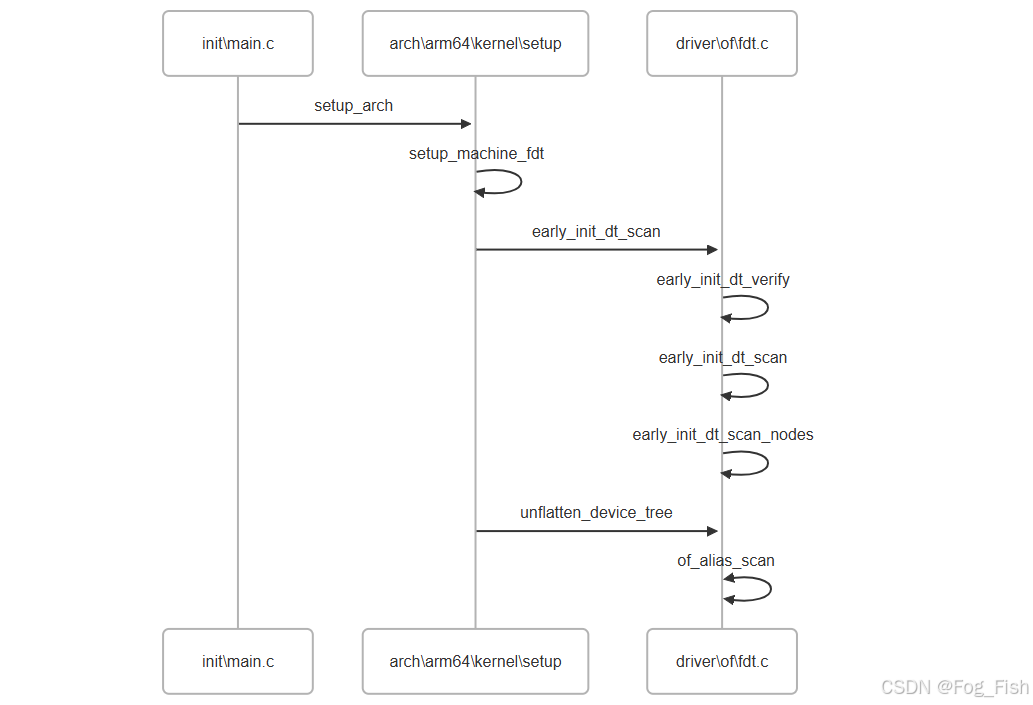
内核解析设备树主要流程如下:
1.2.2.1 Linux内核核心函数:start_kernel(void)
start_kernel函数是Linux内核启动的入口点,Linux内核的核心函数址一,负责完成内核的初始化和启动过程
函数原型如下
/*----- /init/main.c -----*/
asmlinkage __visible void __init start_kernel(void)
{
    char *command_line;
    char *after_dashes;

    set_task_stack_end_magic(&init_task);    // 设置任务栈的魔数
    smp_setup_processor_id();    // 设置处理器ID
    debug_objects_early_init();    // 初始化调试对象
    cgroup_init_early();    // 初始化cgroup(控制组)

    local_irq_disable();    // 禁用本地中断
    early_boot_irqs_disabled = true;     // 标记早期引导期间中断已禁用

    /*
     * 中断仍然被禁用。进行必要的设置,然后启用它们。
     */
    boot_cpu_init();    // 初始化引导CPU
    page_address_init();    // 设置页地址
    pr_notice("%s", linux_banner);    // 打印Linux内核版本信息
    setup_arch(&command_line);    // 架构相关的初始化
    mm_init_cpumask(&init_mm);    // 初始化内存管理的cpumask(CPU掩码)
    setup_command_line(command_line);    // 设置命令行参数
    setup_nr_cpu_ids();    // 设置CPU个数
    setup_per_cpu_areas();    // 设置每个CPU的区域
    smp_prepare_boot_cpu();    // 准备启动CPU(架构特定的启动CPU钩子)
    boot_cpu_hotplug_init();    // 初始化热插拔的引导CPU

    build_all_zonelists(NULL);    // 构建所有内存区域列表
    page_alloc_init();    // 初始化页面分配器
	........
}
上述start_kernel函数中,与设备树相关的函数为21行setup_arch(&command_line),该函数定义在“/arch/arm64/kernel/setup.c”中
-
setup_arch(&command_line)
/*----- arch/arm64/kernel/setup.c -----*/
void __init setup_arch(char **cmdline_p)
{
	init_mm.start_code = (unsigned long) _text;
	init_mm.end_code   = (unsigned long) _etext;
	init_mm.end_data   = (unsigned long) _edata;
	init_mm.brk	   = (unsigned long) _end;

	*cmdline_p = boot_command_line;

	early_fixmap_init();		//初始化 early fixmap
	early_ioremap_init();		//初始化 early ioremap

	setup_machine_fdt(__fdt_pointer);		//设置机器的FDT(平台设备树)

	/*
	 * Initialise the static keys early as they may be enabled by the
	 * cpufeature code and early parameters.
	 */
	//初始化静态密钥,早期可能被 cpufeature 代码和早期参数启用
	jump_label_init();
	parse_early_param();

	/*
	 * Unmask asynchronous aborts and fiq after bringing up possible
	 * earlycon. (Report possible System Errors once we can report this
	 * occurred).
	 */
	//在启动可能的早期控制台后,接触屏蔽异步中断和FIQ
	local_daif_restore(DAIF_PROCCTX_NOIRQ);

	/*
	 * TTBR0 is only used for the identity mapping at this stage. Make it
	 * point to zero page to avoid speculatively fetching new entries.
	 */
	//在这个阶段,TTBR0仅用于身份映射,将其指向零页面,以避免做出猜测性的新条目获取
	cpu_uninstall_idmap();

	xen_early_init();		//Xen 平台的早期初始化
	efi_init();				//EFI 平台的初始化
	arm64_memblock_init();	//ARM64 内存块的初始化

	paging_init();			//分页初始化

	acpi_table_upgrade();		//ACPI 表的升级

	/* Parse the ACPI tables for possible boot-time configuration */
	acpi_boot_table_init();		//解析ACPI表以进行可能的引导时配置

	if (acpi_disabled)
		unflatten_device_tree();		//展开设备树

	bootmem_init();				//引导内存的初始化
……………………
……………………
};
在
setup_arch函数中与设备树相关的函数分别为14行的setup_machine_fdt(__fdt_pointer);与第51行的unflatten_device_tree();后续章节详细介绍这两个函数
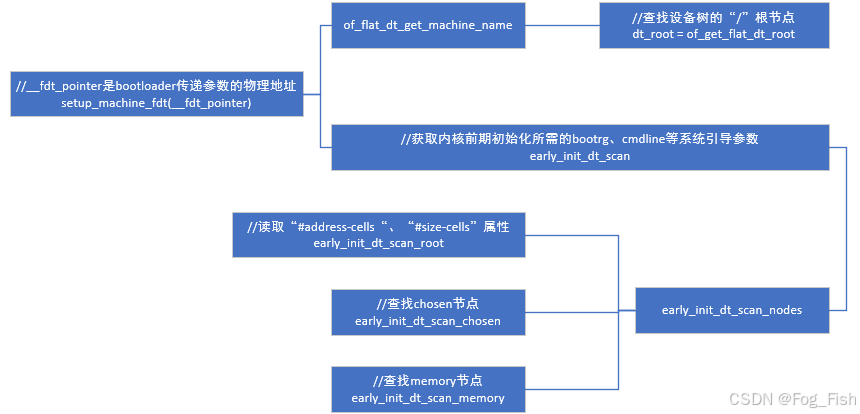
1.2.2.2 设备树解析关键函数:setup_machine_fdt(__fdt_pointer)
setup_machine_fdt(__fdt_pointer)中的__fdt_pointer是dtb二进制文件加载到内存的地址,该地址由bootloader启动kernel时透过x0寄存器传递过来的,汇编代码在源码目录“/arch/arm64/kernel/head.S”文件中
preserve_boot_args:
	mov	x21, x0				// x21=FDT

__primary_switched:
	str_l	x21, __fdt_pointer, x5		// Save FDT pointer
第2行:将寄存器
x0的值复制到x21。x0寄存器保存了一个指针,该指针指向设备树(Device Tree)第4行:将寄存器
x21的值存储到内存地址__fdt_pointer中
-
setup_machine_fdt函数/*----- arch/arm64/kernel/setup.c -----*/ /* 初始化设置机器的设备树 */ static void __init setup_machine_fdt(phys_addr_t dt_phys) { int size; /* 将设备树物理地址映射导内核虚拟地址上 */ void *dt_virt = fixmap_remap_fdt(dt_phys, &size, PAGE_KERNEL); const char *name; /* 映射成功————>保留设备树占用的内存区域 */ if (dt_virt) memblock_reserve(dt_phys, size); /* 映射/解析失败————>输出错误信息————>无限循环,等待系统崩溃 */ if (!dt_virt || !early_init_dt_scan(dt_virt)) { pr_crit("\n" "Error: invalid device tree blob at physical address %pa (virtual address 0x%p)\n" "The dtb must be 8-byte aligned and must not exceed 2 MB in size\n" "\nPlease check your bootloader.", &dt_phys, dt_virt); while (true) cpu_relax(); } /* Early fixups are done, map the FDT as read-only now */ /* 早期修改完成,将设备树映射为只读模式 */ fixmap_remap_fdt(dt_phys, &size, PAGE_KERNEL_RO); /* 获取设备树的机器名 */ name = of_flat_dt_get_machine_name(); /* 若没有设备名————>退出 */ if (!name) return; /* 输出机器型号信息————>设置栈转储的架构描述为机器型号 */ pr_info("Machine model: %s\n", name); dump_stack_set_arch_desc("%s (DT)", name); }-
设备树的有效性与完整性检查通过调用
early_init_dt_scan()进行早期扫描若设备树无效或扫描失败,则输出错误信息并进入死循环
-
机器名的获取通过调用
of_flat_dt_get_machine_name实现,其原型如下/*----- drivers/of/fdt.c -----*/ const char * __init of_flat_dt_get_machine_name(void) { const char *name; unsigned long dt_root = of_get_flat_dt_root(); //获取根节点 name = of_get_flat_dt_prop(dt_root, "model", NULL); //获取根节点 model 属性 if (!name) name = of_get_flat_dt_prop(dt_root, "compatible", NULL); //若无 model 属性,则获取 compatible属性 return name; }
-
-
early_init_dt_scan函数/*----- drivers/of/fdt.c -----*/ bool __init early_init_dt_scan(void *params) { bool status; /* 验证设备树的兼容性与完整性 */ status = early_init_dt_verify(params); if (!status) return false; /* 扫描设备树节点 */ early_init_dt_scan_nodes(); return true; }首先调用
early_init_dt_verify函数对设备树进行兼容性与完整性验证,检查设备树中的一致性标记、版本信息以及必须的节点与属性是否存在,若验证失败则返回false。
若设备树验证成功,则调用early_init_dt_scan_nodes扫描设备树的节点并进行相应的处理 -
early_init_dt_verify函数/*----- drivers/of/fdt.c -----*/ bool __init early_init_dt_verify(void *params) { /* 传入参数为空————>返回false */ if (!params) return false; /* check device tree validity */ /* 检查设备树头部信息————>若无效————>返回false */ if (fdt_check_header(params)) return false; /* Setup flat device-tree pointer */ /* 计算设备树的 CRC32 校验值————>将结果保存导全局变量 of_fdt_crc32 中 */ initial_boot_params = params; of_fdt_crc32 = crc32_be(~0, initial_boot_params, fdt_totalsize(initial_boot_params)); /* 返回验证成功结果 */ return true; } -
early_init_dt_scan_nodes函数/*----- drivers/of/fdt.c -----*/ void __init early_init_dt_scan_nodes(void) { /* Retrieve various information from the /chosen node */ /* 从“/chosen”节点中检索各种信息 */ of_scan_flat_dt(early_init_dt_scan_chosen, boot_command_line); /* Initialize {size,address}-cells info */ /* 初始化{size,address}-cells信息 */ of_scan_flat_dt(early_init_dt_scan_root, NULL); /* Setup memory, calling early_init_dt_add_memory_arch */ /* 设置内存信息,调用early_init_dt_add_memory_arch函数 */ of_scan_flat_dt(early_init_dt_scan_memory, NULL); }-
of_scan_flat_dt(early_init_dt_scan_chosen, boot_command_line)
从设备树的
/chosen节点中检索各种信息
/chosen节点通常包含一些系统的全局配置参数,如命令行参数
early_init_dt_scan_chosen是一个回调函数,用于处理/chosen节点的信息,boot_command_line是一个参数,表示内核启动时的命令行参数 -
of_scan_flat_dt(early_init_dt_scan_root, NULL)
初始化
{size,address}-cells信息
{size,address}-cells节点描述了设备节点中地址和大小的编码方式
early_init_dt_scan_root是一个回调函数,用于处理设备树的根节点 -
of_scan_flat_dt(early_init_dt_scan_memory, NULL)
设置内存信息,并调用
early_init_dt_scan_memory函数主要用于在设备树中获取内存相关的信息,并将其传递给内核的内存管理模块
-
-
小结
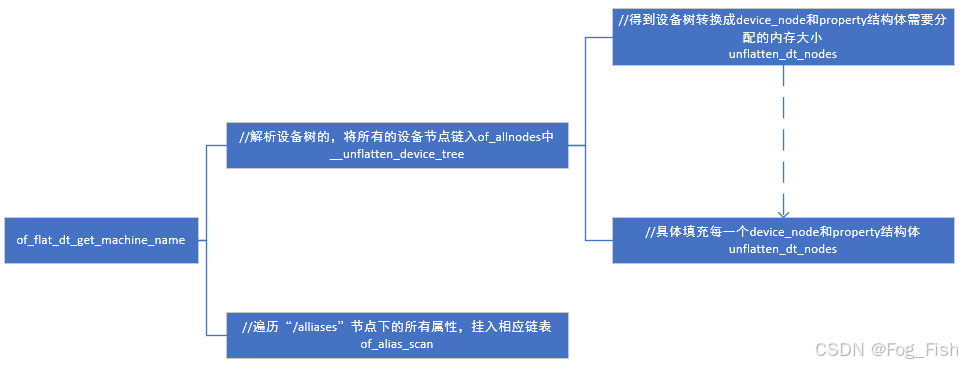
1.2.2.3 设备树解析关键函数:unflatten_device_tree
该函数用于解析设备树,将紧凑的设备树结构数据转换为树状结构的设备树,并将设备树各节点转换为对应的struct device_node结构体
-
unflatten_device_tree 函数/*----- driver/of/fdt.c -----*/ /** * unflatten_device_tree - create tree of device_nodes from flat blob * * unflattens the device-tree passed by the firmware, creating the * tree of struct device_node. It also fills the "name" and "type" * pointers of the nodes so the normal device-tree walking functions * can be used. */ void __init unflatten_device_tree(void) { /* 解析设备树 */ __unflatten_device_tree(initial_boot_params, NULL, &of_root, early_init_dt_alloc_memory_arch, false); /* Get pointer to "/chosen" and "/aliases" nodes for use everywhere */ /* 获取指向“/chosen”和“/aliases”节点的指针,并为他们分配内存,以供全局使用 */ of_alias_scan(early_init_dt_alloc_memory_arch); /* 运行设备树的单元测试 */ unittest_unflatten_overlay_base(); } -
__unflatten_device_tree函数/*----- driver/of/fdt.c -----*/ /** * __unflatten_device_tree - create tree of device_nodes from flat blob * * unflattens a device-tree, creating the * tree of struct device_node. It also fills the "name" and "type" * pointers of the nodes so the normal device-tree walking functions * can be used. * @blob: The blob to expand * @dad: Parent device node * @mynodes: The device_node tree created by the call * @dt_alloc: An allocator that provides a virtual address to memory * for the resulting tree * @detached: if true set OF_DETACHED on @mynodes * * Returns NULL on failure or the memory chunk containing the unflattened * device tree on success. */ void *__unflatten_device_tree(const void *blob, struct device_node *dad, struct device_node **mynodes, void *(*dt_alloc)(u64 size, u64 align), bool detached) { int size; void *mem; /* 校验设备树文件 */ pr_debug(" -> unflatten_device_tree()\n"); if (!blob) { pr_debug("No device tree pointer\n"); return NULL; } pr_debug("Unflattening device tree:\n"); pr_debug("magic: %08x\n", fdt_magic(blob)); pr_debug("size: %08x\n", fdt_totalsize(blob)); pr_debug("version: %08x\n", fdt_version(blob)); if (fdt_check_header(blob)) { pr_err("Invalid device tree blob header\n"); return NULL; } /* First pass, scan for size */ /* 第一轮扫描:计算大小 */ size = unflatten_dt_nodes(blob, NULL, dad, NULL); if (size < 0) return NULL; size = ALIGN(size, 4); pr_debug(" size is %d, allocating...\n", size); /* Allocate memory for the expanded device tree */ /* 为展开的设备树分配内存 */ mem = dt_alloc(size + 4, __alignof__(struct device_node)); if (!mem) return NULL; memset(mem, 0, size); *(__be32 *)(mem + size) = cpu_to_be32(0xdeadbeef); pr_debug(" unflattening %p...\n", mem); /* Second pass, do actual unflattening */ /* 第二轮扫描,实际展开设备树 */ unflatten_dt_nodes(blob, mem, dad, mynodes); if (be32_to_cpup(mem + size) != 0xdeadbeef) pr_warning("End of tree marker overwritten: %08x\n", be32_to_cpup(mem + size)); if (detached && mynodes) { of_node_set_flag(*mynodes, OF_DETACHED); pr_debug("unflattened tree is detached\n"); } pr_debug(" <- unflatten_device_tree()\n"); return mem; }该函数重点在两轮设备树扫描上
-
第48行的
unflatten_dt_nodes用于遍历设备树数据块,仅计算设备树所需的内存大小而不进行具体转换(传入的mem参数为NULL),返回展开设备树所需的内存大小。 -
对获取的内存大小进行对齐操作,分配设展开设备树所需的内存
-
第69行的
unflatten_dt_nodes用于实际展开设备树,并填充设备节点的名称、类型和属性等信息
-
-
unflatten_dt_nodes 函数/*----- driver/of/fdt.c -----*/ /** * unflatten_dt_nodes - Alloc and populate a device_node from the flat tree * @blob: The parent device tree blob * @mem: Memory chunk to use for allocating device nodes and properties * @dad: Parent struct device_node * @nodepp: The device_node tree created by the call * * It returns the size of unflattened device tree or error code */ static int unflatten_dt_nodes(const void *blob, void *mem, struct device_node *dad, struct device_node **nodepp) { struct device_node *root; //根节点指针 int offset = 0, depth = 0, initial_depth = 0; //FDT遍历偏移量、当前深度与初始遍历深度 #define FDT_MAX_DEPTH 64 //最大允许节点深度 struct device_node *nps[FDT_MAX_DEPTH]; //节点指针栈,记录当前深度的父节点 void *base = mem; //存放展开后设备树的内存块的起始地址 /* 空跑标识: * 在上层__unflatten_device_tree调用中,一共两轮扫描 * 第一轮传入的 “mem” 为NULL————>*base = NULL————>dryrun=1————>计算设备树展开需要的内存大小 * 第二轮传入的 “mem” 为分配的内存起始————>*base = NULL————>dryrun=0————>具体展开设备树结构 */ bool dryrun = !base; if (nodepp) //初始化设备树节点指针 *nodepp = NULL; /* * We're unflattening device sub-tree if @dad is valid. There are * possibly multiple nodes in the first level of depth. We need * set @depth to 1 to make fdt_next_node() happy as it bails * immediately when negative @depth is found. Otherwise, the device * nodes except the first one won't be unflattened successfully. */ /* * 如果存在父节点(dad),说明正在展开子设备树 * - 设备子树的第一层可能有多个节点 * - 设置depth=1使得fdt_next_node()可以正确处理层级关系 * - 否则除第一个节点外,其余同级函数无法正常处理 * 出现场景: * - 动态设备树加载时,内核调用__unflatten_device_tree展开都是从根节点展开,即dad=NULL */ if (dad) depth = initial_depth = 1; /* 初始化父节点数组 */ root = dad; //当前子树的根节点初始化为父节点 nps[depth] = dad; //将当前深度深度的父节点存入数组 /* 主循环:深度优先遍历FDT节点 */ for (offset = 0; offset >= 0 && depth >= initial_depth; //循环条件:偏移有效且深度合法 offset = fdt_next_node(blob, offset, &depth)) { //获取下一个节点偏移 /*深度安全检验*/ if (WARN_ON_ONCE(depth >= FDT_MAX_DEPTH)) continue; /* 检查节点可用性(若未启用OF_KOBJ配置) */ if (!IS_ENABLED(CONFIG_OF_KOBJ) && !of_fdt_device_is_available(blob, offset)) continue; /* 核心操作:填充当前节点到内存 */ if (!populate_node(blob, offset, &mem, nps[depth], &nps[depth+1], dryrun)) return mem - base; //若失败(内存不足),返回当前消耗量 /* * 全局展开: * 将第一个有效节点,即根节点“/”,赋值到 *nodepp中 * - 初始状态:depth = 0,nps[0] = NULL * - 处理: * -- populate_node 创建根节点,nps[1] = 根节点指针 * -- *nodepp 未初始化,将其赋值为 nps[1](即根节点) */ if (!dryrun && nodepp && !*nodepp) //更新条件:非空跑 && nodepp存在 && *nodepp未初始化, *nodepp = nps[depth+1]; //赋值为 nps[1](根节点) /* 子树展开: * - 初始状态:depth = 1,nps[1] = dad(父节点指针) * - 处理: * -- populate_node 创建子节点,nps[2] = 子节点指针 * -- 若 *nodepp 未初始化,将其赋值为 nps[2](即子树的根节点) * - 场景:动态设备树加载 */ if (!dryrun && !root) //更新条件:非空跑 + 非全局展开 root = nps[depth+1]; //将节点赋值为nps[2] } /* 错误处理(FDT解析失败) */ if (offset < 0 && offset != -FDT_ERR_NOTFOUND) { pr_err("Error %d processing FDT\n", offset); return -EINVAL; } /* * Reverse the child list. Some drivers assumes node order matches .dts * node order */ /* 反转子节点链表 */ if (!dryrun) reverse_nodes(root); /* */ return mem - base; }思考点:
-
为什么要用
device_node要以链表的形式链接兄弟节点?只用nps记录当前层次的根节点?每个平台对应不同的设备树,这些设备树在层次、数量上均不相同,且如fdt等动态设备树机制,可以进行动态修改,若使用数组提前分配的方式,分配少了会导致溢出,分配多了浪费内存资源,而链表方式在内存分配上更为灵活,且数组类型在使用动态设备树时插入、删除等操作都较复杂
-
为什么主循环中是深度优先遍历节点?
dtb文件(blob)存储时以平面树状结构存储,本身结构也为深度优先,主循环通过
fdt_next_node找对应的令牌匹配找寻偏移值,故遍历规则为深度优先 -
fdt_next_node函数怎么查找下一个节点?通过匹配不同的令牌,判断blob文件后续内容是节点开始、属性还是子节点等,返回不同的
offset/*----- driver/of/fdt.c -----*/ int fdt_next_node(const void *fdt, int offset, int *depth) { int nextoffset = 0; uint32_t tag; if (offset >= 0) if ((nextoffset = fdt_check_node_offset_(fdt, offset)) < 0) return nextoffset; do { offset = nextoffset; tag = fdt_next_tag(fdt, offset, &nextoffset); switch (tag) { case FDT_PROP: //节点属性 case FDT_NOP: //无操作 break; case FDT_BEGIN_NODE: //节点开始 if (depth) (*depth)++; break; case FDT_END_NODE: //节点结束 if (depth && ((--(*depth)) < 0)) return nextoffset; break; case FDT_END: //设备树结束 if ((nextoffset >= 0) || ((nextoffset == -FDT_ERR_TRUNCATED) && !depth)) return -FDT_ERR_NOTFOUND; else return nextoffset; } } while (tag != FDT_BEGIN_NODE); return offset; } -
OF_KOBJ配置的作用是什么?
CONFIG_OF_KOBJ用于控制设备树节点在sysfs中是否可视,如目录/sys/firmware/devicetree/base/目录下是否生成设备树可视节点

-
-
populate_node函数/*----- driver/of/fdt.c -----*/ /** * populate_node - 从扁平设备树(FDT) blob中解析并构建设备节点结构 * @blob: 指向FDT数据的指针 * @offset: 当前节点在FDT中的偏移量 * @mem: 内存分配器指针,用于节点内存分配 * @dad: 父设备节点指针 * @pnp: 输出参数,返回新建的设备节点指针 * @dryrun: 空跑模式(仅计算内存不实际分配) * * 返回值: true表示成功创建节点,false表示失败 */ static bool populate_node(const void *blob, int offset, void **mem, struct device_node *dad, struct device_node **pnp, bool dryrun) { struct device_node *np; //新设备节点指针 const char *pathp; //节在设备树中的路径名 unsigned int l, allocl; //路径字符串长度和分配的内存大小 /* 获取节点路径名 */ pathp = fdt_get_name(blob, offset, &l); //获取节点路径和长度 if (!pathp) { *pnp = NULL; return false; } /* 计算内存分配长度(路径长度+1,包含终止符)*/ allocl = ++l; /* 分配设备节点内存(device_node结构体 + 路径名空间) */ np = unflatten_dt_alloc(mem, sizeof(struct device_node) + allocl, __alignof__(struct device_node)); //按对齐要求分配内存 /* 非空跑模式————>初始化节点结构 */ if (!dryrun) { char *fn; //全名存储位置指针 of_node_init(np); //初始化节点基础字段(如引用计数) np->full_name = fn = ((char *)np) + sizeof(*np); //存储fn到结构体device_node的file_name成员 memcpy(fn, pathp, l); //赋值路径名到节点 /* 构建设备树层级关系 */ if (dad != NULL) { // 存在父节点时的处理 np->parent = dad; //设置父节点指针 /* 将新节点插入父节点的子链表头部 */ np->sibling = dad->child; dad->child = np; } } /* 填充节点属性(reg、interrupt等) */ populate_properties(blob, offset, mem, np, pathp, dryrun); if (!dryrun) { /* 从属性中获取name和device_type字段 */ np->name = of_get_property(np, "name", NULL); np->type = of_get_property(np, "device_type", NULL); //默认值处理 if (!np->name) np->name = "<NULL>"; if (!np->type) np->type = "<NULL>"; } *pnp = np; //返回创建的新节点 return true; } -
小结
-
populate_properties 填充 device_node->properties 分析
populate_properties函数主要包含以下功能- 遍历节点所有属性,转换为struct property并链接到device_node.properties链表
- 处理phandle/ibm,phandle等特殊属性
- 确保节点拥有有效的"name"属性(必要时从节点名自动生成)
static void populate_properties(const void *blob, int offset, void **mem, struct device_node *np, const char *nodename, bool dryrun) { struct property *pp, **pprev = NULL; int cur; bool has_name = false; //是否已存在”name“标记 /* 初始化链表头指针 */ pprev = &np->properties; /* 遍历当前节点的所有属性 */ for (cur = fdt_first_property_offset(blob, offset); cur >= 0; cur = fdt_next_property_offset(blob, cur)) { const __be32 *val; //属性值指针(大端) const char *pname; //属性名指针 u32 sz; //属性值字节长度 /* 从dtb中提取当前属性的名称和值 */ val = fdt_getprop_by_offset(blob, cur, &pname, &sz); //name由字符串块获取,值由结构块获取 if (!val) { pr_warn("Cannot locate property at 0x%x\n", cur); continue; } if (!pname) { pr_warn("Cannot find property name at 0x%x\n", cur); continue; } /* 如果获取的属性名是”name“,标记存在”name“属性 */ if (!strcmp(pname, "name")) has_name = true; /* 为struct property分配内存(内存池来自DTB预留空间) */ pp = unflatten_dt_alloc(mem, sizeof(struct property), __alignof__(struct property)); if (dryrun) continue; /* We accept flattened tree phandles either in * ePAPR-style "phandle" properties, or the * legacy "linux,phandle" properties. If both * appear and have different values, things * will get weird. Don't do that. */ /* 特殊属性处理,兼容三种属性名:phandle,linux,phandle(不可同时使用),ibm,phandle */ if (!strcmp(pname, "phandle") || !strcmp(pname, "linux,phandle")) { if (!np->phandle) //仅首次设置phandle值(避免冲突) np->phandle = be32_to_cpup(val); //大端序转cpu序 } /* And we process the "ibm,phandle" property * used in pSeries dynamic device tree * stuff */ // 处理IBM pSeries的特殊phandle属性 if (!strcmp(pname, "ibm,phandle")) np->phandle = be32_to_cpup(val); /* 填充属性结构 */ pp->name = (char *)pname; //指向DTB字符串段的属性名 pp->length = sz; //属性值长度 pp->value = (__be32 *)val; //指向DTB中的原始值(暂不拷贝) /* 将属性加入链表尾部 */ *pprev = pp; //前驱节点的next指针指向当前属性 pprev = &pp->next; //更新前驱指针为当前属性的next指针 } /* With version 0x10 we may not have the name property, * recreate it here from the unit name if absent */ /* 确保节点拥有“name”属性 */ if (!has_name) { const char *p = nodename, *ps = p, *pa = NULL; int len; /*从完整节点名提取name * - 找到最后一个“/”后的字串(如“/cpus/cpu@0" 中的 “cpu@0” ) * - 截取第一个“@”前的部分(如“cpu”) */ while (*p) { if ((*p) == '@') pa = p; //记录@位置 else if ((*p) == '/') ps = p + 1; //更新子串起始位置(跳过“/”) p++; } /* 处理无“@”的情况 */ if (pa < ps) pa = p; //指向字符串末尾 len = (pa - ps) + 1; //计算name长度(包括终止符) /* 分配 属性结构+name字符串 的内存 */ pp = unflatten_dt_alloc(mem, sizeof(struct property) + len, __alignof__(struct property)); if (!dryrun) { pp->name = "name"; pp->length = len; pp->value = pp + 1; //值紧接结构体之后 /* 将name值拷贝到属性值区域 */ *pprev = pp; pprev = &pp->next; memcpy(pp->value, ps, len - 1); //复制字符(不包含@) ((char *)pp->value)[len - 1] = 0; //添加终止符 pr_debug("fixed up name for %s -> %s\n", nodename, (char *)pp->value); } } if (!dryrun) *pprev = NULL; } -
函数调用关系图
-
device_node节点关系
device node通过父节点、子节点与兄弟节点三个指针来维护各节点之间的关系
如示例设备树[^1],其解析后的device node结构如下如所示
-
1.3 总结
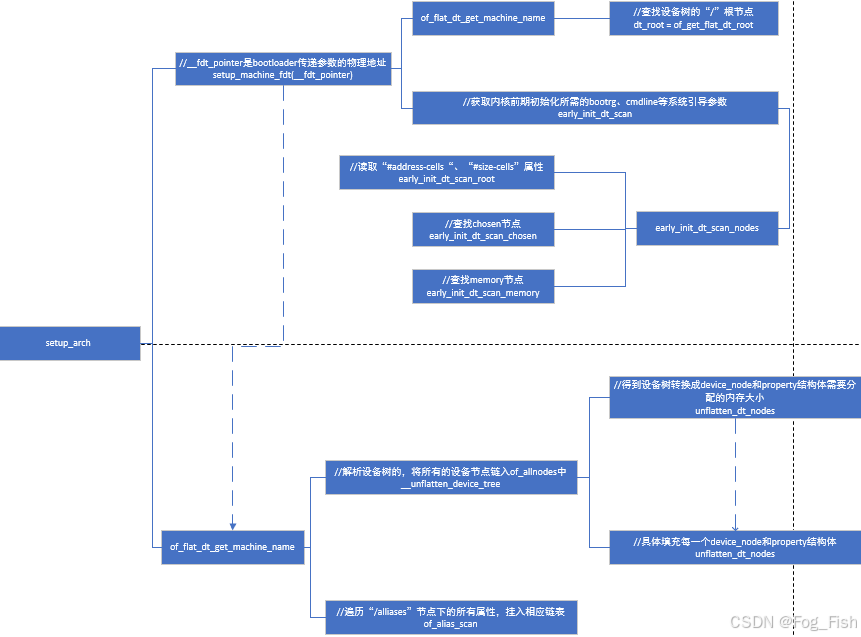
内核通过setup_machine_fdt接口实现early_dts(早期设备树)信息扫描接口,解析memory以及bootargs等一些启动早期需要使用的信息。后续通过unflatten_device_tree将完整的device tree信息解析到device_node结构体中。由于device_node包含了设备树所有节点以及它们之间的关系,所以后续内核可通过device_node快速索引设备节点
-
内核解析设备树整体流程
1.3.1 示例验证
-
目的
打印内核解析之后的device_node的所有结构体,结合实际可视现象进一步理解内核解析设备树效果 -
源码
修改驱动“${SDK}/driver/of/fdt.c”如下
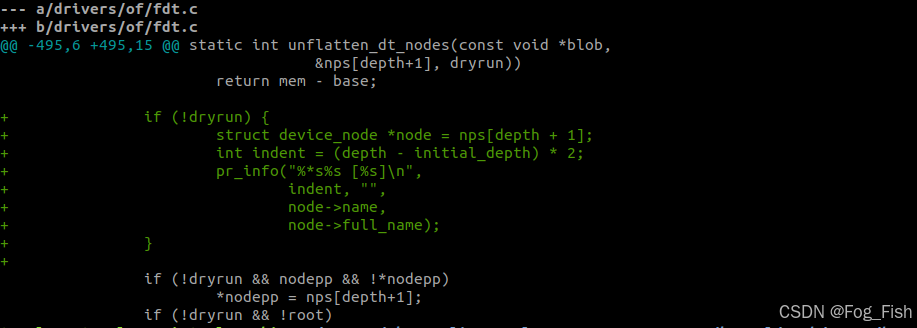
-
现象
以i2c2节点与其子节点为例&i2c2 { status = "okay"; pinctrl-0 = <&i2c2m1_xfer>; gt911@5d { pinctrl-names = "default"; pinctrl-0 = <>911_int_pin >911_rst_pin>; compatible = "goodix,gt911"; reg = <0x5d>; interrupt-parent = <&gpio2>; interrupts = <18 0>; irq-gpios = <&gpio2 RK_PC2 0>; reset-gpios = <&gpio1 RK_PA4 GPIO_ACTIVE_HIGH>; }; wusb3801: tcpc@60 { status = "okay"; compatible = "willsemi,wusb3801"; reg = <0x60>; pinctrl-names = "default"; pinctrl-0 = <&wusb3801_int_pin &ch482d_sel_pin>; interrupt-parent = <&gpio0>; interrupts = <RK_PA6 IRQ_TYPE_LEVEL_LOW>; ch482d_sel-gpios = <&gpio4 RK_PD2 GPIO_ACTIVE_LOW>; }; vm149c: vm149c@c { compatible = "silicon touch,vm149c"; status = "okay"; reg = <0x0c>; rockchip,camera-module-index = <2>; rockchip,camera-module-facing = "back"; }; ov13850: ov13850@10 { compatible = "ovti,ov13850"; status = "okay"; reg = <0x10>; clocks = <&pmucru CLK_WIFI>; clock-names = "xvclk"; pinctrl-names = "default"; pinctrl-0 = <&refclk_pins>; pwdn-gpios = <&gpio0 RK_PC4 GPIO_ACTIVE_HIGH>; rockchip,camera-module-index = <0>; rockchip,camera-module-facing = "back"; rockchip,camera-module-name = "RK-CMK-8M-2-v1"; rockchip,camera-module-lens-name = "CK8401"; lens-focus = <&vm149c>; port { ov13850_out: endpoint { remote-endpoint = <&mipi_in_ucam0>; data-lanes = <1 2 3 4>; }; }; };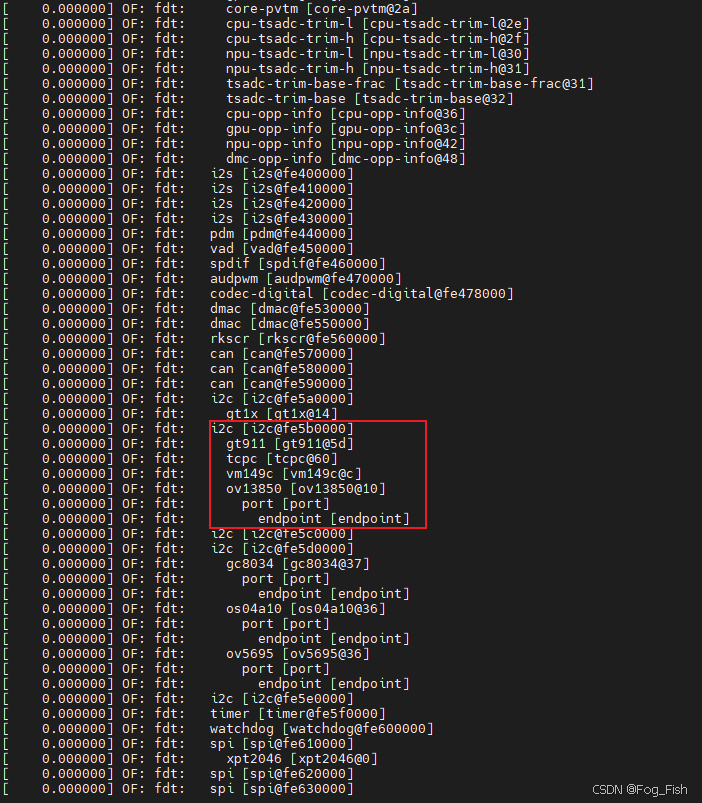
二 device_node 转换 device
在上述学习中,了解了内核将设备树dtb解析成device_node的机制,但该结构体并不能直接与设备驱动模型中的device_driver匹配
在设备模型[^2]的学习中,device部分是由结构体xxx_device结构体对硬件资源进行描述,所以内核会最终将device_node进一步转换为设备驱动模型可匹配的对应device结构体
2.1 device_node 转换为平台设备(platform_device)
思考点
Q1
为什么要先分析platform_device?为什么内核启动过程中要先解析platform_device?A1
-
platform_device平台设备(时钟、中断控制器、cpu、内存控制器、gpio控制器等)是系统的基础设施,其他设备驱动(如串口、GPIO)依赖这些资源完成初始化。若内核不优先解析并注册platform_device,后续驱动可能无法获取所需资源(如内存地址、中断号),导致启动失败。- Linux内核通过设备驱动模型管理设备与驱动的绑定。
platform_driver注册时,需要匹配已存在的platform_device。若设备未提前注册,驱动无法绑定,导致设备不可用。- 部分平台设备(如定时器、时钟源)是系统运行的关键。例如,调度器依赖定时器,若其依赖的时钟控制器未初始化,系统将无法正常启动。
- Q2
所有的device_node都会转换成platform_device吗?- A2
只有满足转换规则的device_node节点才会进行转换
2.1.1 转换规则
内核会将满足以下条件的device_node转换
-
规则1
节点为根节点
“/”的直接子节点,且包含compatible属性,则会创建对应的platform_device -
规则2
节点的父节点的
compatible为“simple-bus”、"simple-mfd"或"isa",且节点本身包含compatible,则会创建对应的platform_device -
规则3
节点的compatible属性是否包含"arm" 或"primecell",如果是,则不将该节点转换为platform_device,而是将其识别为AMBA设备
2.1.2 转换流程分析
2.1.2.1 关键函数调用链
-
arch_initcall_sync注册当内核启动时,调用
rest_init()函数来启动初始化过程。在初始化过程中,arch_initcall_sync函数会被调用,以确保所有与当前架构相关的初始化函数按照正确的顺序执行。这样可以保证在启动过程中,特定架构相关的初始化工作得到正确地完成。start_kernel() | ├─setup_arch() // 解析设备树,生成device_node树 | └─rest_init() | └─kernel_init() | └─kernel_init_freeable() | └─kernel_init_freeable() | └─do_basic_setup() | └─do_initcalls() | └─do_initcall_level(level=3s) // 执行arch_initcall_sync级别函数 | └─arch_initcall_sync(of_platform_default_populate_init) | └─of_platform_default_populate_init() -
平台设备生成流程
of_platform_default_populate_init函数的作用是在内核初始化过程中自动解析设备树,并根据设备树中的设备节点创建对应的platform_device结构。它会遍历设备树中的设备节点,并为每个设备节点创建一个对应的platform_device结构,然后将其注册到内核中,使得设备驱动程序能够识别和操作这些设备of_platform_default_populate() | └─of_platform_populate() | └─of_platform_bus_create() // 递归处理节点 | └─of_platform_device_create_pdata()
2.1.2.2 转换流程代码解析
-
of_platform_default_populate_init函数/*----- kernel/driver/of/platform.c -----*/ static int __init of_platform_default_populate_init(void) { struct device_node *node; /* 暂停设备链接(device link)的状态同步,避免在初始化过程中出现竟态条件 */ device_links_supplier_sync_state_pause(); /* 检查设备树是否正常加载/填充,若没有则返回错误码 */ if (!of_have_populated_dt()) return -ENODEV; /* * Handle certain compatibles explicitly, since we don't want to create * platform_devices for every node in /reserved-memory with a * "compatible", */ /* * - 显式处理保留内存(reserved-memory)中特定compatible的节点 * - 尽管这些节点有compatible属性,但不为保留内存节点创建platform_device * - reserved_mem_matches 是预定义的匹配表,仅处理特定 compatibles(例如 DMA 内存池等) * -- 为/reserved-memory 中匹配的节点创建 platform_device 结构。这些节点不会为每个节点都创建 platform_device,而是根据需要进行显式处理 */ for_each_matching_node(node, reserved_mem_matches) of_platform_device_create(node, NULL, NULL); /* 处理/firmware节点下的设备(如 UEFI/ACPI 相关服务) */ node = of_find_node_by_path("/firmware"); if (node) { of_platform_populate(node, NULL, NULL, NULL); //递归创建并填充子节点设备 of_node_put(node); //释放节点引用计数 } /* Populate everything else. */ /* 填充其他设备 */ fw_devlink_pause(); //暂停固件设备链接(fw_devlink)解析,避免依赖关系冲突 of_platform_default_populate(NULL, NULL, NULL); //默认填充设备树其余节点:除保留内存和/firmware外,为所有有效节点创建 platform_device fw_devlink_resume(); //恢复固件设备链接解析 return 0; } arch_initcall_sync(of_platform_default_populate_init); -
of_platform_default_populate函数/*----- kernel/driver/of/platform.c -----*/ int of_platform_default_populate(struct device_node *root, const struct of_dev_auxdata *lookup, struct device *parent) { return of_platform_populate(root, of_default_bus_match_table, lookup, parent); }调用
of_platform_populate函数填充设备树中的平台设备,并使用默认的设备树匹配表of_default_bus_match_table/*----- kernel/driver/of/platform.c -----*/ const struct of_device_id of_default_bus_match_table[] = { { .compatible = "simple-bus", }, { .compatible = "simple-mfd", }, { .compatible = "isa", }, #ifdef CONFIG_ARM_AMBA { .compatible = "arm,amba-bus", }, #endif /* CONFIG_ARM_AMBA */ {} /* Empty terminated list */ };该匹配表对应上述规则2,函数将自动根据设备树节点的属性匹配相应的设备驱动程序,并填充内核的平台设备列表
-
of_platform_populate函数/*----- kernel/driver/of/platform.c -----*/ /** * of_platform_populate() - 根据设备树节点创建并注册平台设备 * @root: 起始设备树节点(若为NULL,则从根节点"/"开始) * @matches: 设备兼容性匹配表(用于过滤需创建设备的节点) * @lookup: 辅助数据表(用于覆盖设备树中的名称、父设备等属性) * @parent: 父设备指针(通常为平台总线设备) * * 返回值:成功返回0,失败返回负的错误码 * * 该函数遍历设备树中指定节点的子节点,递归创建对应的platform_device, * 并注册到内核设备模型中,供后续驱动匹配。 */ int of_platform_populate(struct device_node *root, const struct of_device_id *matches, const struct of_dev_auxdata *lookup, struct device *parent) { struct device_node *child; int rc = 0; /* 如果root不为空,则增加root节点的引用次数;否则,在设备树中根据路径查找root节点 */ root = root ? of_node_get(root) : of_find_node_by_path("/"); if (!root) return -EINVAL; pr_debug("%s()\n", __func__); pr_debug(" starting at: %pOF\n", root); device_links_supplier_sync_state_pause(); //暂停设备链接状态同步;防止在设备创建过程中供应商设备转台变化引发竟态 /* 遍历所有子节点并创建设备;for_each_child_of_node 宏遍历root的每个直接子节点 */ for_each_child_of_node(root, child) { /*为子节点创建平台设备(及可能的下级设备)*/ rc = of_platform_bus_create(child, matches, lookup, parent, true); if (rc) { of_node_put(child); //创建失败:释放子节点并终止循环 break; } } device_links_supplier_sync_state_resume(); //恢复设备链表状态同步 /* 标记该节点的总线设备已初始化;OF_POPULATED_BUS 标志避免后续重复处理*/ of_node_set_flag(root, OF_POPULATED_BUS); of_node_put(root); //释放root节点的引用计数 return rc; } EXPORT_SYMBOL_GPL(of_platform_populate);
for_each_child_of_node宏定义如下/*----- kernel/include/linux/of.h -----*/ #define for_each_child_of_node(parent, child) \ for (child = of_get_next_child(parent, NULL); child != NULL; \ child = of_get_next_child(parent, child)) -
of_platform_bus_create函数/*----- kernel/driver/of/platform.c -----*/ /** * of_platform_bus_create() - Create a device for a node and its children. * @bus: device node of the bus to instantiate * @matches: match table for bus nodes * @lookup: auxdata table for matching id and platform_data with device nodes * @parent: parent for new device, or NULL for top level. * @strict: require compatible property * * Creates a platform_device for the provided device_node, and optionally * recursively create devices for all the child nodes. */ /* * 递归创建平台设备或AMBA设备,处理以下情况: * 1. 严格模式跳过无compatible属性的节点 * 2. 跳过标记为忽略的节点(如保留内存) * 3. 避免重复初始化已处理的节点 * 4. 特殊处理ARM PrimeCell兼容的AMBA设备 * * 返回值: 0成功,非0表示错误(仅子节点初始化失败时返回错误码) */ static int of_platform_bus_create(struct device_node *bus, const struct of_device_id *matches, const struct of_dev_auxdata *lookup, struct device *parent, bool strict) { const struct of_dev_auxdata *auxdata; struct device_node *child; struct platform_device *dev; const char *bus_id = NULL; void *platform_data = NULL; int rc = 0; /* Make sure it has a compatible property */ /* 严格模式检查:若无compatible属性则跳过 */ if (strict && (!of_get_property(bus, "compatible", NULL))) { pr_debug("%s() - skipping %pOF, no compatible prop\n", __func__, bus); return 0; //跳过 } /* Skip nodes for which we don't want to create devices */ /* 检查节点是否在跳过列表中 */ if (unlikely(of_match_node(of_skipped_node_table, bus))) { pr_debug("%s() - skipping %pOF node\n", __func__, bus); return 0; } /* 避免重复处理已初始化的节点 */ if (of_node_check_flag(bus, OF_POPULATED_BUS)) { pr_debug("%s() - skipping %pOF, already populated\n", __func__, bus); return 0; } /* 从auxdata表中获取设备覆盖信息(如名称、平台数据) */ auxdata = of_dev_lookup(lookup, bus); if (auxdata) { bus_id = auxdata->name; //覆盖设备名称 platform_data = auxdata->platform_data; //自定义平台数据 } /* 特殊处理ARM PrimeCell设备(AMBA总线) */ if (of_device_is_compatible(bus, "arm,primecell")) { /* * Don't return an error here to keep compatibility with older * device tree files. */ //创建AMBA设备,不返回错误以兼容旧设备树 of_amba_device_create(bus, bus_id, platform_data, parent); return 0; } /* 创建平台设备 */ dev = of_platform_device_create_pdata(bus, bus_id, platform_data, parent); if (!dev || !of_match_node(matches, bus)) return 0; /* 递归处理子节点 */ for_each_child_of_node(bus, child) { pr_debug(" create child: %pOF\n", child); rc = of_platform_bus_create(child, matches, lookup, &dev->dev, strict); if (rc) { of_node_put(child); //错误时释放子节点引用 break; } } /* 标记当前节点的总线设备已初始化 */ of_node_set_flag(bus, OF_POPULATED_BUS); return rc; //返回子节点处理中的首个错误 }-
of_skipped_node_tablestatic const struct of_device_id of_skipped_node_table[] = { { .compatible = "operating-points-v2", }, {} /* Empty terminated list */ }; -
函数解析
-
第36行
若strict 为真且设备节点bus没有兼容性属性,则输出调试信息并返回 0
判断确保设备节点具有compatible属性,因为compatible属性用于匹配设备驱动程序,对应我们规则1 -
第44行
如果设备节点bus在被跳过的节点表中,则输出调试信息并返回 0
这个条件判断用于跳过不想创建设备的节点 -
第50行
如果设备节点
bus的OF_POPULATED_BUS标志已经设置,则输出调试信息并返回 0
这个条件判断用于避免重复创建已经填充的设备节点 -
第57行
用lookup辅助数据结构查找设备节点bus的特定配置信息,并将其赋值给变量bus_id和platform_data
用于获取设备节点的特定配置信息,以便在创建平台设备时使用,由于这里传入的参数为NULL,所以下面的条件判断并不会被执行 -
第64行
如果设备节点
bus兼容于"arm,primecell",则调用of_amba_device_create函数创建 AMBA 设备,并返回 0对应上述规则3
-
第75行
调用
of_platform_device_create_pdata函数创建平台设备,并将其赋值给变量dev
检查设备节点bus是否与给定的匹配表matches匹配
如果平台设备创建失败或者设备节点不匹配,那么返回 -
第80行
遍历设备节点
bus的每个子节点child,并递归调用of_platform_bus_create函数来创建子节点的平台设备
-
-
-
of_platform_device_create_pdata函数/*----- kernel/driver/of/platform.c -----*/ /** * of_platform_device_create_pdata - Alloc, initialize and register an of_device * @np: pointer to node to create device for * @bus_id: name to assign device * @platform_data: pointer to populate platform_data pointer with * @parent: Linux device model parent device. * * Returns pointer to created platform device, or NULL if a device was not * registered. Unavailable devices will not get registered. */ static struct platform_device *of_platform_device_create_pdata( struct device_node *np, const char *bus_id, void *platform_data, struct device *parent) { struct platform_device *dev; /* 检查设备节点是否可用或已填充 */ if (!of_device_is_available(np) || //检查节点是否可用(status = “okay”) of_node_test_and_set_flag(np, OF_POPULATED)) //原子操作标记已初始化 return NULL; //跳过不可用或已处理节点 /* 分配平台设备platform_device结构体 */ dev = of_device_alloc(np, bus_id, parent); if (!dev) goto err_clear_flag; /* 设置平台设备的一些属性 */ dev->dev.coherent_dma_mask = DMA_BIT_MASK(32); //默认32位一致性DMA if (!dev->dev.dma_mask) dev->dev.dma_mask = &dev->dev.coherent_dma_mask; //同一DMA掩码 dev->dev.bus = &platform_bus_type; //设置总线类型 dev->dev.platform_data = platform_data; //注入平台私有数据 /* 配置设备资源 */ of_msi_configure(&dev->dev, dev->dev.of_node); //解析MSI-X中断信息 of_reserved_mem_device_init_by_idx(&dev->dev, dev->dev.of_node, 0); //初始化保留内存区域 /* 将平台设备添加到设备模型中 */ if (of_device_add(dev) != 0) { //注册设备到系统 /* 失败处理 */ platform_device_put(dev); //释放设备资源 goto err_clear_flag; //跳转错误处理 } return dev; //成功返回指针 err_clear_flag: /* 清除设备节点的已填充节点 */ of_node_clear_flag(np, OF_POPULATED); //防止节点被永久跳过 return NULL; }-
关键函数处理:
of_device_add/* drivers/of/device.c */ int of_device_add(struct platform_device *ofdev) { BUG_ON(ofdev->dev.of_node == NULL); /* name and id have to be set so that the platform bus doesn't get * confused on matching */ ofdev->name = dev_name(&ofdev->dev); //设备名赋值 ofdev->id = PLATFORM_DEVID_NONE; /* * If this device has not binding numa node in devicetree, that is * of_node_to_nid returns NUMA_NO_NODE. device_add will assume that this * device is on the same node as the parent. */ set_dev_node(&ofdev->dev, of_node_to_nid(ofdev->dev.of_node)); return device_add(&ofdev->dev); //————>设备驱动模型的device函数 }后续知识参考:1.3 DEVICE[^20]
-
2.1.2.3 小结
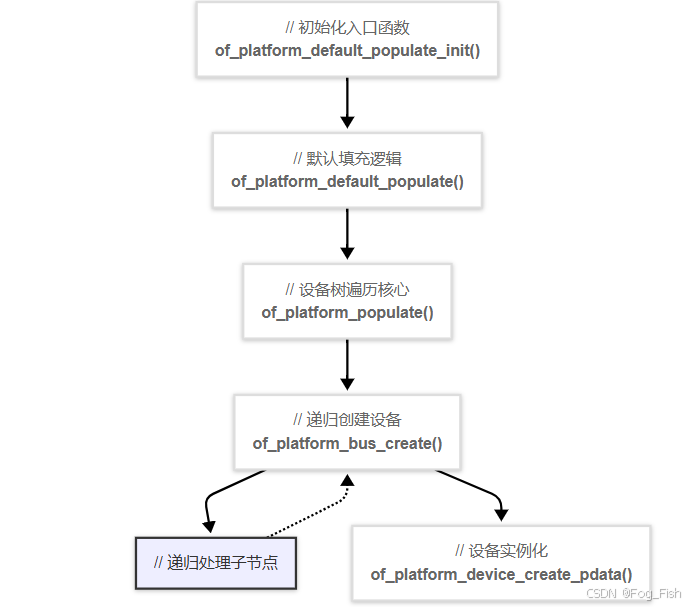
2.1.3 示例验证
-
目的
- 添加打印,查看成功创建的
platform设备 - 添加跳过条件(如
compatible = "rockchip,rk3568-i2s-tdm"),用于过滤不想创建platform_device的device_node
- 添加打印,查看成功创建的
-
修改
--- a/drivers/of/platform.c +++ b/drivers/of/platform.c @@ -35,6 +35,7 @@ const struct of_device_id of_default_bus_match_table[] = { static const struct of_device_id of_skipped_node_table[] = { { .compatible = "operating-points-v2", }, + { .compatible = "rockchip,rk3568-i2s-tdm",}, //添加跳过条件 {} /* Empty terminated list */ }; @@ -198,6 +199,7 @@ static struct platform_device *of_platform_device_create_pdata( platform_device_put(dev); goto err_clear_flag; } + pr_info("create plateform_device[%s] success\n", dev_name(&dev->dev)); //打印成功转换成platform_device的platform_device——>device.name return dev; -
现象
-
/sys/devices/platform路径下打印
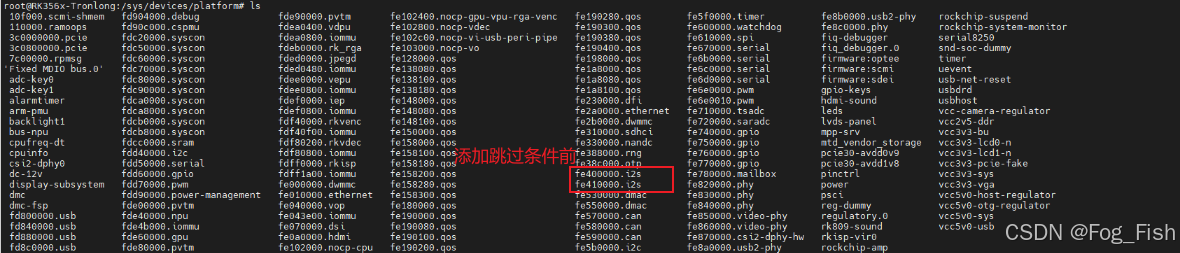

-
添加的内核打印
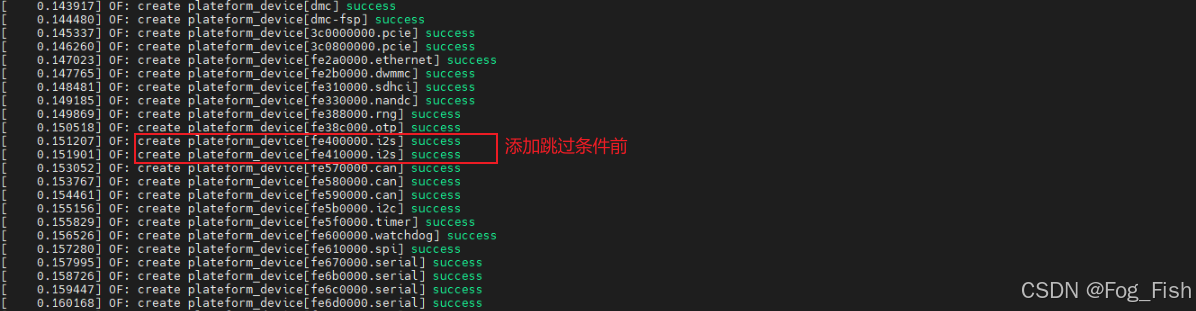
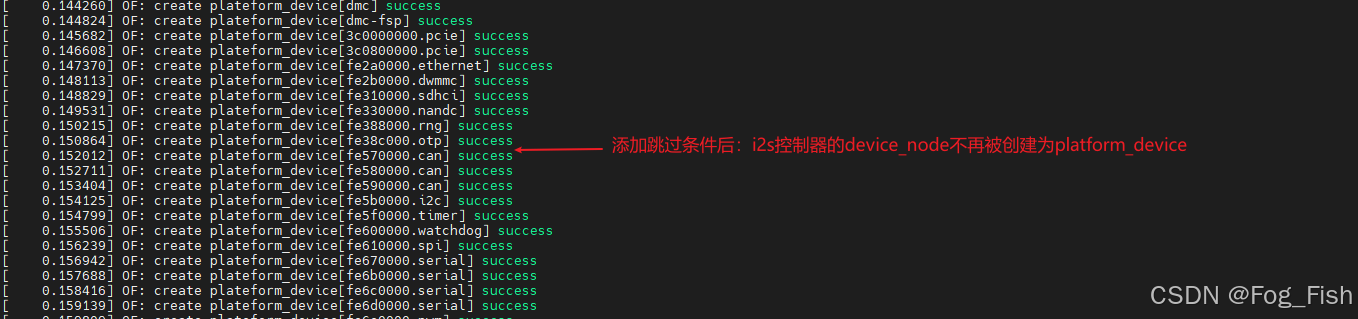
-
2.2 device_node 转换为总线挂载设备(如i2c_device)
通过platform总线设备 & 驱动匹配[^17]部分学习,可知后续内核中会执行如下操作
-
platform_device与platform_driver会通过第二优先级匹配[^21]规则匹配,并执行对应的probe函数 -
以
i2c控制器执行对应的probe函数为例,会调用关键函数i2c_add_adapter注册适配器,进一步解析设备树中该控制器节点下的子节点(挂载外设) -
其余总线、设备下的子节点在对应
probe函数中执行“2”中类似操作,直到所有platform_device都执行完成
2.2.1 关键函数调用链
rk3x_i2c_probe()
|
└─i2c_add_adapter()		//声明一个i2c适配器,使用动态总线号
	|
	└─i2c_register_adapter()	//注册i2c适配器
		|
		└─device_register()	//创建i2c适配器设备节点,如“devices/platform/fe5b0000.i2c/”路径下的“i2c-2”
		|
		└─of_i2c_register_devices(adap)		//通过“adap->dev->node”获取设备树节点,for_each_child_of_node遍历控制器节点的所有子节点
			|
			└─of_i2c_register_device(adap, node)		//为每个子节点创建“i2c_client”
				|
				└─of_i2c_get_board_info()		//获取子节点属性
				|
				└─i2c_new_device()		//创建子节点设备,如如“devices/platform/fe5b0000.i2c/i2c-2”路径下的“2-005d”,即gt911外设
					|
					└─device_register()		//实例化device设备
2.2.2 转换流程代码解析
-
i2c_add_adapter函数/*----- driver/i2c/i2c-core-base.c -----*/ /** * i2c_add_adapter - declare i2c adapter, use dynamic bus number * @adapter: the adapter to add * Context: can sleep * * This routine is used to declare an I2C adapter when its bus number * doesn't matter or when its bus number is specified by an dt alias. * Examples of bases when the bus number doesn't matter: I2C adapters * dynamically added by USB links or PCI plugin cards. * * When this returns zero, a new bus number was allocated and stored * in adap->nr, and the specified adapter became available for clients. * Otherwise, a negative errno value is returned. */ /** * i2c_add_adapter - 向内核注册一个I2C适配器(总线控制器),支持动态分配总线编号或使用设备树别名 * @adapter: 要注册的I2C适配器结构体指针 * Context: 可睡眠(可能因内存分配或互斥锁休眠) * * 此函数用于在以下场景注册I2C适配器: * 1. 总线编号不重要(例如动态添加的USB或PCIe适配器) * 2. 总线编号由设备树别名(如i2c0, i2c1)指定 * * 成功时返回0,适配器编号存储在adap->nr中,适配器可供客户端设备使用; * 失败时返回负的错误码。 */ int i2c_add_adapter(struct i2c_adapter *adapter) { struct device *dev = &adapter->dev; int id; /* 设备树优先;尝试从别名节点下获取总线编号 */ if (dev->of_node) { /* 解析设备树中的i2c别名 */ id = of_alias_get_id(dev->of_node, "i2c"); if (id >= 0) { adapter->nr = id; //使用设备树指定的编号 return __i2c_add_numbered_adapter(adapter); //注册带固定编号的适配器 } } /* 动态分配总线编号 */ mutex_lock(&core_lock); //保护IDR分配操作的原子性 /* 从IDR分配器中动态分配ID,起始于第一个动态编号(避免于静态编号冲突) */ id = idr_alloc(&i2c_adapter_idr, adapter, __i2c_first_dynamic_bus_num, 0, GFP_KERNEL); mutex_unlock(&core_lock); //解锁 /* 分配失败 */ if (WARN(id < 0, "couldn't get idr")) return id; adapter->nr = id; //存储动态分配的编号 /* 执行适配器注册的核心逻辑 */ return i2c_register_adapter(adapter); } EXPORT_SYMBOL(i2c_add_adapter); -
i2c_register_adapter 函数/*----- driver/i2c/i2c-core-of.c -----*/ static int i2c_register_adapter(struct i2c_adapter *adap) { int res = -EINVAL; /* Can't register until after driver model init */ /* 检查驱动模型是否已初始化 */ if (WARN_ON(!is_registered)) { res = -EAGAIN; goto out_list; } /* Sanity checks */ /* 健全性检查 */ if (WARN(!adap->name[0], "i2c adapter has no name")) goto out_list; if (!adap->algo) { pr_err("adapter '%s': no algo supplied!\n", adap->name); goto out_list; } /* 初始化同步锁和同步机制 */ if (!adap->lock_ops) adap->lock_ops = &i2c_adapter_lock_ops; rt_mutex_init(&adap->bus_lock); // 实时互斥锁保护总线操作 rt_mutex_init(&adap->mux_lock); // 多路复用器锁 mutex_init(&adap->userspace_clients_lock); // 用户空间客户端锁 INIT_LIST_HEAD(&adap->userspace_clients); // 初始化用户空间客户端链表 /* Set default timeout to 1 second if not already set */ /* 设置默认超时时间 */ if (adap->timeout == 0) adap->timeout = HZ; /* register soft irqs for Host Notify */ /* 注册Host Notify软中断 */ res = i2c_setup_host_notify_irq_domain(adap); if (res) { pr_err("adapter '%s': can't create Host Notify IRQs (%d)\n", adap->name, res); goto out_list; } /* 创建设备节点并注册到sysfs */ dev_set_name(&adap->dev, "i2c-%d", adap->nr); //设备名如i2c-2 adap->dev.bus = &i2c_bus_type; //绑定到i2c总线 adap->dev.type = &i2c_adapter_type; //设备类型为i2c适配器 res = device_register(&adap->dev); //注册设备 if (res) { pr_err("adapter '%s': can't register device (%d)\n", adap->name, res); goto out_list; } /* 配置SMBUS警报(设备树) */ res = of_i2c_setup_smbus_alert(adap); if (res) goto out_reg; dev_dbg(&adap->dev, "adapter [%s] registered\n", adap->name); /* 电源管理配置 */ pm_runtime_no_callbacks(&adap->dev); pm_suspend_ignore_children(&adap->dev, true); pm_runtime_enable(&adap->dev); /* 兼容性支持(旧版sysfs路径) */ #ifdef CONFIG_I2C_COMPAT res = class_compat_create_link(i2c_adapter_compat_class, &adap->dev, adap->dev.parent); if (res) dev_warn(&adap->dev, "Failed to create compatibility class link\n"); #endif /* 初始化恢复机制(如总线错误恢复) */ i2c_init_recovery(adap); /* create pre-declared device nodes */ /* 注册设备树的子设备 */ of_i2c_register_devices(adap); // 遍历设备树子节点,注册i2c_client /* 12. 处理ACPI设备 */ i2c_acpi_install_space_handler(adap); // 安装ACPI空间句柄 i2c_acpi_register_devices(adap); //注册ACPI描述的I2C设备 /* 扫描静态板级信息(非设备树平台) */ if (adap->nr < __i2c_first_dynamic_bus_num) i2c_scan_static_board_info(adap); /* Notify drivers */ /* 通知驱动新适配器已注册 */ mutex_lock(&core_lock); bus_for_each_drv(&i2c_bus_type, NULL, adap, __process_new_adapter); mutex_unlock(&core_lock); return 0; /* 错误处理 */ out_reg: init_completion(&adap->dev_released); device_unregister(&adap->dev); wait_for_completion(&adap->dev_released); out_list: mutex_lock(&core_lock); idr_remove(&i2c_adapter_idr, adap->nr); mutex_unlock(&core_lock); return res; } -
of_i2c_register_devices函数/*----- driver/i2c/i2c-core-of.c -----*/ void of_i2c_register_devices(struct i2c_adapter *adap) { struct device_node *bus, *node; struct i2c_client *client; /* Only register child devices if the adapter has a node pointer set */ /* 检查适配器是否有device_node,即有设备树节点 */ if (!adap->dev.of_node) return; dev_dbg(&adap->dev, "of_i2c: walking child nodes\n"); /* 查找适配器下的“i2c_bus”子节点 */ bus = of_get_child_by_name(adap->dev.of_node, "i2c-bus"); /* 若无“i2c_bus”子节点,直接使用适配器节点作为总线父节点 */ if (!bus) bus = of_node_get(adap->dev.of_node); /* 遍历所有可用的子节点 */ for_each_available_child_of_node(bus, node) { /* 检查节点是否已被处理(防止重复注册) */ if (of_node_test_and_set_flag(node, OF_POPULATED)) continue; /* 注册单个设备树节点对应的I2C设备 */ client = of_i2c_register_device(adap, node); /* 失败处理 */ if (IS_ERR(client)) { dev_err(&adap->dev, "Failed to create I2C device for %pOF\n", node); of_node_clear_flag(node, OF_POPULATED); } } /* 释放节点引用计数 */ of_node_put(bus); } -
of_i2c_register_device函数/*----- driver/i2c/i2c-core-of.c -----*/ static struct i2c_client *of_i2c_register_device(struct i2c_adapter *adap, struct device_node *node) { struct i2c_client *client; struct i2c_board_info info; int ret; dev_dbg(&adap->dev, "of_i2c: register %pOF\n", node); /* 获取子节点属性(获取i2c地址、phandle属性,并通过链接device_node内存储的属性) */ ret = of_i2c_get_board_info(&adap->dev, node, &info); if (ret) return ERR_PTR(ret); client = i2c_new_device(adap, &info); //创建子节点设备 if (!client) { dev_err(&adap->dev, "of_i2c: Failure registering %pOF\n", node); return ERR_PTR(-EINVAL); } return client; } -
i2c_new_device函数/* driver/i2c/i2c-core-base.c */ /** * i2c_new_device - instantiate an i2c device * @adap: the adapter managing the device * @info: describes one I2C device; bus_num is ignored * Context: can sleep * * Create an i2c device. Binding is handled through driver model * probe()/remove() methods. A driver may be bound to this device when we * return from this function, or any later moment (e.g. maybe hotplugging will * load the driver module). This call is not appropriate for use by mainboard * initialization logic, which usually runs during an arch_initcall() long * before any i2c_adapter could exist. * * This returns the new i2c client, which may be saved for later use with * i2c_unregister_device(); or NULL to indicate an error. */ /** * i2c_new_device - 实例化一个I2C设备客户端 * @adap: 管理该设备的I2C适配器 * @info: 描述I2C设备的结构体(bus_num被忽略) * Context: 可睡眠 * * 该函数创建一个I2C设备客户端,绑定通过驱动模型的probe()/remove()方法完成。 * 可能在函数返回时已有驱动绑定,或在后续时刻绑定(如热插拔加载驱动模块)。 * 注意:不适用于主板初始化逻辑(此时i2c_adapter可能尚未存在)。 * * 成功返回新i2c_client指针,失败返回NULL。 */ struct i2c_client * i2c_new_device(struct i2c_adapter *adap, struct i2c_board_info const *info) { struct i2c_client *client; int status; client = kzalloc(sizeof *client, GFP_KERNEL); //分配内存 if (!client) return NULL; /* 基础属性初始化 */ client->adapter = adap; //绑定适配器 client->dev.platform_data = info->platform_data; //平台特定数据 client->flags = info->flags; //设备标志(如10位/7位地址等配置) client->addr = info->addr; //I2C设备地址 /* 中断号处理 */ client->init_irq = info->irq; //直接指定的IRQ if (!client->init_irq) //未指定,从资源中解析 client->init_irq = i2c_dev_irq_from_resources(info->resources, info->num_resources); client->irq = client->init_irq; /* 设备命名 */ strlcpy(client->name, info->type, sizeof(client->name)); /* 地址有效性检查 */ status = i2c_check_addr_validity(client->addr, client->flags); if (status) { dev_err(&adap->dev, "Invalid %d-bit I2C address 0x%02hx\n", client->flags & I2C_CLIENT_TEN ? 10 : 7, client->addr); goto out_err_silent; } /* Check for address business */ /* 地址冲突检查 */ status = i2c_check_addr_ex(adap, i2c_encode_flags_to_addr(client)); if (status) dev_err(&adap->dev, "%d i2c clients have been registered at 0x%02x", status, client->addr); /* 设备模型设置 */ client->dev.parent = &client->adapter->dev; //父设备为适配器 client->dev.bus = &i2c_bus_type; //绑定I2C总线类型 client->dev.type = &i2c_client_type; //设备类型为I2C Client client->dev.of_node = of_node_get(info->of_node); //设备树节点引用 client->dev.fwnode = info->fwnode; //固件节点(ACPI等) /* 生成设备名称(如i2c2-005d) */ i2c_dev_set_name(adap, client, info, status); /* 填充设备属性 */ if (info->properties) { status = device_add_properties(&client->dev, info->properties); if (status) { dev_err(&adap->dev, "Failed to add properties to client %s: %d\n", client->name, status); goto out_err_put_of_node; } } /* 注册设备到内核 */ status = device_register(&client->dev); if (status) goto out_free_props; dev_dbg(&adap->dev, "client [%s] registered with bus id %s\n", client->name, dev_name(&client->dev)); return client; /* 错误处理 */ out_free_props: if (info->properties) device_remove_properties(&client->dev); out_err_put_of_node: of_node_put(info->of_node); out_err_silent: kfree(client); return NULL; } EXPORT_SYMBOL_GPL(i2c_new_device);
2.2.3 示例验证
-
目的
添加打印,查看成功创建的i2c_adapter和i2c_client设备 -
修改
--- a/drivers/i2c/i2c-core-base.c +++ b/drivers/i2c/i2c-core-base.c @@ -805,6 +805,8 @@ i2c_new_device(struct i2c_adapter *adap, struct i2c_board_info const *info) status = device_register(&client->dev); if (status) goto out_free_props; + else + pr_info("I2c Client[%s] registered with bus id:%s\n", client->name, dev_name(&client->dev)); //添加I2C Client设备注册成功打印 dev_dbg(&adap->dev, "client [%s] registered with bus id %s\n", client->name, dev_name(&client->dev)); @@ -1277,6 +1279,8 @@ static int i2c_register_adapter(struct i2c_adapter *adap) pr_err("adapter '%s': can't register device (%d)\n", adap->name, res); goto out_list; } + else + pr_info("I2c Adapter[%s] register device Success\n", adap->name); //添加I2C Client设备注册成功打印 res = of_i2c_setup_smbus_alert(adap); if (res) -
现象


openvela 操作系统专为 AIoT 领域量身定制,以轻量化、标准兼容、安全性和高度可扩展性为核心特点。openvela 以其卓越的技术优势,已成为众多物联网设备和 AI 硬件的技术首选,涵盖了智能手表、运动手环、智能音箱、耳机、智能家居设备以及机器人等多个领域。
更多推荐



 15
15 0
0- 0


 已为社区贡献1条内容

所有评论(0)