
openvela Input 驱动开发指南
一、概述
本文档旨在为嵌入式开发者提供在 openvela 平台上开发输入 (Input) 设备驱动的详细指南。
openvela 的 Input 驱动框架遵循 NuttX 的标准分层模型,为触摸屏 (Touchscreen)、键盘 (Keyboard)、鼠标 (Mouse) 等各类输入设备提供了统一的软件架构。该框架的核心目标是将硬件相关的底层实现与上层应用逻辑解耦,从而提高驱动的可移植性和复用性。
二、架构解析
输入设备驱动(Input Driver)是连接物理输入设备与应用程序的关键组件。
Input 驱动框架采用经典的上半层 (Upper Half) 与下半层 (Lower Half) 分层设计。绝大部分触控芯片都是使用 I2C 接口接入主控芯片的,这部分被放进 Lower Half 层中。
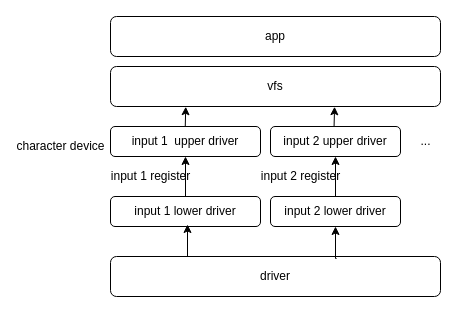
上半层 (Upper Half)
上半层是面向操作系统内核和应用程序的通用接口层,它负责处理与具体硬件无关的逻辑。其主要职责包括:
-
提供标准设备接口:通过在 drivers/input/ 目录下创建字符设备 (例如 /dev/input0),为应用程序提供标准的 open, read, ioctl 等文件操作接口:
// 文件路径:drivers/input/touchscreen_upper.c static const struct file_operations g_touch_fops = { touch_open, /* open */ touch_close, /* close */ touch_read, /* read */ touch_write, /* write */ NULL, /* seek */ touch_ioctl, /* ioctl */ NULL, /* mmap */ NULL, /* truncate */ touch_poll /* poll */ }; -
管理下半层驱动:提供注册 (touch_register) 和注销 (touch_unregister) 接口,用于挂载或卸载特定硬件的下半层驱动:
int touch_register(FAR struct touch_lowerhalf_s *lower, FAR const char *path, uint8_t nums) void touch_unregister(FAR struct touch_lowerhalf_s *lower, FAR const char *path) -
缓冲事件数据:提供事件上报接口 (touch_event),接收来自下半层的输入数据,并将其存入环形缓冲区 (Circular Buffer),供上层应用读取:
// 将touch 事件写入到一个 circle buffer 中
void touch_event(FAR void *priv, FAR const struct touch_sample_s *sample)
下半层 (Lower Half)
下半层是驱动的核心实现部分,直接与输入设备硬件交互。驱动开发者主要的工作都集中在这一层。其职责包括:
- 硬件初始化:配置芯片寄存器,设置中断模式、通信接口 (如 I2C/SPI) 等。
- 中断处理:响应硬件中断,并从设备读取原始输入数据。
- 事件上报:将解析后的标准化输入事件通过上半层提供的接口上报。
三、核心 API 与数据结构
为了实现上下半层的通信,框架定义了一系列标准化的数据结构和接口函数。
1、关键数据结构
这些结构体用于描述触摸事件的标准化格式。
-
struct touch_point_s: 描述一个独立的触摸点信息。
#define TOUCH_DOWN (1 << 0) /* A new touch contact is established */ #define TOUCH_MOVE (1 << 1) /* Movement occurred with previously reported contact */ #define TOUCH_UP (1 << 2) /* The touch contact was lost */ #define TOUCH_ID_VALID (1 << 3) /* Touch ID is certain */ #define TOUCH_POS_VALID (1 << 4) /* Hardware provided a valid X/Y position */ #define TOUCH_PRESSURE_VALID (1 << 5) /* Hardware provided a valid pressure */ #define TOUCH_SIZE_VALID (1 << 6) /* Hardware provided a valid H/W contact size */ #define TOUCH_GESTURE_VALID (1 << 7) /* Hardware provided a valid gesture */ struct touch_point_s { uint8_t id; /* Unique identifies contact; Same in all reports for the contact */ uint8_t flags; /* See TOUCH_* definitions above */ int16_t x; /* X coordinate of the touch point (uncalibrated) */ int16_t y; /* Y coordinate of the touch point (uncalibrated) */ int16_t h; /* Height of touch point (uncalibrated) */ int16_t w; /* Width of touch point (uncalibrated) */ uint16_t gesture; /* Gesture of touchscreen contact */ uint16_t pressure; /* Touch pressure */ uint64_t timestamp; /* Touch event time stamp, in microseconds */ }; -
struct touch_sample_s: 一次上报的完整触摸样本,可包含一个或多个触摸点。
struct touch_sample_s { int npoints; /* The number of touch points in point[] */ struct touch_point_s point[1]; /* Actual dimension is npoints */ }; #define SIZEOF_TOUCH_SAMPLE_S(n) \ (sizeof(struct touch_sample_s) + ((n) - 1) * sizeof(struct touch_point_s)) -
struct touch_lowerhalf_s: 下半层驱动的实例,封装了硬件相关的操作和属性。
struct touch_lowerhalf_s
{
  uint8_t       maxpoint;       /* Maximal point supported by the touchscreen */
  FAR void      *priv;          /* Save the upper half pointer */

  /**************************************************************************
   * Name: control
   *
   * Description:
   *   Users can use this interface to implement custom IOCTL.
   *
   * Arguments:
   *   lower   - The instance of lower half of touchscreen device.
   *   cmd     - User defined specific command.
   *   arg     - Argument of the specific command.
   *
   * Return Value:
   *   Zero(OK) on success; a negated errno value on failure.
   *   -ENOTTY - The command is not supported.
   **************************************************************************/

  CODE int (*control)(FAR struct touch_lowerhalf_s *lower,
                      int cmd, unsigned long arg);

  /**************************************************************************
   * Name: write
   *
   * Description:
   *   Users can use this interface to implement custom write.
   *
   * Arguments:
   *   lower   - The instance of lower half of touchscreen device.
   *   buffer  - User defined specific buffer.
   *   buflen  - User defined specific buffer size.
   *
   * Return Value:
   *   Number of bytes written;a negated errno value on failure.
   *
   **************************************************************************/

  CODE ssize_t (*write)(FAR struct touch_lowerhalf_s *lower,
                        FAR const char *buffer, size_t buflen);
};
2、核心函数接口
-
设备注册/注销
// 注册触摸屏下半层驱动 int touch_register(FAR struct touch_lowerhalf_s *lower, FAR const char *path, uint8_t nums) // 注销触摸屏下半层驱动 void touch_unregister(FAR struct touch_lowerhalf_s *lower, FAR const char *path); -
事件上报
// 从下半层向上半层上报一个触摸事件样本
void touch_event(FAR void *priv, FAR const struct touch_sample_s *sample);
四、驱动开发工作流
开发一个 Input 驱动通常遵循以下标准流程。
步骤 1:初始化与注册
驱动的初始化函数中,下半层驱动需要完成硬件初始化,并调用相应的注册函数将自身注册到 Input 框架中。例如,触摸屏驱动应调用 touch_register。
步骤 2:中断处理与事件采集
当硬件产生输入事件(如触摸、按键)并触发中断时,驱动的中断服务程序 (ISR) 会被调用。
注意: 中断服务程序 (ISR) 必须在禁止抢占或禁用中断的上下文中快速执行。由于上半层的 xxx_event 函数内部包含> 锁操作,可能会导致休眠,因此严禁在 ISR 中直接调用 xxx_event 函数。
正确的做法是使用工作队列 (Work Queue) 机制:
int work_queue(int qid, FAR struct work_s *work, worker_t worker,
               FAR void *arg, clock_t delay)

Arguments:
  qid    - work queue ID:use HPWORK
  work   - the work structure to queue
  worker - the work callback
  arg    - callback argument
  delay  - delay (in clock ticks) from the time queue until the worker is invoked.
           Zero means to perform the work immediately.
- qid: 工作队列 ID。对于高优先级中断,应使用 HPWORK;对于普通任务,可使用 LPWORK。
- worker: 工作队列任务的回调函数。事件的完整解析和上报应在此函数中完成。
- delay: 延迟执行的时间(单位:tick)。设置为 0 表示立即调度。
步骤 3:事件上报
在工作队列的回调函数(worker)中,驱动可以安全地执行以下操作:
- 通过 I2C/SPI 等总线从硬件读取完整的事件数据。
- 将原始数据解析并填充到标准的数据结构中(如 struct touch_sample_s)。
- 根据设备类型,调用相应的事件上报函数(如 touch_event),将事件数据发送到上半层。
五、开发者适配指南
本节将以触摸屏驱动为例,说明下半层驱动需要实现的具体接口。
1、实现下半层接口
您需要定义一个 struct touch_lowerhalf_s 类型的静态实例,并根据硬件能力填充其成员:
- maxpoint: 必须准确设置为硬件支持的最大并发触摸点数。此值直接影响上半层为环形缓冲区分配的内存大小。
- control, write: 如果需要支持自定义的 ioctl 或 write 操作,请实现这两个函数指针;否则,将其设置为 NULL。
2、注册 Input 设备
在驱动初始化时,调用 touch_register 函数。
int touch_register(FAR struct touch_lowerhalf_s *lower,
                   FAR const char *path, uint8_t nums)

Arguments:
  lower     - A pointer of lower half instance.
  path      - The path of touchscreen device. such as "/dev/input0"
  nums      - Number of the touch points structure, used to calculate circbuf size
- lower: 指向您实现的 touch_lowerhalf_s 实例的指针。
- path: 设备节点路径,例如 /dev/input0。
-
nums: 用于计算环形缓冲区大小的样本数量。它与 lower->maxpoint 共同决定了缓冲区总容量。计算公式如下:
circbuf_size = nums * SIZEOF_TOUCH_SAMPLE_S(lower->maxpoint)
3、传输 Input 事件
在工作队列的回调函数中,调用 touch_event 函数上报数据。
void touch_event(FAR void *priv, FAR const struct touch_sample_s *sample);

Arguments:
  priv    - Upper half driver handle.
  sample  - pointer to data of touch point event.
- priv: 上半层驱动的句柄。该值在 touch_register 成功后,由上半层回填到 lower->priv 成员中。
- sample: 指向已填充好数据的 touch_sample_s 结构体指针。请确保 sample->npoints 的值准确反映了 sample->point 数组中的有效数据点数量。
六、构建与验证
1、构建配置
在 menuconfig 中启用相应类型的 Input 驱动框架支持。
# 使能 touch 驱动
CONFIG_INPUT_TOUCHSCREEN=y

# 使能 keyboard 驱动
CONFIG_INPUT_KEYBOARD=y

# 使能 mouse 驱动
CONFIG_INPUT_MOUSE=y
同时,您还需要在 menuconfig 中选中您自己开发的下半层驱动。
2、功能验证
要验证驱动的正确性,您可以参考 getevent 工具使用指南等标准测试工具读取设备节点,并观察输出的事件信息是否与硬件的实际操作一致。
将 getevent 工具输出的事件序列与硬件行为进行对比,可以有效调试坐标、按键值、事件标志等是否正确。
七、代码示例
您可以参考 goldfish_events.c 驱动,它为 Goldfish 模拟器实现了一套完整的 Input 事件处理,是一个很好的学习范例。
- 代码路径: nuttx/drivers/input/goldfish_events.c

openvela 操作系统专为 AIoT 领域量身定制,以轻量化、标准兼容、安全性和高度可扩展性为核心特点。openvela 以其卓越的技术优势,已成为众多物联网设备和 AI 硬件的技术首选,涵盖了智能手表、运动手环、智能音箱、耳机、智能家居设备以及机器人等多个领域。
更多推荐


 0
0 0
0- 0



 已为社区贡献185条内容

所有评论(0)