
在飞腾E2000Q开发板上,基于RT-Thread操作系统,实现DeepSeek语音交互
目录
一 ,简介
DeepSeek是由深度求索团队开发的大语言模型,本实验将基于DeepSeek-R1模型。结合百度AI语音识别,在嵌入式设备上实现实时聊天功能。
- 使用Rt-Thread的Phytium E2000Q demo开发板
- 插入SD卡,挂载RT-Thread DFS-V2 elm FatFs文件系统
- 安装Rt-Thread支持的webclient,mbedtls,cJSON,llm-chat软件包
- 使用Audio组件,实现实时录音功能,将录音内容以PCM格式存入文件系统
- 使用webclient将PCM文件上传到百度语音识别AI服务端,识别后返回Json
- 将识别内容通过Webclient + mbedtls 上传至Deep-Seek服务端,使用llm-chat + cJson分析返回内容,在输出界面上实时打印返回内容。
二 ,流程与结果分享
1. Phytium E2000q demo开发板连接
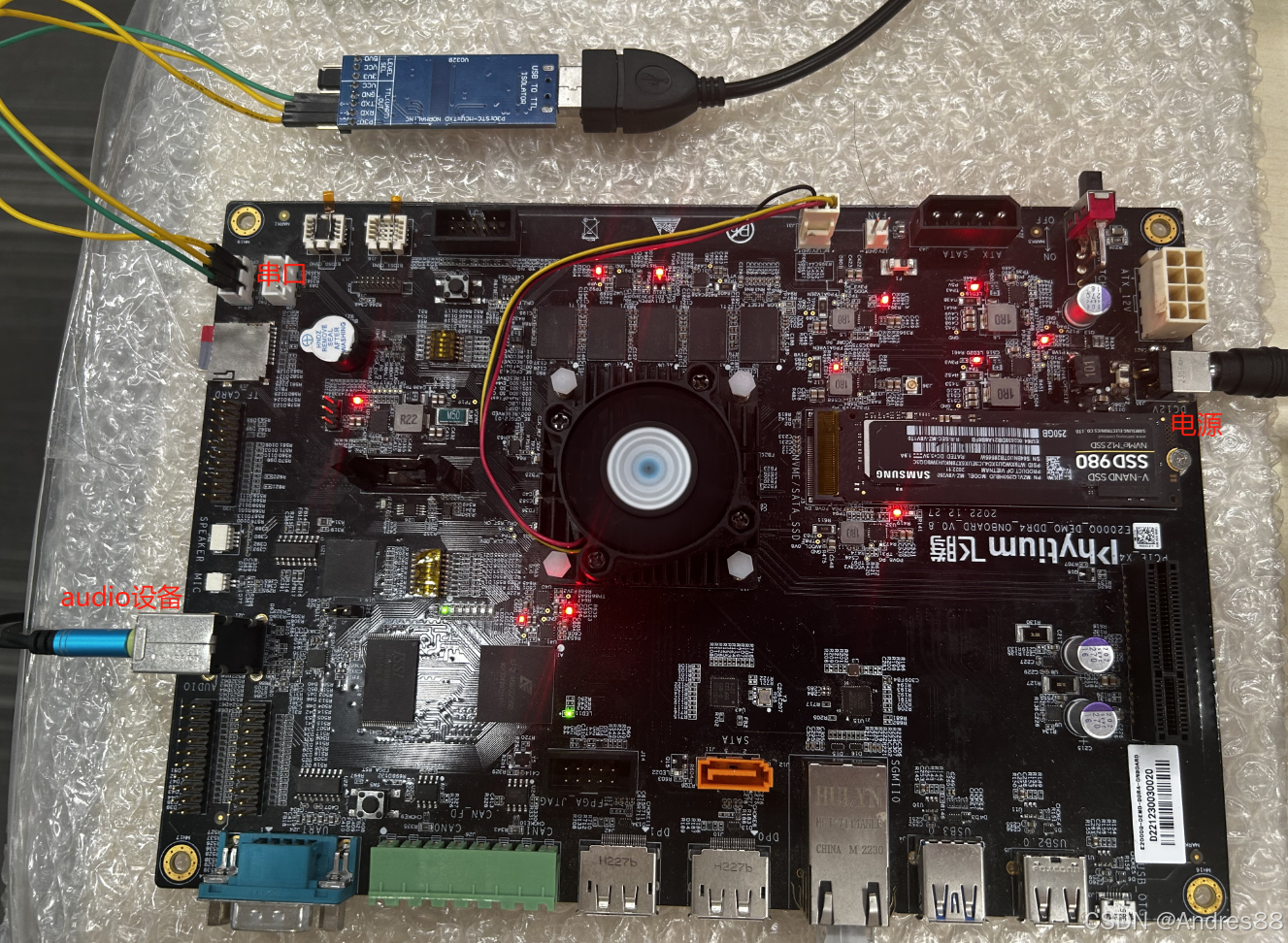
按照官方指南,搭载RT-Thread运行环境
2. RT-Thread Kconfig 配置选择
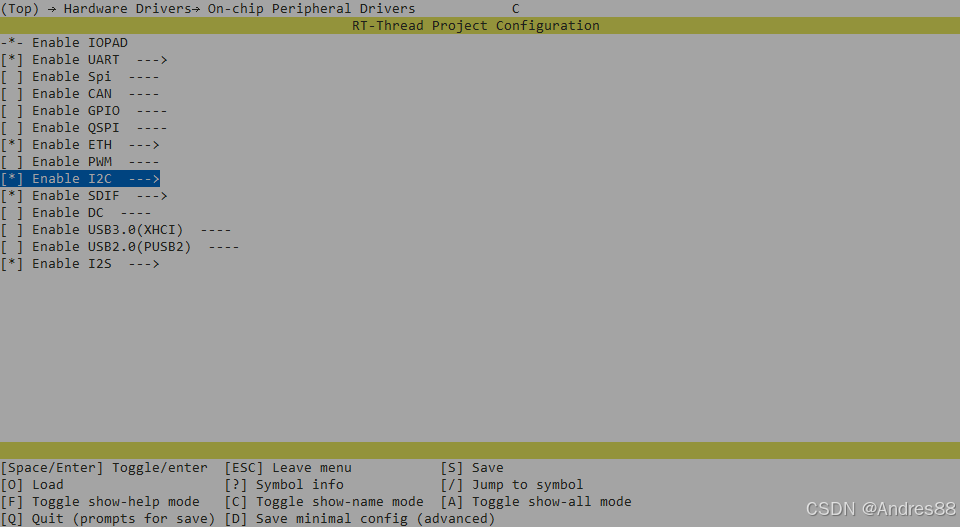
(1)驱动
E2000Q demo自带的ES8336驱动需要I2C支持,I2C设备也需要勾选
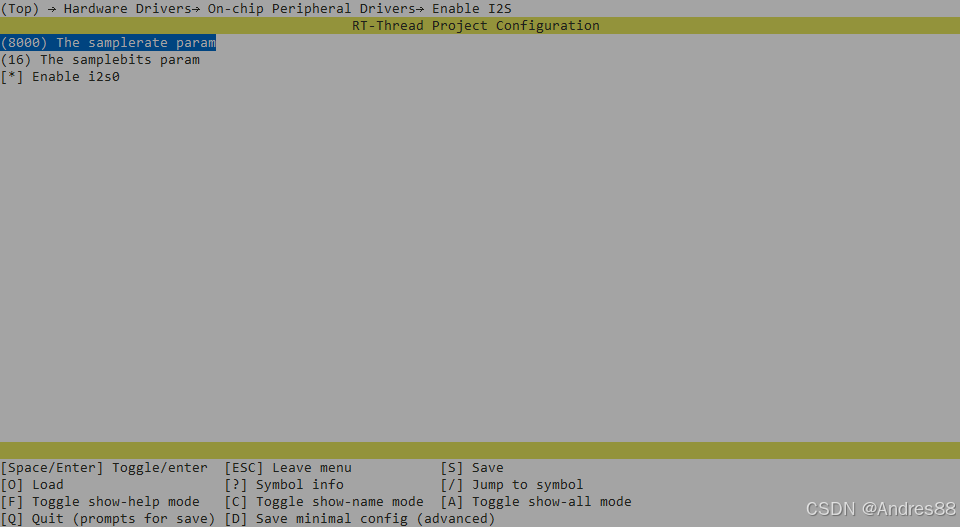
 勾选I2S设备,并按下图配置采样率和采样位数
(2)软件包
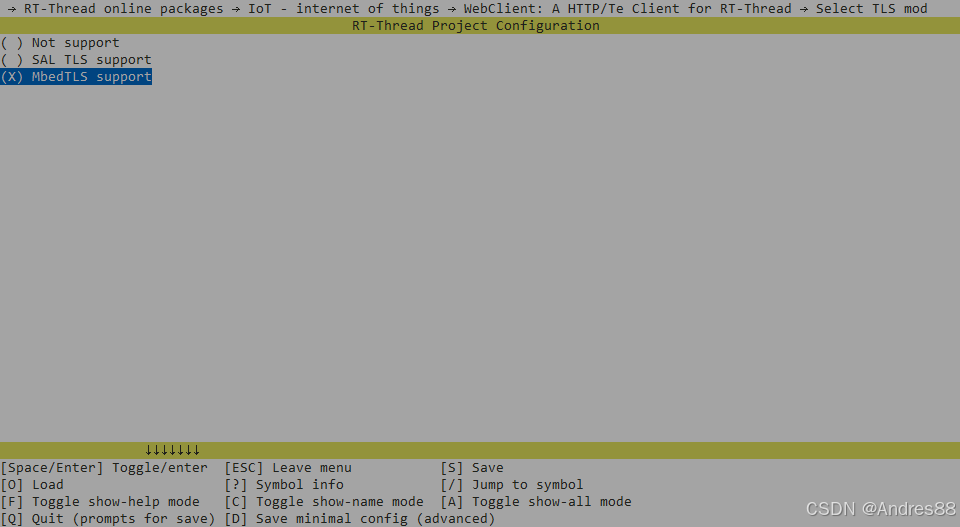
WebClient,并支持MbedTLS
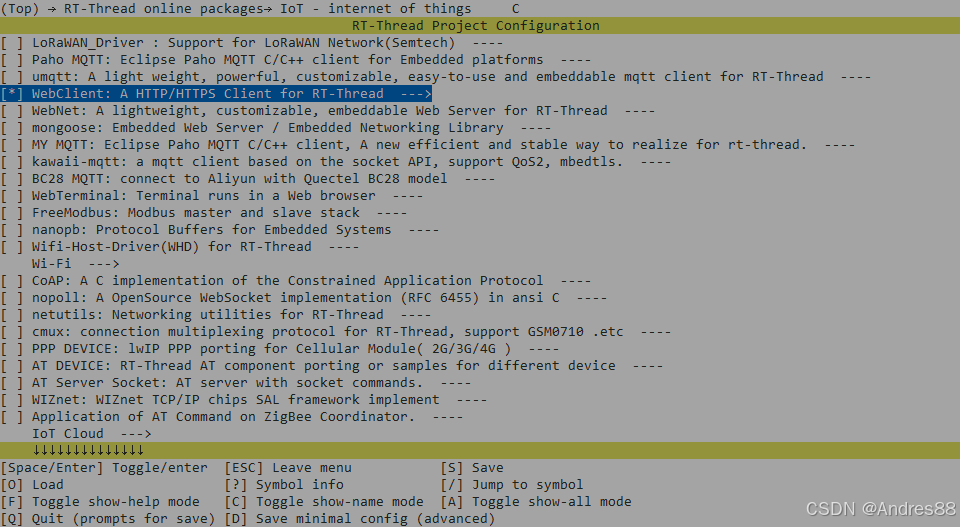
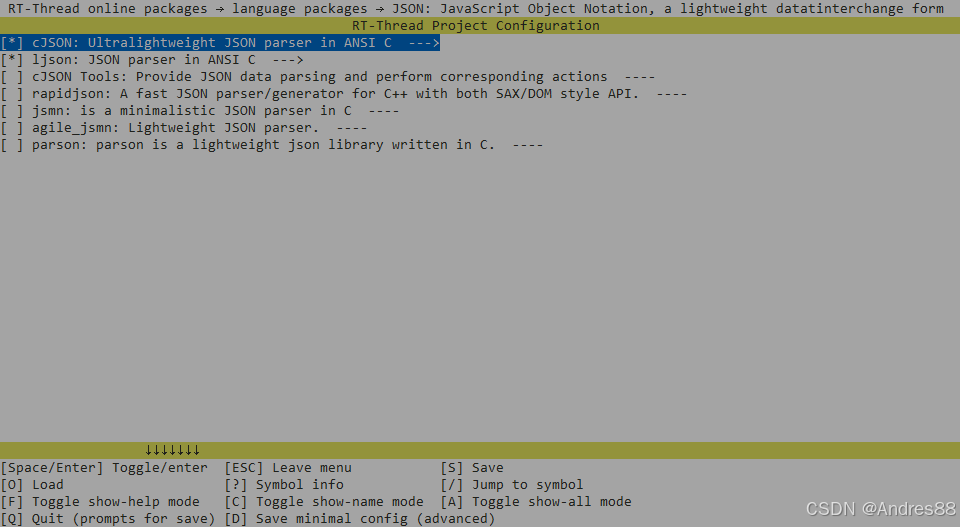
cJSON支持,用于分析返回json
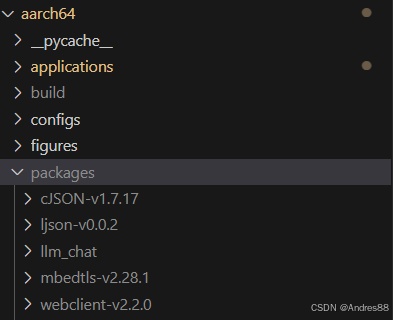
llm 用于创建与DeepSeek的连接,若无配置选项,可下载后放置于bsp\phytium\aarch64\packages下,开源仓库:https://github.com/Rbb666/llm_chat
3. 主要代码
(1)录音功能,将录音结果保存为PCM文件
/* pcm_record.c */
#include <rtthread.h>
#include <rtdevice.h>
#include <dfs_posix.h>

#define RECORD_TIME_MS      5000
#define RT_I2S_SAMPLERATE   8000
#define RECORD_CHANNEL      2
#define RECORD_CHUNK_SZ     ((RT_I2S_SAMPLERATE * RECORD_CHANNEL * 2) * 20 / 1000)

#define SOUND_DEVICE_NAME    "I2S0"      /* Audio 设备名称 */
static rt_device_t mic_dev;              /* Audio 设备句柄 */

int pcm_record()
{
    int fd = -1;
    uint8_t *buffer = NULL;
    int length, total_length = 0;

    fd = open("file.pcm", O_WRONLY | O_CREAT);
    if (fd < 0)
    {
        rt_kprintf("open file for recording failed!\n");
        return -1;
    }

    buffer = rt_malloc(RECORD_CHUNK_SZ);
    if (buffer == RT_NULL)
        goto __exit;

    mic_dev = rt_device_find(SOUND_DEVICE_NAME);
    if (mic_dev == RT_NULL)
        goto __exit;

    rt_device_open(mic_dev, RT_DEVICE_OFLAG_RDONLY);

    while (1)
    {
        length = rt_device_read(mic_dev, 0, buffer, RECORD_CHUNK_SZ);
        if (length)
        {
            write(fd, buffer, length);
            total_length += length;
        }

        if ((total_length / RECORD_CHUNK_SZ) >  (RECORD_TIME_MS / 20))
            break;
    }

    close(fd);

    rt_device_close(mic_dev);

__exit:
    if (fd >= 0)
        close(fd);

    if (buffer)
        rt_free(buffer);

    return 0;
}
MSH_CMD_EXPORT(pcm_record, record voice to a pcm file);  // 修改命令描述
(2)使用百度AI进行语音识别
使用百度语音之前,需要在百度AI官网上获取token,请按照官方教程获取百度AI开放平台-全球领先的人工智能服务平台
以短语音识别模型为例,其中get_llm_answer(item->valuestring)函数用于获取自然语言模型的输出结果并打印。
#include <rtthread.h>
#include <sys/socket.h>
#include <webclient.h>
#include <dfs_posix.h>
#include <cJSON.h>

/* 使用外设需要的头文件 */
#include <rtdevice.h>
#include <board.h>

#define RES_BUFFER_SIZE     4096        //数据接收数组大小
#define HEADER_BUFFER_SIZE      2048    //最大支持的头部长度

/* URL 请在**处自己填写主要参数cuid, token */
#define POST_FILE_URL  "http://vop.baidu.com/server_api?dev_pid=1537&cuid=**&token=**"
/*采样率与文件格式选择如下*/
char *form_data = "audio/pcm;rate=16000";
void baidu_voice_recignition()
{
    char *filename = NULL;
    unsigned char *buffer = RT_NULL;
    int content_length = -1, bytes_read = 0;
    int content_pos = 0;
    int ret = 0;

    /* 获取pcm音频文件名 */
    filename = "file.pcm";

    /* 以只读方式打开音频文件 */
    int fd = open(filename, O_RDONLY, 0);
    if(fd < 0)
    {
        rt_kprintf("open %d fail!\r\n", filename);
        goto __exit;
    }

    /* 获取pcm音频文件大小 */
    size_t length = lseek(fd, 0, SEEK_END);
    lseek(fd, 0, SEEK_SET);

    /* 创建响应数据接收数据 */
    buffer = (unsigned char *) web_malloc(RES_BUFFER_SIZE);
    if(buffer == RT_NULL)
    {
        rt_kprintf("no memory for receive response buffer.\n");
        ret = -RT_ENOMEM;
        goto __exit;
    }

    /* 创建会话 */
    struct webclient_session *session = webclient_session_create(HEADER_BUFFER_SIZE);
    if(session == RT_NULL)
    {
        ret = -RT_ENOMEM;
        goto __exit;
    }

    /* 拼接头部数据 */
    webclient_header_fields_add(session, "Content-Length: %d\r\n", length);
    webclient_header_fields_add(session, "Content-Type: %s\r\n", form_data);

    /* 发送POST请求 */
    int rc = webclient_post(session, POST_FILE_URL, NULL, 100);
    if(rc < 0)
    {
        rt_kprintf("webclient post data error!\n");
        goto __exit;
    }else if (rc == 0)
    {
        rt_kprintf("webclient connected !\n");
    }else
    {
        rt_kprintf("rc code: %d!\n", rc);
    }

    while(1)
    {
        rt_memset(buffer, 0, RES_BUFFER_SIZE);
        length = read(fd, buffer, RES_BUFFER_SIZE);
        if(length <= 0)
        {
            break;
        }
        ret = webclient_write(session, buffer, length);
        if(ret < 0)
        {
            rt_kprintf("webclient write error!\r\n");
            break;
        }
        rt_thread_mdelay(100);
    }
    close(fd);
    rt_kprintf("Please wait ... \r\n");

    if(webclient_handle_response(session) != 200)
    {
        rt_kprintf("get handle resposne error!");
        goto __exit;
    }

    /* 获取接收的响应数据长度 */
    content_length = webclient_content_length_get(session);
    rt_thread_delay(100);

    do
    {
        bytes_read = webclient_read(session, buffer, 1024);
        if (bytes_read <= 0)
        {
            break;
        }

        for(int index = 0; index < bytes_read; index++)
        {
            rt_kprintf("%c", buffer[index]);
        }

        content_pos += bytes_read;
        }while(content_pos < content_length);

    /* 解析json数据 */
    bd_data_parse(buffer);

    __exit:
                if(fd >= 0)
                    close(fd);
                if(session != NULL)
                    webclient_close(session);
                if(buffer != NULL)
                    web_free(buffer);

                return;
}

/*JSON数据分析*/
void bd_data_parse(uint8_t *data)
{
    cJSON *root = RT_NULL, *object = RT_NULL, *item =RT_NULL;

    root = cJSON_Parse((const char *)data);
    if (!root)
    {
        rt_kprintf("No memory for cJSON root!\n");
        return;
    }

    object = cJSON_GetObjectItem(root, "result");

    item = object->child;

    rt_kprintf("\nQuestion :%s \r\n", item->valuestring);

    /*获取自然语言模型输出结果并打印*/
    get_llm_answer(item->valuestring);

    if (root != RT_NULL)
        cJSON_Delete(root);
}

/*导出指令,便于阶段性测试*/
MSH_CMD_EXPORT(baidu_voice_recignition, webclient post file);
(3)将识别内容上传至DeepSeek,并显示返回打印
可以按照DeepSeek官方教程注册API_Key,但当前使用DeepSeekAPI可能会出现服务器崩溃,网络异常问题。因此建议使用火山引擎的DeepSeek模型。
创建API_Key

创建API_Key后,在在线推理栏中接入Deep-Seek模型,一般新创建的账号会提供免费的使用次数。

以上步骤Ok后,修改"llm_chat/ports/chat/port/chat_port.c"文件中的LLM_API_KEY ,LLM_API_URL, LLM_MODEL_NAME.
/*
 * Copyright (c) 2006-2025, RT-Thread Development Team
 *
 * SPDX-License-Identifier: MIT
 *
 * Change Logs:
 * Date           Author       Notes
 * 2025/02/01     Rbb666       Add license info
 * 2025/02/03     Rbb666       Unified Adaptive Interface
 * 2025/02/06     Rbb666       Add http stream support
 */
#include "llm.h"
#include "webclient.h"
#include <cJSON.h>

#define LLM_API_KEY ""
#define LLM_API_URL ""

#define LLM_MODEL_NAME ""
#define WEB_SOCKET_BUF_SIZE 80960

static char authHeader[128] = {0};
static char responseBuffer[WEB_SOCKET_BUF_SIZE] = {0};
static char contentBuffer[WEB_SOCKET_BUF_SIZE] = {0};

char *get_llm_answer(const char *inputText)
{
    struct webclient_session *webSession = NULL;
    char *allContent = NULL;
    int bytesRead, responseStatus;
    cJSON *responseRoot = NULL;

    // Create web session
    webSession = webclient_session_create(WEB_SOCKET_BUF_SIZE);
    if (webSession == NULL)
    {
        rt_kprintf("Failed to create webclient session.\n");
        goto cleanup;
    }

    // Create JSON payload
    cJSON *requestRoot = cJSON_CreateObject();
    cJSON *model = cJSON_CreateString(LLM_MODEL_NAME);
    cJSON *messages = cJSON_CreateArray();
    cJSON *systemMessage = cJSON_CreateObject();
    cJSON *userMessage = cJSON_CreateObject();

    cJSON_AddItemToObject(requestRoot, "model", model);
    cJSON_AddItemToObject(requestRoot, "messages", messages);
// #ifdef PKG_LLMCHAT_STREAM
    cJSON_AddBoolToObject(requestRoot, "stream", RT_TRUE);
// #else
    // cJSON_AddBoolToObject(requestRoot, "stream", RT_FALSE);
// #endif
    cJSON_AddItemToArray(messages, systemMessage);
    cJSON_AddItemToArray(messages, userMessage);

    cJSON_AddStringToObject(systemMessage, "role", "system");
    cJSON_AddStringToObject(systemMessage, "content", "");

    cJSON_AddStringToObject(userMessage, "role", "user");
    cJSON_AddStringToObject(userMessage, "content", inputText);

    char *payload = cJSON_PrintUnformatted(requestRoot);
    if (payload == NULL)
    {
        rt_kprintf("Failed to create JSON payload.\n");
        goto cleanup;
    }

    // Prepare authorization header
    rt_snprintf(authHeader, sizeof(authHeader), "Authorization: Bearer %s\r\n", LLM_API_KEY);

    // Add headers
    webclient_header_fields_add(webSession, "Content-Type: application/json\r\n");
    webclient_header_fields_add(webSession, authHeader);
    webclient_header_fields_add(webSession, "Content-Length: %d\r\n", rt_strlen(payload));

    // LLM_DBG("HTTP Header: %s\n", webSession->header->buffer);
    // LLM_DBG("HTTP Payload: %s\n", payload);

    // Send POST request
    responseStatus = webclient_post(webSession, LLM_API_URL, payload, rt_strlen(payload));
    if (responseStatus != 200)
    {
        rt_kprintf("Webclient POST request failed, response status: %d\n", responseStatus);
        goto cleanup;
    }

    // Read and process response
    while ((bytesRead = webclient_read(webSession, responseBuffer, WEB_SOCKET_BUF_SIZE)) > 0)
    {
        // printf("bytesRead == %d\n", bytesRead);
        int inContent = 0;
        for (int i = 0; i < bytesRead; i++)
        {
            if (inContent)
            {
                if (responseBuffer[i] == '"')
                {
                    inContent = 0;

                    // Append content to allContent
                    char *oldAllContent = allContent;
                    size_t oldLen = oldAllContent ? rt_strlen(oldAllContent) : 0;
                    size_t newLen = rt_strlen(contentBuffer);
                    size_t totalLen = oldLen + newLen + 1;

                    char *newAllContent = (char *)web_malloc(totalLen);
                    if (newAllContent)
                    {
                        newAllContent[0] = '\0';
                        if (oldAllContent)
                        {
                            rt_strcpy(newAllContent, oldAllContent);
                        }
                        strcat(newAllContent, contentBuffer);
                        allContent = newAllContent;
                        for (int i = 0; contentBuffer[i] != '\0'; i++) {
                            // 当遇到 \n 时,替换为换行符
                            if (contentBuffer[i] == '\\' && contentBuffer[i + 1] == 'n') {
                                rt_kprintf("\r\n");  // 输出真正的换行符
                                i++;  // 跳过下一个字符 'n'
                            } else {
                                rt_kprintf("%c", contentBuffer[i]);
                            }
                        }
                        rt_free(oldAllContent);
                    }
                    else
                    {
                        rt_kprintf("Memory allocation failed, content truncated!\n");
                    }

                    contentBuffer[0] = '\0'; // Reset content buffer
                }
                else
                {
                    strncat(contentBuffer, &responseBuffer[i], 1);
                }
            }
            else if (responseBuffer[i] == '"' && i > 8 &&
                     rt_strncmp(&responseBuffer[i - 10], "\"content\":\"", 10) == 0)
            {
                inContent = 1;
            }
        }
    }

    rt_kprintf("\n");

cleanup:
    // Cleanup resources
    if (webSession)
        webclient_close(webSession);

    if (requestRoot)
        cJSON_Delete(requestRoot);

    if (responseRoot)
        cJSON_Delete(responseRoot);

    if (payload)
        cJSON_free(payload);

    return allContent;
}
将之前的代码创建线程进行串联,请在合适位置执行voice_recignition()初始化线程
#include <rtthread.h>
#include <rtdevice.h>
#include <board.h>
#include <dfs_posix.h>
#include <string.h>

/* 函数声明 */
extern int pcm_record();
extern void baidu_voice_recignition();

/* 线程参数 */
#define THREAD_PRIORITY          25      //优先级
#define THREAD_STACK_SIZE        40096    //线程栈大小
#define THREAD_TIMESLICE         10      //时间片

/* 线程句柄 */
static rt_thread_t tid1 = RT_NULL;
static rt_thread_t tid2 = RT_NULL;

/* 指向信号量的指针 */
static rt_sem_t start_record_sem = RT_NULL;
static rt_sem_t voice_recignition_sem = RT_NULL;

/* 录音线程入口函数 */
static void record_entry(void *parameter)
{
    static rt_err_t result;
    while(1)
    {
        result = rt_sem_take(start_record_sem, RT_WAITING_FOREVER);
        if (result != RT_EOK)
        {
            rt_kprintf("take a dynamic semaphore, failed.\n");
            rt_sem_delete(start_record_sem);
            return;
        }
        else
        {
            rt_kprintf("take a dynamic semaphore, successfully.creat pcm file\n");
            pcm_record();         //获取到信号量,开始录音,生成pcm文件
            rt_sem_release(voice_recignition_sem);
        }
        rt_thread_mdelay(100);
    }
}

/* 语音识别线程入口函数 */
static void voice_recignition_entry(void *parameter)
{
    while (1)
    {
        if (rt_sem_take(voice_recignition_sem, RT_WAITING_FOREVER) == RT_EOK)
        {
            baidu_voice_recignition();       //收到邮件,进行语音识别
            rt_thread_mdelay(100);
        }
    }
}

/* start_record 函数 */
static void start_record(void *parameter)
{
    rt_kprintf("release a start_record_sem semaphore.\n");
    rt_sem_release(start_record_sem);
}

MSH_CMD_EXPORT(start_record, record voice to a pcm file and uplode to deepseek);

int voice_recignition(void)
{
    start_record_sem = rt_sem_create("start_record_sem", 0, RT_IPC_FLAG_FIFO);
    if (start_record_sem == RT_NULL)
    {
        rt_kprintf("create dynamic semaphore failed.\n");
        return -1;
    }

    voice_recignition_sem = rt_sem_create("voice_recignition_sem", 0, RT_IPC_FLAG_FIFO);
    if (voice_recignition_sem == RT_NULL)
    {
        rt_kprintf("create dynamic semaphore failed.\n");
        return -1;
    }

    /* 创建线程 */
        tid1 = rt_thread_create("thread1",
                            record_entry, RT_NULL,
                            THREAD_STACK_SIZE,
                            THREAD_PRIORITY, THREAD_TIMESLICE);
    if (tid1 != RT_NULL)
        rt_thread_startup(tid1);


        tid2 = rt_thread_create("thread2",
                            voice_recignition_entry, RT_NULL,
                            THREAD_STACK_SIZE,
                            THREAD_PRIORITY, THREAD_TIMESLICE);
    if (tid2 != RT_NULL)
        rt_thread_startup(tid2);

    return 0;
}
4. 结果展示
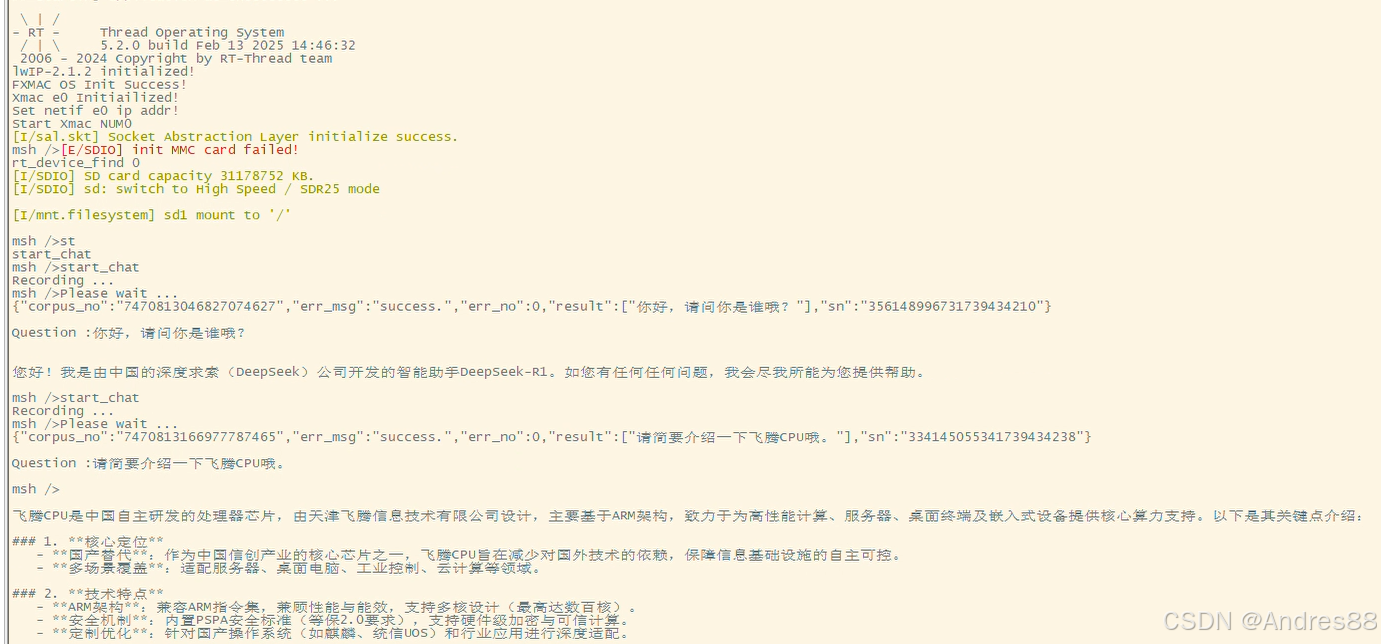
以下是语音交谈的结果
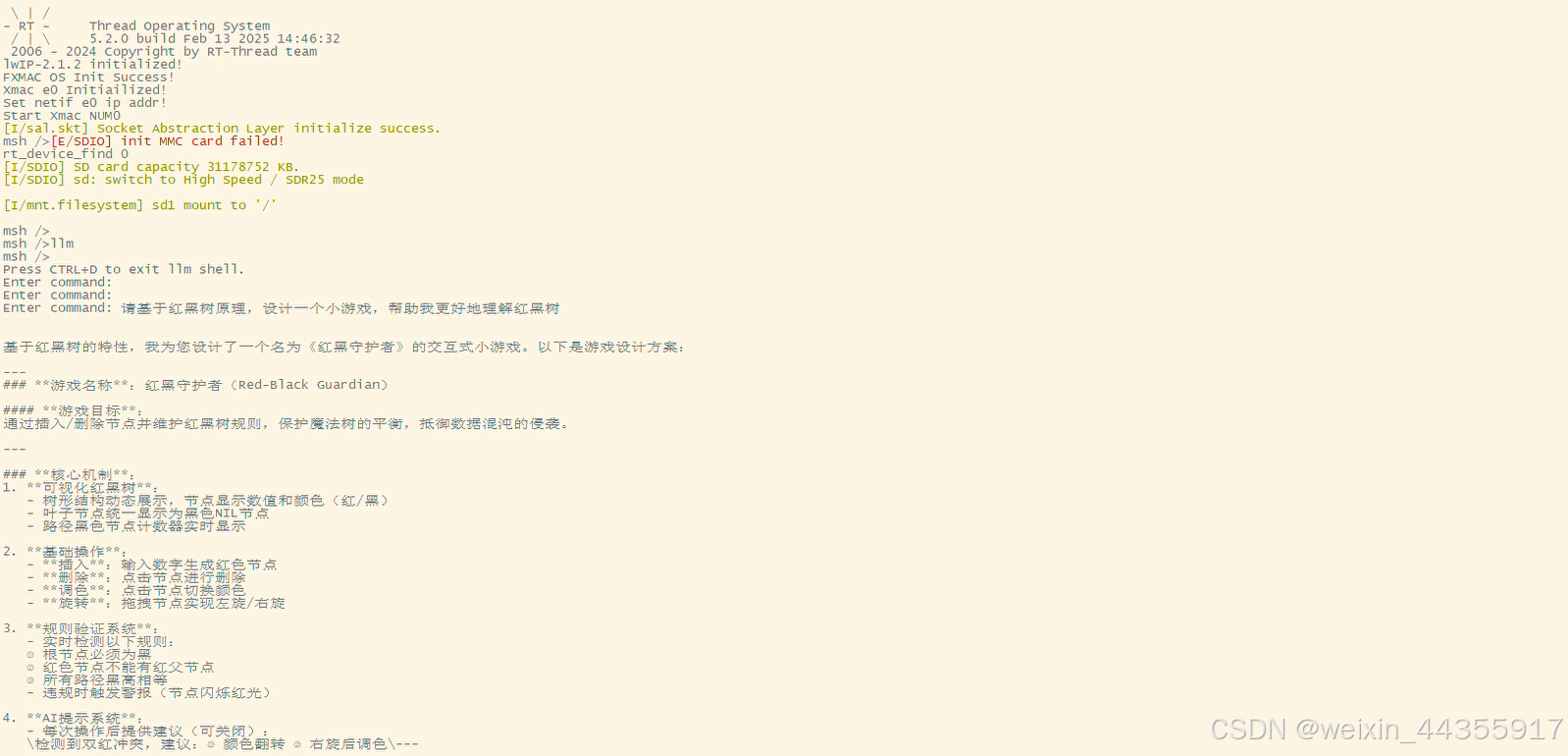
以下是直接键入汉字的交流结果
参考文章:

openvela 操作系统专为 AIoT 领域量身定制,以轻量化、标准兼容、安全性和高度可扩展性为核心特点。openvela 以其卓越的技术优势,已成为众多物联网设备和 AI 硬件的技术首选,涵盖了智能手表、运动手环、智能音箱、耳机、智能家居设备以及机器人等多个领域。
更多推荐


 39
39 0
0- 0


 已为社区贡献1条内容

所有评论(0)