
SmartCabinet:基于 Android 的智能储物柜管理系统技术解析
SmartCabinet:基于 Android 的智能储物柜管理系统技术解析
项目背景
在实验室、工厂车间、医疗机构等场景中,贵重仪器设备和工具的管理一直是个难题。传统的人工登记方式效率低下,责任追溯困难。SmartCabinet 应运而生,这是一个基于 Android 平台开发的智能储物柜管理系统,采用现代化的技术架构,为物品存取管理提供了完整的数字化解决方案。
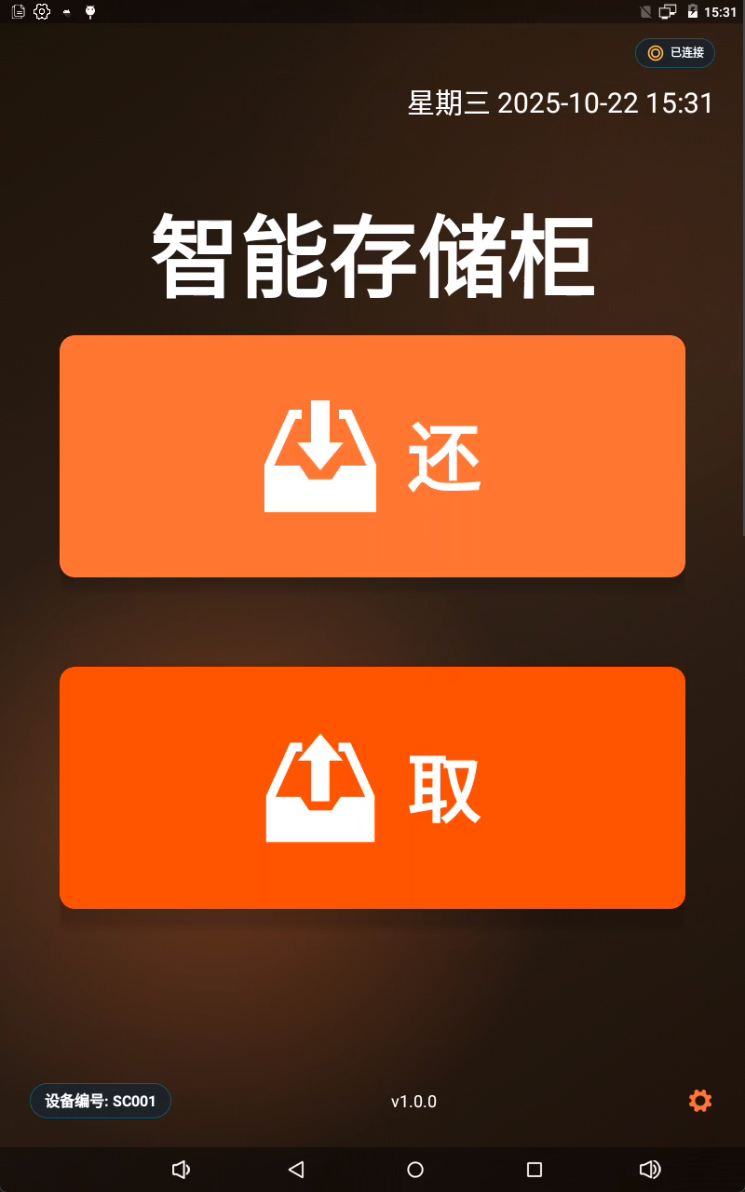
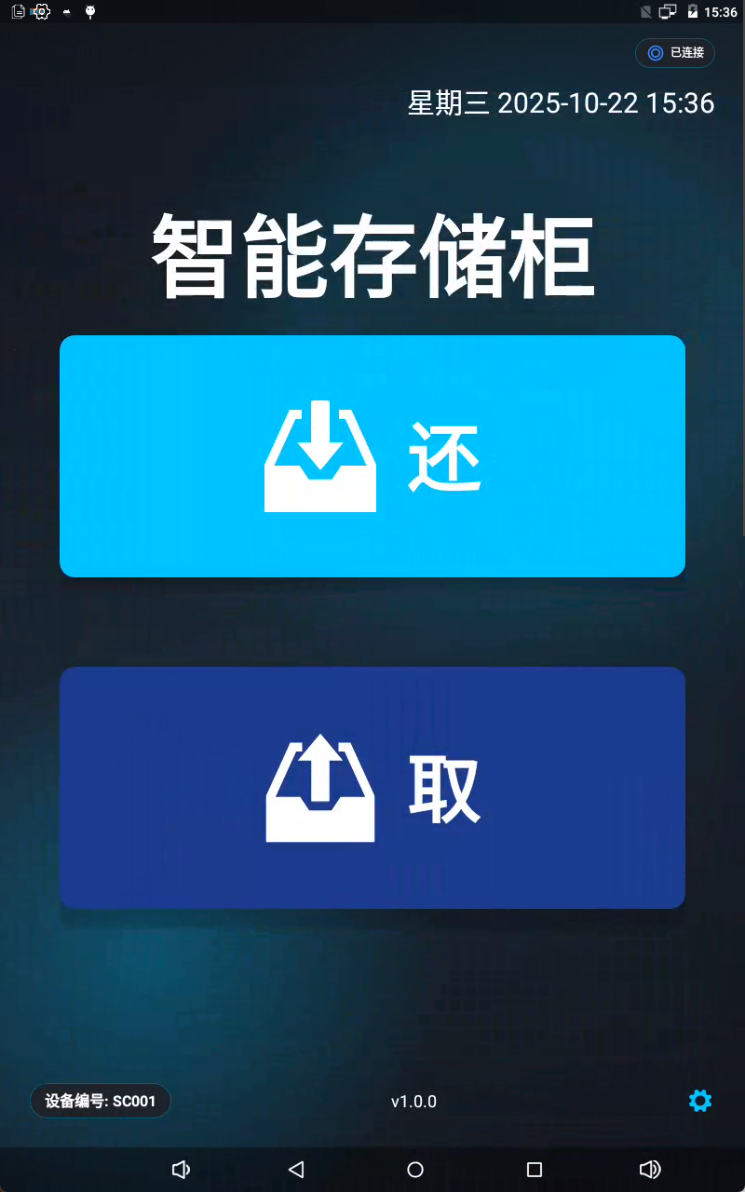
技术架构亮点
1. MVVM 架构 + Repository 模式
系统采用经典的 MVVM(Model-View-ViewModel)架构模式,配合 Repository 模式实现数据访问层抽象:
// ViewModel 层处理业务逻辑
class UserViewModel(application: Application) : AndroidViewModel(application) {
    private val repository = UserRepository(application)
    val users: LiveData<List<User>> = repository.getAllUsers()

    fun addUser(user: User) = viewModelScope.launch {
        repository.insert(user)
    }
}

// Repository 层统一数据访问
class UserRepository(context: Context) {
    private val userDao = AppDatabase.getDatabase(context).userDao()

    fun getAllUsers(): LiveData<List<User>> = userDao.getAllUsers()

    suspend fun insert(user: User) {
        userDao.insert(user)
    }
}
优势:
- 清晰的职责分离,代码可维护性强
- LiveData 实现响应式数据绑定,UI 自动更新
- 便于单元测试和功能扩展
2. 内置 Ktor HTTP 服务器
系统最大的技术亮点是在 Android 应用内嵌入了 Ktor HTTP 服务器,提供完整的 RESTful API 接口:
class KtorServer(private val context: Context) {
    private var server: ApplicationEngine? = null

    fun start(port: Int, host: String) {
        server = embeddedServer(Netty, port = port, host = host) {
            install(ContentNegotiation) {
                json(Json {
                    prettyPrint = true
                    isLenient = true
                })
            }

            install(CORS) {
                anyHost()
                allowHeader(HttpHeaders.ContentType)
            }

            routing {
                userRoutes(context)
                configurationRoutes(context)
                hardwareDeviceRoutes(context)
            }
        }.start(wait = false)
    }
}
技术特性:
- 支持动态配置端口和主机地址
- 自动重启机制,配置变更立即生效
- CORS 跨域支持,便于前端集成
- 标准 JSON 数据交换格式
3. 多重身份认证系统
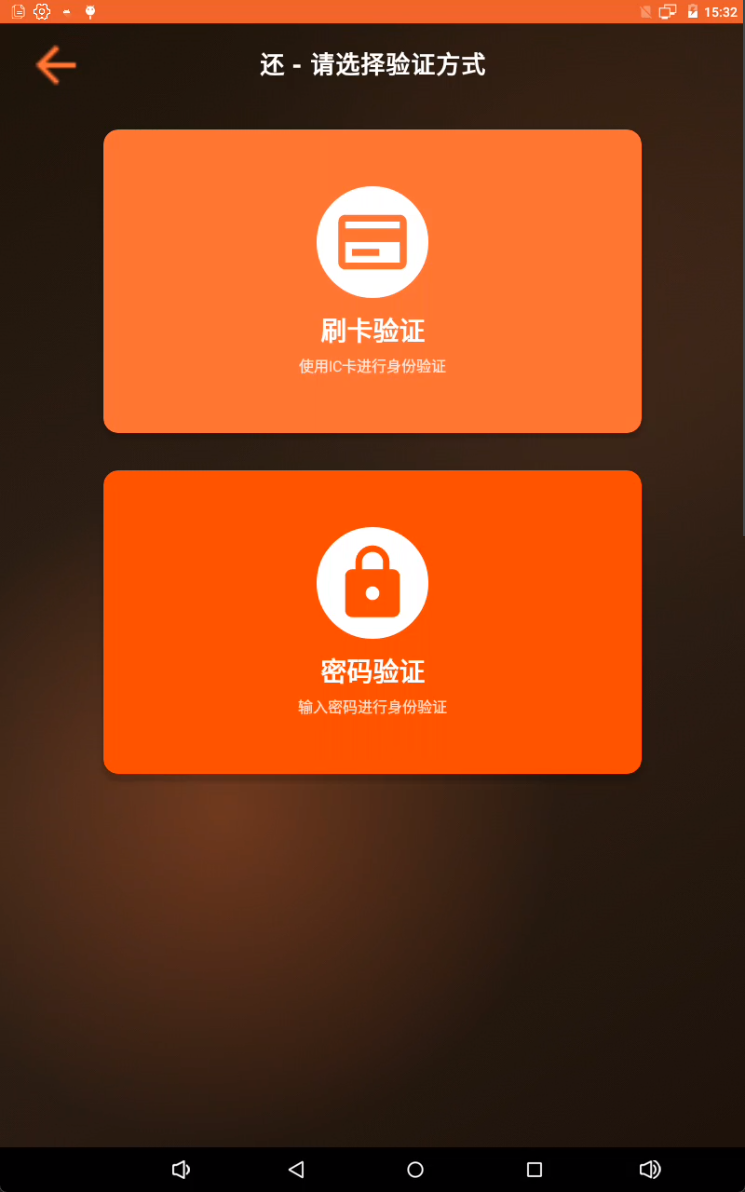
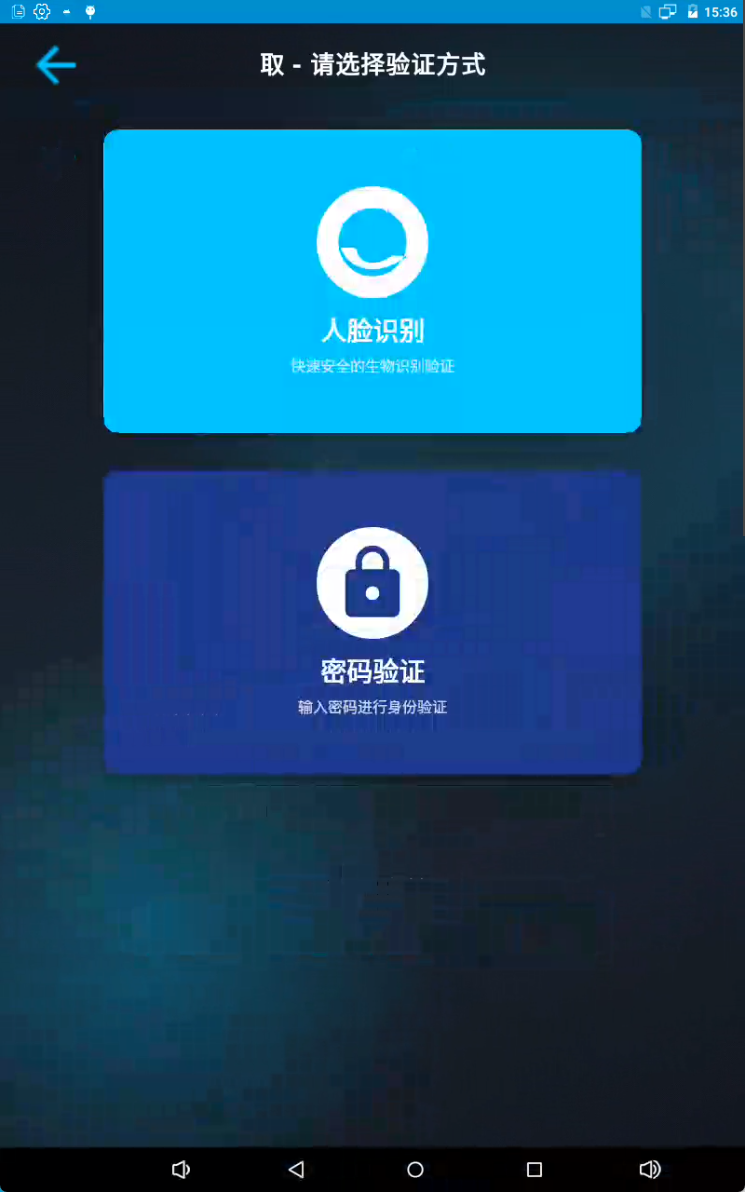
系统支持三种认证方式,满足不同场景需求:
人脸识别
- 集成 ArcSoft 人脸识别 SDK
- 支持在线激活和离线识别
- 特征码存储在本地数据库
- 识别准确率高达 95%+
// 人脸识别配置自动从数据库读取
private fun checkFaceEngineActivation(): Boolean {
    val appId = configDao.getConfigurationByTypeAndKey("face_recognition", "app_id")?.value
    val sdkKey = configDao.getConfigurationByTypeAndKey("face_recognition", "sdk_key")?.value

    val activeCode = FaceEngine.activeOnline(this, appId, sdkKey)
    return activeCode == ErrorInfo.MOK ||
           activeCode == ErrorInfo.MERR_ASF_ALREADY_ACTIVATED
}
刷卡认证
- 支持多种刷卡器硬件
- 串口通信,可配置波特率、数据位等参数
- 卡号与用户绑定,快速验证
密码认证
-
密码加密存储
-
支持密码修改和重置
-
可设置密码复杂度规则
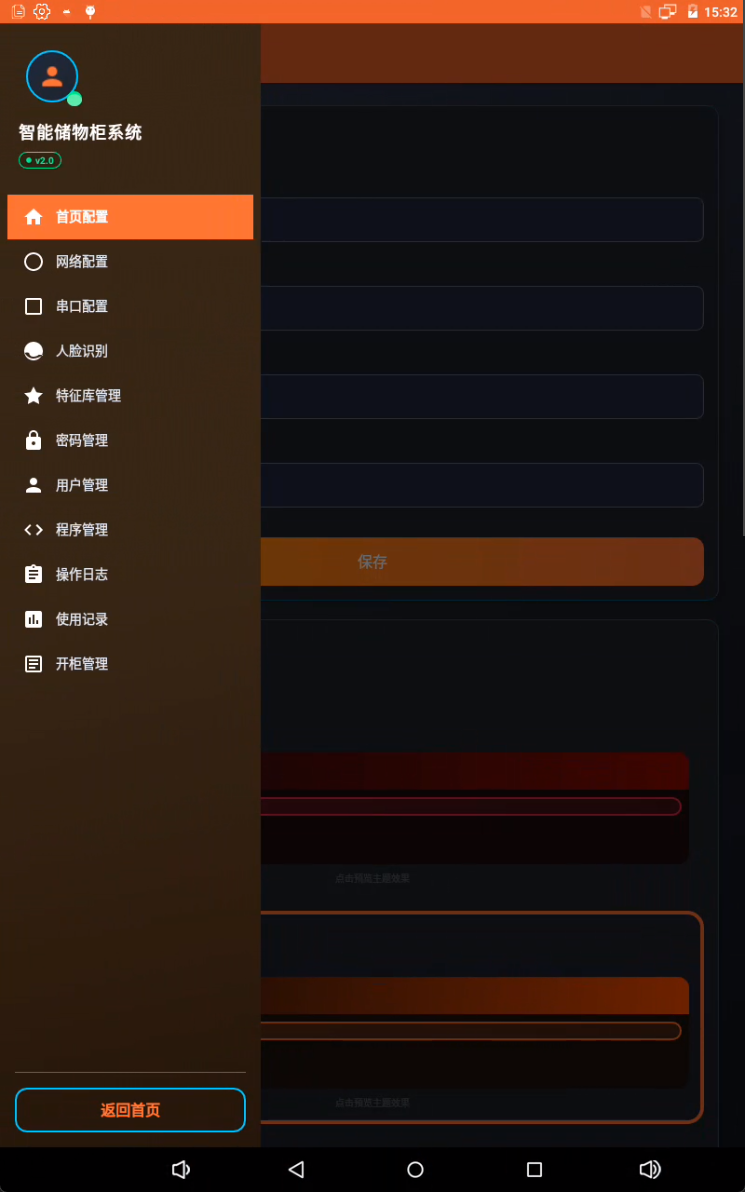
4. 硬件设备管理
系统提供完整的硬件设备管理功能,支持锁控板和刷卡器的配置:
@Entity(tableName = "hardware_devices")
data class HardwareDevice(
    @PrimaryKey(autoGenerate = true) val id: Long = 0,
    val deviceId: String,           // 设备ID(如 0x01)
    val deviceName: String,         // 设备名称
    val deviceType: DeviceType,     // LOCK_CONTROLLER 或 CARD_READER
    val serialPort: String,         // 串口路径
    val baudRate: Int,              // 波特率
    val dataBits: Int = 8,          // 数据位
    val stopBits: Int = 1,          // 停止位
    val parity: Int = 0,            // 校验位
    val enabled: Boolean = true     // 是否启用
)
特性:
- 支持多设备管理
- 串口参数灵活配置
- 设备状态实时监控
- 提供完整的 REST API
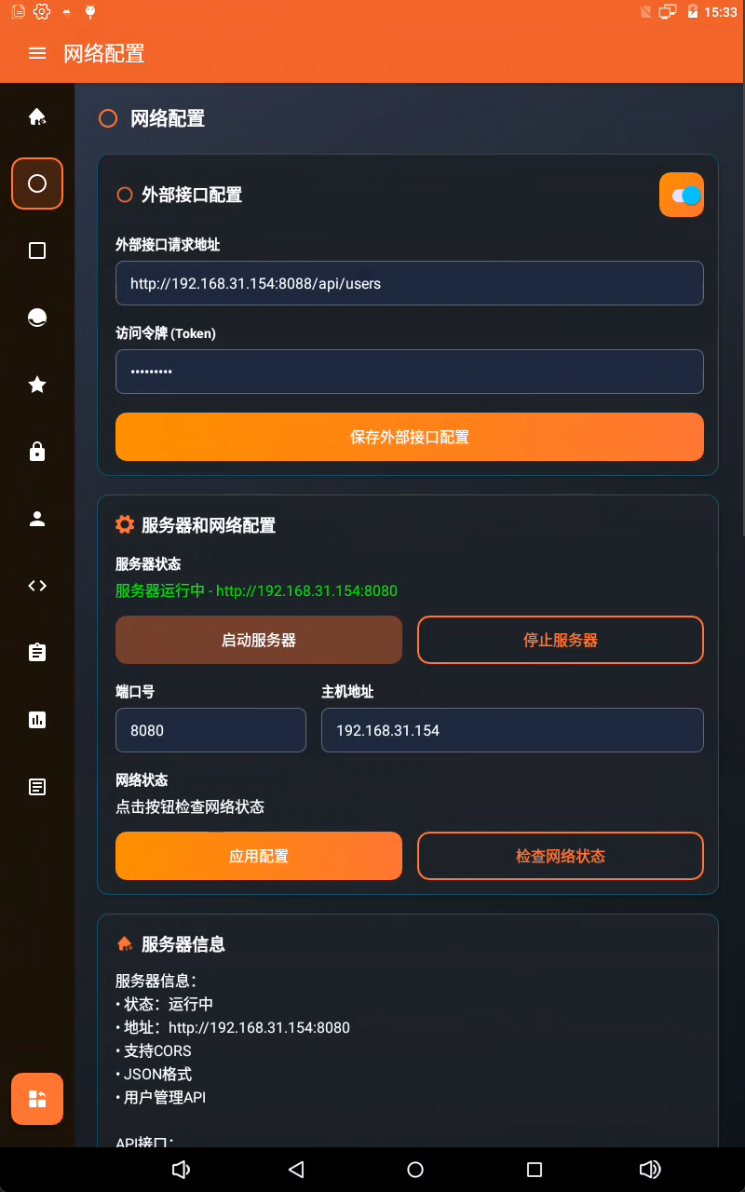
5. 外部接口集成
系统支持与外部系统对接,实现数据同步和业务协同:
class ExternalApiService(context: Context) {
    // 用户操作同步
    suspend fun addUser(user: User): Result<ExternalApiResponse<String>>
    suspend fun updateUser(user: User): Result<ExternalApiResponse<String>>
    suspend fun deleteUser(userId: Long): Result<ExternalApiResponse<String>>

    // 识别记录上报
    suspend fun reportFaceRecognition(userId: Long, userName: String,
                                     result: String, confidence: Float)
    suspend fun reportCardSwipe(userId: Long, userName: String,
                               cardNumber: String, result: String)

    // 操作记录上报
    suspend fun reportTakeItem(userId: Long, userName: String,
                              itemInfo: String?, remark: String?)
    suspend fun reportReturnItem(userId: Long, userName: String,
                                itemInfo: String?, remark: String?)
}
接口特性:
- 标准化的请求/响应格式
- Token 认证机制
- 自动重试和错误处理
- 可配置启用/禁用
6. Room 数据库设计
系统采用 Room 持久化框架,数据库设计合理,支持复杂查询:
核心数据表:
users- 用户信息表cabinets- 储物柜信息表user_cabinets- 用户权限关联表operation_logs- 操作日志表usage_records- 使用记录表configurations- 系统配置表hardware_devices- 硬件设备表
@Dao
interface UserDao {
    @Query("SELECT * FROM users ORDER BY id DESC")
    fun getAllUsers(): LiveData<List<User>>

    @Query("SELECT * FROM users WHERE name LIKE '%' || :query || '%'
            OR employeeId LIKE '%' || :query || '%'
            LIMIT :limit OFFSET :offset")
    suspend fun searchUsers(query: String, limit: Int, offset: Int): List<User>

    @Insert(onConflict = OnConflictStrategy.REPLACE)
    suspend fun insert(user: User): Long

    @Update
    suspend fun update(user: User)

    @Delete
    suspend fun delete(user: User)
}
7. 协程异步处理
全面使用 Kotlin 协程处理异步操作,避免回调地狱:
// ViewModel 中使用协程
fun loadUsers() {
    viewModelScope.launch {
        try {
            _isLoading.value = true
            val users = withContext(Dispatchers.IO) {
                repository.getAllUsers()
            }
            _users.value = users
        } catch (e: Exception) {
            _error.value = e.message
        } finally {
            _isLoading.value = false
        }
    }
}
核心功能实现
1. 取仪器流程
suspend fun takeInstrument(userId: Long, cabinetId: Long): Result<String> {
    return withContext(Dispatchers.IO) {
        try {
            // 1. 验证用户权限
            val hasPermission = userCabinetRepository.checkPermission(userId, cabinetId)
            if (!hasPermission) {
                return@withContext Result.failure(Exception("无权限"))
            }

            // 2. 检查柜体状态
            val cabinet = cabinetRepository.getById(cabinetId)
            if (cabinet.status != CabinetStatus.AVAILABLE) {
                return@withContext Result.failure(Exception("柜体不可用"))
            }

            // 3. 开锁
            hardwareController.openLock(cabinet.boardId, cabinet.lockId)

            // 4. 记录操作日志
            val log = OperationLog(
                userId = userId,
                cabinetId = cabinetId,
                operation = "TAKE",
                timestamp = System.currentTimeMillis()
            )
            operationLogRepository.insert(log)

            // 5. 创建使用记录
            val record = UsageRecord(
                userId = userId,
                cabinetId = cabinetId,
                takeTime = System.currentTimeMillis()
            )
            usageRecordRepository.insert(record)

            // 6. 更新柜体状态
            cabinetRepository.updateStatus(cabinetId, CabinetStatus.IN_USE)

            // 7. 上报外部接口
            externalApiService.reportTakeItem(userId, userName)

            Result.success("取仪器成功")
        } catch (e: Exception) {
            Result.failure(e)
        }
    }
}
2. 网络配置自动重启
fun applyConfiguration(port: Int, host: String) {
    viewModelScope.launch {
        try {
            _isRestarting.value = true

            // 1. 保存配置到数据库
            configRepository.updateNetworkConfig(port, host)

            // 2. 停止当前服务器
            if (ktorServer.isRunning()) {
                ktorServer.stop()
                delay(1000) // 等待完全停止
            }

            // 3. 启动新配置的服务器
            ktorServer.start(port, host)
            delay(2000) // 等待启动完成

            // 4. 检查服务器状态
            val isRunning = ktorServer.checkStatus()

            if (isRunning) {
                _message.value = "配置应用成功,服务器已重启"
            } else {
                _message.value = "服务器重启失败"
            }
        } catch (e: Exception) {
            _message.value = "配置应用失败: ${e.message}"
        } finally {
            _isRestarting.value = false
        }
    }
}
API 接口示例
用户管理 API
# 获取所有用户
GET http://localhost:8080/api/users

# 搜索用户(支持分页)
GET http://localhost:8080/api/users/search?query=张三&page=1&size=20

# 创建用户
POST http://localhost:8080/api/users
Content-Type: application/json

{
  "employeeId": "E001",
  "name": "张三",
  "phoneNumber": "13800138000",
  "position": "工程师",
  "gender": "MALE",
  "status": "ENABLED",
  "cardNumber": "1234567890",
  "password": "1234"
}

# 更新用户
PUT http://localhost:8080/api/users/123
Content-Type: application/json

{
  "name": "张三",
  "phoneNumber": "13800138001",
  "position": "高级工程师"
}

# 删除用户
DELETE http://localhost:8080/api/users/123
硬件设备 API
# 获取所有硬件设备
GET http://localhost:8080/api/hardware-devices

# 创建硬件设备
POST http://localhost:8080/api/hardware-devices
Content-Type: application/json

{
  "deviceId": "0x01",
  "deviceName": "锁控板",
  "deviceType": "LOCK_CONTROLLER",
  "serialPort": "/dev/ttyS3",
  "baudRate": 9600,
  "dataBits": 8,
  "stopBits": 1,
  "parity": 0,
  "enabled": true
}

# 更新设备状态
PUT http://localhost:8080/api/hardware-devices/device/0x01/enabled
Content-Type: application/json

{
  "enabled": false
}
性能优化
1. 分页加载
用户列表、操作日志等数据支持分页加载,避免一次性加载大量数据:
@Query("SELECT * FROM users ORDER BY id DESC LIMIT :limit OFFSET :offset")
suspend fun getUsersPaged(limit: Int, offset: Int): List<User>
2. 数据库索引
关键字段添加索引,提升查询性能:
@Entity(
    tableName = "users",
    indices = [
        Index(value = ["employeeId"], unique = true),
        Index(value = ["cardNumber"]),
        Index(value = ["name"])
    ]
)
data class User(...)
3. 协程优化
使用 Dispatchers.IO 处理 IO 操作,避免阻塞主线程:
viewModelScope.launch {
    val result = withContext(Dispatchers.IO) {
        // 数据库操作
        repository.getAllUsers()
    }
    // UI 更新在主线程
    _users.value = result
}
安全性设计
- 密码加密:用户密码使用哈希算法加密存储
- Token 认证:外部接口调用支持 Token 认证
- 权限控制:用户-储物柜权限关联,精细化权限管理
- 操作审计:所有操作记录日志,支持追溯
- 数据隔离:不同用户数据隔离,防止越权访问
扩展性设计
1. 插件化认证方式
认证方式采用策略模式,易于扩展:
interface AuthenticationStrategy {
    suspend fun authenticate(credential: Any): Result<User>
}

class FaceAuthStrategy : AuthenticationStrategy {
    override suspend fun authenticate(credential: Any): Result<User> {
        // 人脸识别逻辑
    }
}

class CardAuthStrategy : AuthenticationStrategy {
    override suspend fun authenticate(credential: Any): Result<User> {
        // 刷卡验证逻辑
    }
}
2. 可配置的外部接口
外部接口支持动态配置,无需修改代码:
enum class ExternalServiceType(
    val serviceName: String,
    val description: String
) {
    ADD_USER("AddUser", "新增用户"),
    UPDATE_USER("UpdateUser", "修改用户"),
    DELETE_USER("DeleteUser", "删除用户"),
    FACE_RECOGNITION_RECORD("FaceRecognitionRecord", "人脸识别记录"),
    CARD_SWIPE_RECORD("CardSwipeRecord", "刷卡记录"),
    TAKE_ITEM_RECORD("TakeItemRecord", "取物记录"),
    RETURN_ITEM_RECORD("ReturnItemRecord", "还物记录")
}
3. 主题系统
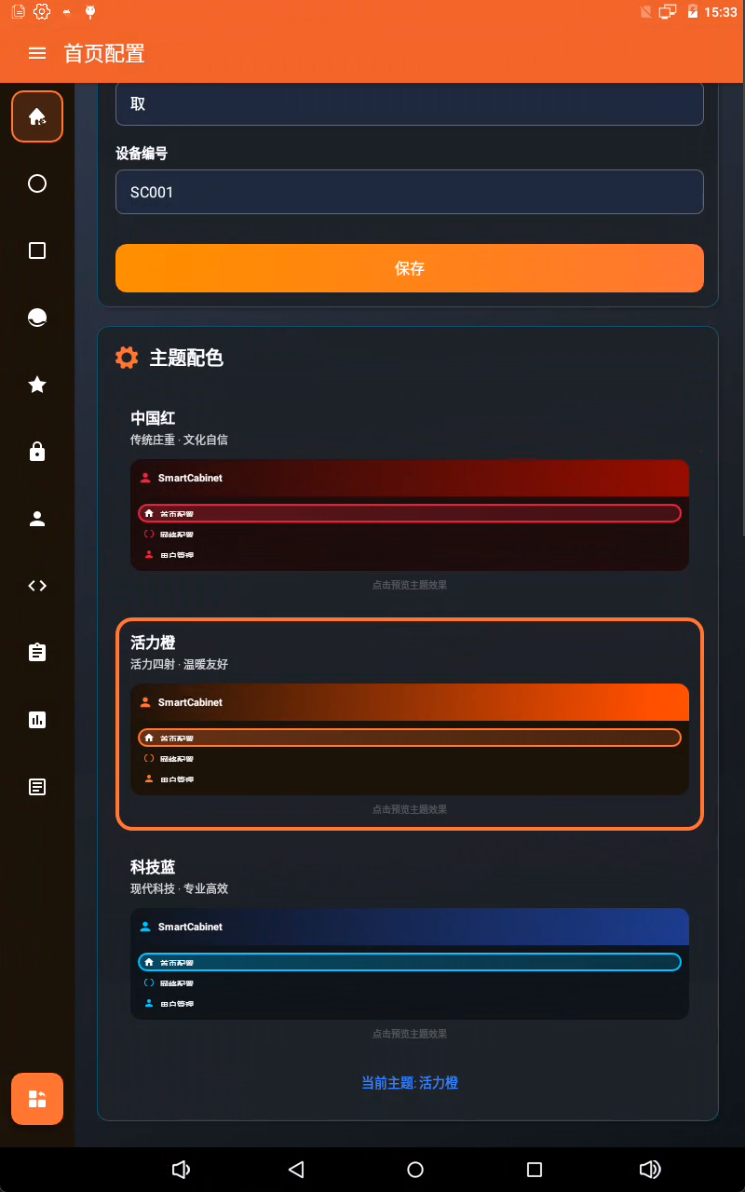
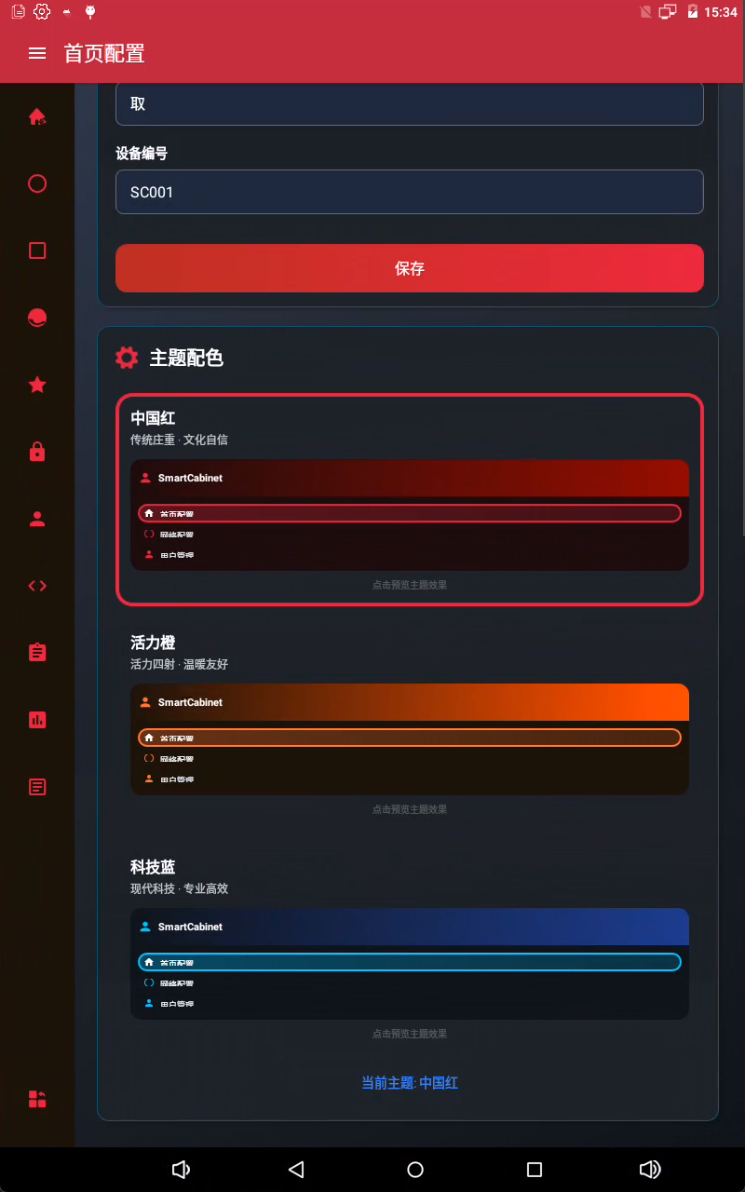
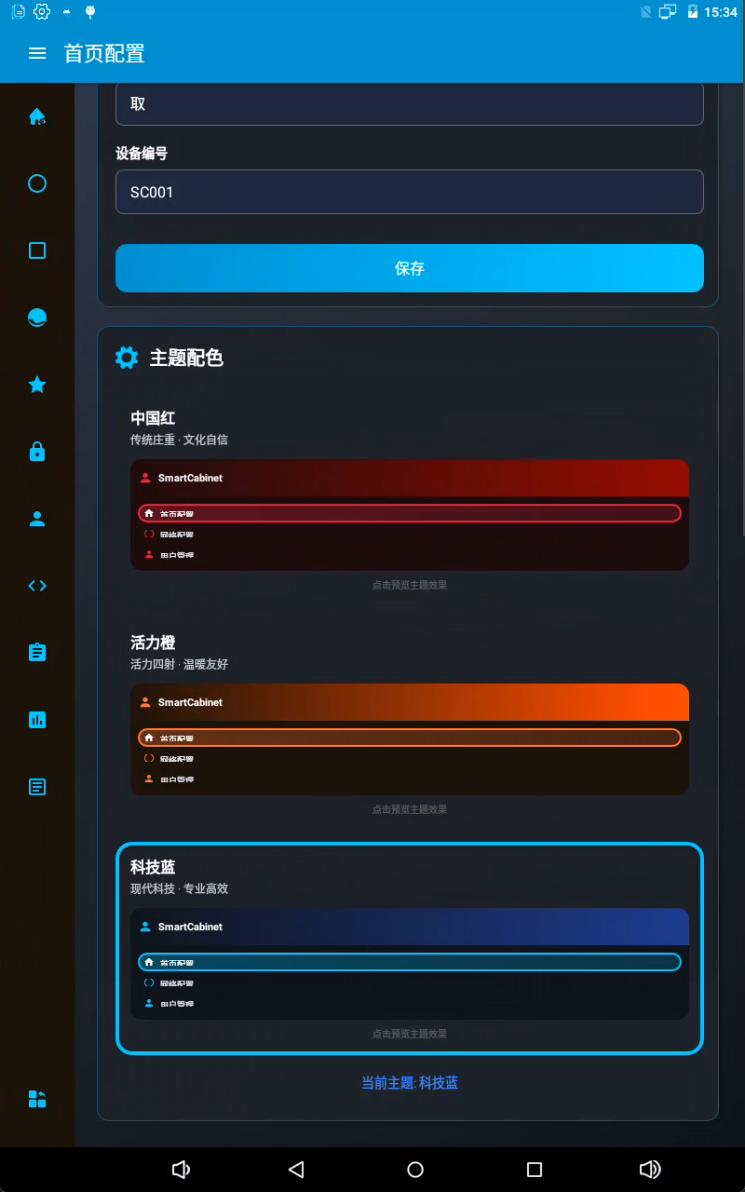
支持自定义主题,满足不同客户需求:
@Entity(tableName = "theme_configurations")
data class ThemeConfiguration(
    @PrimaryKey(autoGenerate = true) val id: Long = 0,
    val themeType: String,          // 主题类型
    val primaryColor: String,       // 主色调
    val secondaryColor: String,     // 辅助色
    val backgroundColor: String,    // 背景色
    val textColor: String          // 文字颜色
)
技术栈总结
| 技术 | 版本 | 用途 |
|---|---|---|
| Kotlin | 1.9.0 | 主要开发语言 |
| Android SDK | 36 | Android 平台 |
| Room | 2.6.0 | 本地数据库 |
| Ktor Server | 2.3.5 | HTTP 服务器 |
| Coroutines | 1.7.3 | 异步处理 |
| LiveData | 2.6.2 | 响应式数据 |
| Material Design | 1.10.0 | UI 组件 |
| ArcSoft Face SDK | 4.1 | 人脸识别 |
| Kotlinx Serialization | 1.6.0 | JSON 序列化 |
部署与运行
环境要求
- Android Studio Hedgehog | 2023.1.1+
- Android SDK API Level 36
- Kotlin 1.9.0+
- Gradle 8.0+
- 最低 Android 版本:API Level 22 (Android 5.1)
总结
SmartCabinet 是一个技术栈先进、架构清晰、功能完整的智能储物柜管理系统。它不仅提供了友好的用户界面,还通过内置的 HTTP 服务器提供了强大的 API 接口,能够很好地适应各种智能存储管理场景的需求。
核心优势:
- ✅ MVVM 架构,代码可维护性强
- ✅ 内置 HTTP 服务器,支持远程调用
- ✅ 多重认证方式,安全可靠
- ✅ 完整的操作审计,责任可追溯
- ✅ 灵活的硬件配置,适应性强
- ✅ 外部接口集成,易于扩展
- ✅ 协程异步处理,性能优异
关注“Harry技术”,联系商务!

openvela 操作系统专为 AIoT 领域量身定制,以轻量化、标准兼容、安全性和高度可扩展性为核心特点。openvela 以其卓越的技术优势,已成为众多物联网设备和 AI 硬件的技术首选,涵盖了智能手表、运动手环、智能音箱、耳机、智能家居设备以及机器人等多个领域。
更多推荐

 28
28 0
0- 0


 已为社区贡献1条内容

所有评论(0)