
嵌入式Linux应用开发基础-4 输入系统编程
框架概述
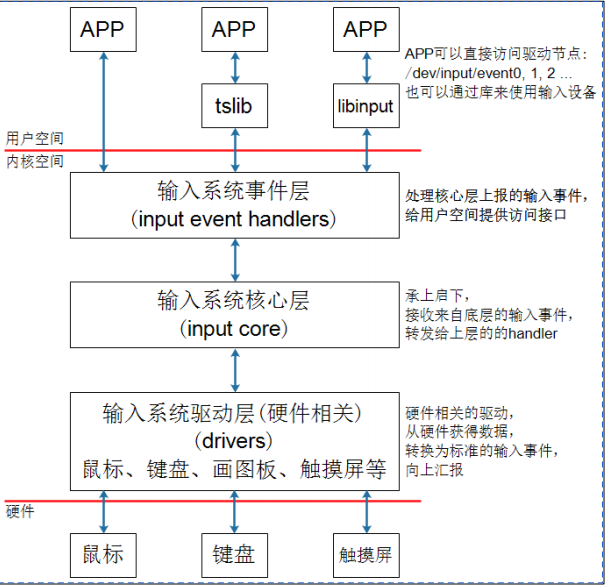
1 编写APP需要掌握的知识
在开发板上执行该代码
hexdump /dev/input/event0
上述该代码可以查看输入设备event0,当我们点击屏幕时,会出现如下代码
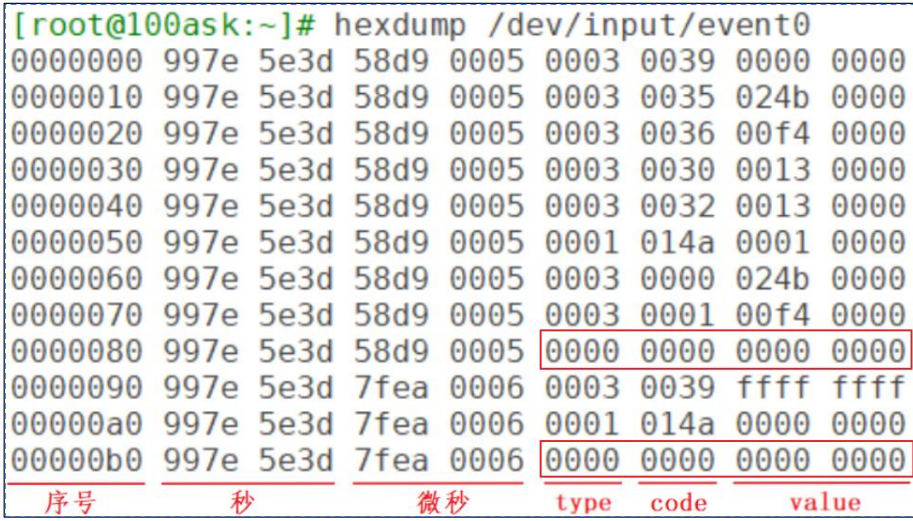
在最下方,分别为每个数字代表含义。也就是我们通过点击屏幕,event0获得为了一系列输入事件,
type为3,对应EV_ABS;code为0x35对应ABS_MT_POSITION_X;code为0x36对应ABS_MT_POSITION_Y。上图中还发现有2个同步事件:它的type、code、value都为0。表示电容屏上报了2次完整的数据。下面对其进行说明
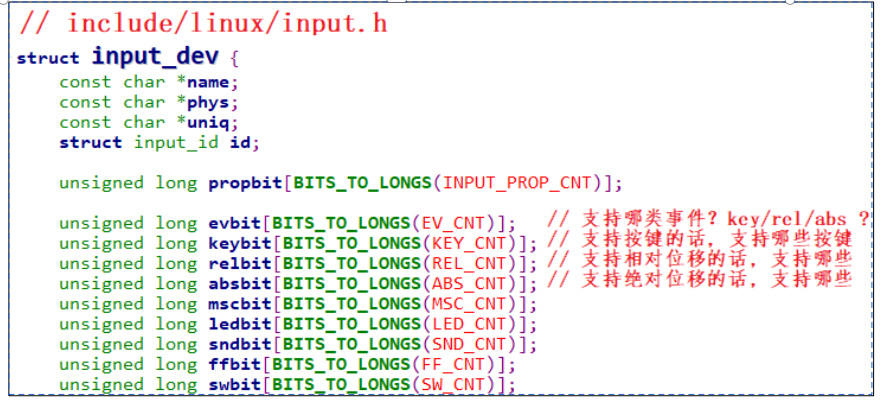
1.内核中怎么表示一个输入设备?
使用input_dev结构体来表示输入设备,
2.APP可以得到什么数据?
可以得到一系列的输入事件,就是一个一个“struct input_event”,
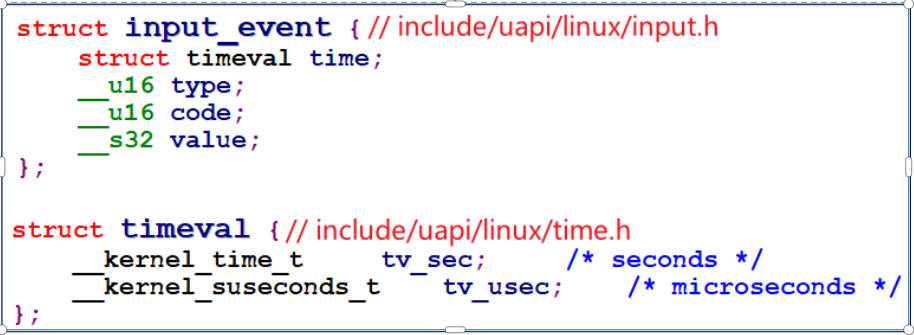
输入事件input_event中更重要的是:type(哪类事件)、code(哪个事件)、value(事件值),细讲如下:
①type:表示哪类事件
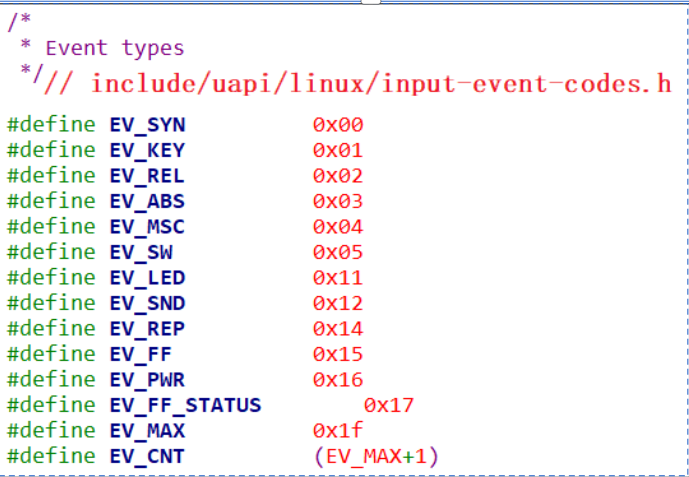
②code:表示该类事件下的哪一个事件
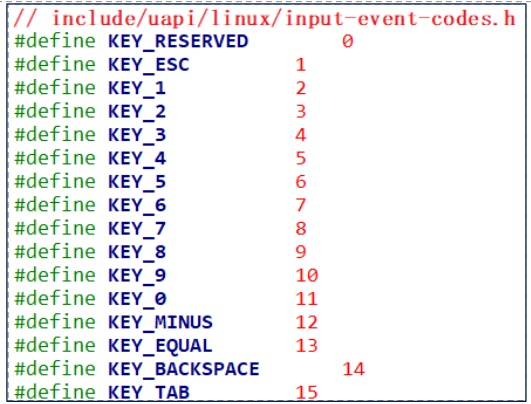
③value:表示事件值
④事件之间的界线
APP怎么知道它已经读到了完整的数据?
驱动程序上报完一系列的数据后,会上报一个“同步事件”,表示数据上报完毕。APP读到“同步事件”时,就知道已经读完了当前的数据。 同步事件也是一个input_event结构体,它的type、code、value三项都是0
2调试
我们已经知道了每次输入事件会带来那些信息。
其中输入设备的设备节点名为/dev/input/eventX(也可能是/dev/eventX,X表示0、1、2等数字)。可以执行以下命令查看设备节点
ls /dev/input/* -l
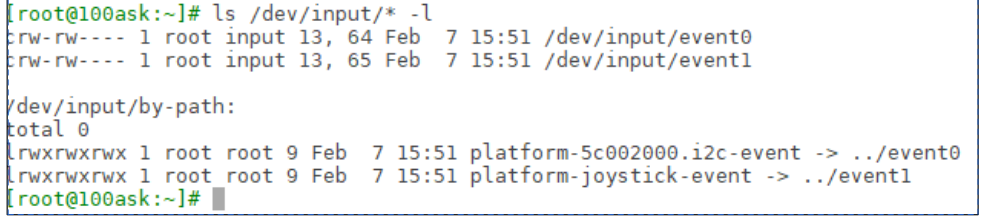
怎么知道这些设备节点对应什么硬件呢?可以在板子上执行以下命令:
cat /proc/bus/input/devices
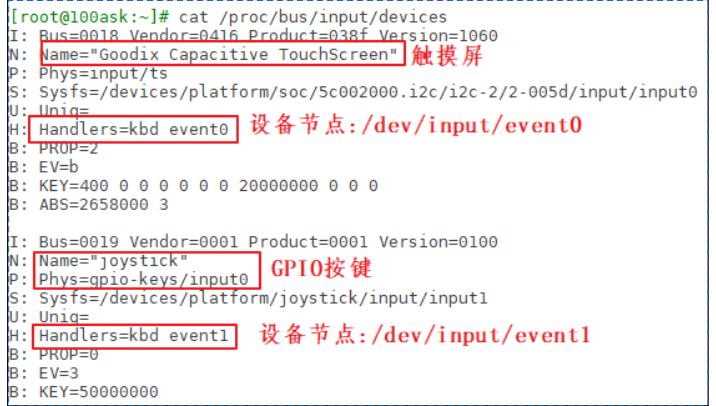
那么这里的I、N、P、S、U、H、B对应的每一行是什么含义呢?
PROP:device properties and quirks(设备属性)EV:types of events supported by the device(设备支持的事件类型)KEY:keys/buttons this device has(此设备具有的键/按钮)MSC:miscellaneous events supported by the device(设备支持的其他事件)LED:leds present on the device(设备上的指示灯)
值得注意的是 B 位图,比如上图中“B: EV=b”用来表示该设备支持哪类 输入事件。b 的二进制是 1011,bit0、1、3 为 1,表示该设备支持 0、1、3 这 三类事件,即 EV_SYN、EV_KEY、EV_ABS。再举一个例子,“B: ABS=2658000 3”如何理解?它表示该设备支持 EV_ABS 这一类事件中的哪一些事件。这是 2 个 32 位的数字:0x2658000、0x3,高位在前低位在后,组成一个 64 位的数字: “0x2658000,00000003”,数值为 1 的位有:0、1、47、48、50、53、54, 即:0、1、0x2f、0x30、0x32、0x35、0x36这些事件。
3使用命令行读取事件
hexdump /dev/input/event0
上述该代码可以查看输入设备event0,当我们点击屏幕时,会出现如下代码
在最下方,分别为每个数字代表含义。也就是我们通过点击屏幕,event0获得为了一系列输入事件,
type为3,对应EV_ABS;code为0x35对应ABS_MT_POSITION_X;code为0x36对应ABS_MT_POSITION_Y。上图中还发现有2个同步事件:它的type、code、value都为0。表示电容屏上报了2次完整的数据。
3:代码实现
1:获取输入类型信息
./01_get_input_info /dev/input/event0
//这是我们定义的事件类型,方便将 类型的二进制转换为 字符串显示
char *ev_names[]
// 打开 事件 /dev/input/event0
fd = open(argv[1], O_RDWR);
//使用
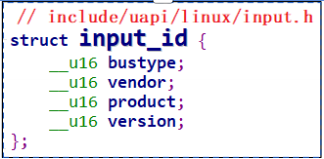
ioctl()系统调用从一个输入设备文件中获取设备的 输入子系统标识符(ID 信息), bustype; vendor; product; version;四类信息err = ioctl(fd, EVIOCGID, &id);
//
EVIOCGBIT(EV, LEN)用于获取输入设备支持的 EV 类型位图;ioctl会把结果写入evbit中。第一个参数0表示你要获取 事件类型(如 EV_KEY、EV_REL 等);第二个参数sizeof(evbit)是分配的内存大小,通常是long evbit[NBITS(EV_MAX)]这样的位图数组;len = ioctl(fd, EVIOCGBIT(0, sizeof(evbit)), &evbit);
//之后将 支持的事件类型打印出来 B 位图,比如上图中“B: EV=b”用来表示该设备支持哪类 输入事件。b 的二进制是 1011,bit0、1、3 为 1,表示该设备支持 0、1、3 这 三类事件,即 EV_SYN、EV_KEY、EV_ABS。
#include <linux/input.h>
#include <sys/types.h>
#include <sys/stat.h>
#include <fcntl.h>
#include <sys/ioctl.h>
#include <stdio.h>

/* ./01_get_input_info /dev/input/event0 */
int main(int argc, char **argv)
{
	int fd;
	int err;
	int len;
	int i;
	unsigned char byte;
	int bit;
	struct input_id id;
	unsigned int evbit[2];
	char *ev_names[] = {
		"EV_SYN ",
		"EV_KEY ",
		"EV_REL ",
		"EV_ABS ",
		"EV_MSC ",
		"EV_SW	",
		"NULL ",
		"NULL ",
		"NULL ",
		"NULL ",
		"NULL ",
		"NULL ",
		"NULL ",
		"NULL ",
		"NULL ",
		"NULL ",
		"NULL ",
		"EV_LED ",
		"EV_SND ",
		"NULL ",
		"EV_REP ",
		"EV_FF	",
		"EV_PWR ",
	};

	if (argc != 2)
	{
		printf("Usage: %s <dev>\n", argv[0]);
		return -1;
	}

	fd = open(argv[1], O_RDWR);
	if (fd < 0)
	{
		printf("open %s err\n", argv[1]);
		return -1;
	}

	err = ioctl(fd, EVIOCGID, &id);
	if (err == 0)
	{
		printf("bustype = 0x%x\n", id.bustype);
		printf("vendor	= 0x%x\n", id.vendor);
		printf("product = 0x%x\n", id.product);
		printf("version = 0x%x\n", id.version);
	}

	len = ioctl(fd, EVIOCGBIT(0, sizeof(evbit)), &evbit);
	if (len > 0 && len <= sizeof(evbit))
	{
		printf("support ev type: ");
		for (i = 0; i < len; i++)
		{
			byte = ((unsigned char *)evbit)[i];
			for (bit = 0; bit < 8; bit++)
			{
				if (byte & (1 << bit))
				{
					printf("%s ", ev_names[i * 8 + bit]);
				}
			}
		}
		printf("\n\r");
	}

	return 0;
}
2:无阻塞 \阻塞 获取输入事件信息
以无阻塞 \阻塞 方式获取信息
./01_get_input_info /dev/input/event0 noblock
fd = open(argv[1], O_RDWR | O_NONBLOCK); //无阻塞方式
fd = open(argv[1], O_RDWR); //阻塞方式
//获取ID信息 后续并打印
err = ioctl(fd, EVIOCGID, &id);
//获取 事件类型 后续并打印
len = ioctl(fd, EVIOCGBIT(0, sizeof(evbit)), &evbit);
//在WHILE循环中,重复读取fd文件的event信息event 结构体包括
struct timeval time; // 时间戳
__u16 type; // 事件类型,比如 EV_KEY、EV_REL
__u16 code; // 键码、坐标、按钮等
__s32 value; // 值:按下=1,抬起=0,移动量等//如果是阻塞状态 如果没有点击屏幕 代码会阻塞在read函数这里,直到数据到来
//无阻塞状态, 他会一直输出 read err ,如果点击屏幕,会输出get event,之后继续输出read err
while (1)
{
//读取 Linux 输入设备(如
/dev/input/eventX)的一条事件数据len = read(fd, &event, sizeof(event));
if (len == sizeof(event))
{
printf("get event: type = 0x%x, code = 0x%x, value = 0x%x\n", event.type, event.code, event.value);
}
else
{
printf("read err %d\n", len);
}
}
#include <linux/input.h>
#include <sys/types.h>
#include <sys/stat.h>
#include <fcntl.h>
#include <sys/ioctl.h>
#include <stdio.h>
#include <string.h>
#include <unistd.h>

/* ./01_get_input_info /dev/input/event0 noblock */
int main(int argc, char **argv)
{
	int fd;
	int err;
	int len;
	int i;
	unsigned char byte;
	int bit;
	struct input_id id;
	unsigned int evbit[2];
	struct input_event event;

	char *ev_names[] = {
		"EV_SYN ",
		"EV_KEY ",
		"EV_REL ",
		"EV_ABS ",
		"EV_MSC ",
		"EV_SW	",
		"NULL ",
		"NULL ",
		"NULL ",
		"NULL ",
		"NULL ",
		"NULL ",
		"NULL ",
		"NULL ",
		"NULL ",
		"NULL ",
		"NULL ",
		"EV_LED ",
		"EV_SND ",
		"NULL ",
		"EV_REP ",
		"EV_FF	",
		"EV_PWR ",
	};

	if (argc < 2)
	{
		printf("Usage: %s <dev> [noblock]\n", argv[0]);
		return -1;
	}

	if (argc == 3 && !strcmp(argv[2], "noblock"))
	{
		fd = open(argv[1], O_RDWR | O_NONBLOCK);
	}
	else
	{
		fd = open(argv[1], O_RDWR);
	}
	if (fd < 0)
	{
		printf("open %s err\n", argv[1]);
		return -1;
	}

	err = ioctl(fd, EVIOCGID, &id);
	if (err == 0)
	{
		printf("bustype = 0x%x\n", id.bustype);
		printf("vendor	= 0x%x\n", id.vendor);
		printf("product = 0x%x\n", id.product);
		printf("version = 0x%x\n", id.version);
	}

	len = ioctl(fd, EVIOCGBIT(0, sizeof(evbit)), &evbit);
	if (len > 0 && len <= sizeof(evbit))
	{
		printf("support ev type: ");
		for (i = 0; i < len; i++)
		{
			byte = ((unsigned char *)evbit)[i];
			for (bit = 0; bit < 8; bit++)
			{
				if (byte & (1 << bit))
				{
					printf("%s ", ev_names[i * 8 + bit]);
				}
			}
		}
		printf("\n");
	}

	while (1)
	{
		len = read(fd, &event, sizeof(event));
		if (len == sizeof(event))
		{
			printf("get event: type = 0x%x, code = 0x%x, value = 0x%x\n", event.type, event.code, event.value);
		}
		else
		{
			printf("read err %d\n", len);
		}
	}

	return 0;
}
3:POLL方式获取输入事件信息
POLL 机制、SELECT 机制是完全一样的,只是 APP 接口函数不一样。 简单地说,它们就是“定个闹钟”:在调用 poll、select 函数时可以传入 “超时时间”。在这段时间内,条件合适时(比如有数据可读、有空间可写)就会 立刻返回,否则等到“超时时间”结束时返回错误。用法如下。APP 先调用 open 函数时。⚫ APP 不是直接调用 read 函数,而是先调用 poll 或 select 函数,这 2 个函数中可以传入“超时时间”。它们的作用是:如果驱动程序中有数据,则立刻返回;否则就休眠。在休眠期间,如果有人操作了硬件,驱动程序获得数据后就会把 APP 唤醒,导致 poll 或 select 立刻返回;如果在“超时时间”内无人操作硬件,则时间到后 poll 或 select 函数也会返回。APP 可以根据函数的返回值判断返回原因:有数据?无数据超时返回?⚫ APP 根据 poll 或 select 的返回值判断有数据之后,就调用 read 函数读取数据时,这时就会立刻获得数据。⚫ poll/select 函数可以监测多个文件,可以监测多种事件
./01_get_input_info /dev/input/event0
//定义poll结构体,包括 int fd; // 文件描述符(如 /dev/input/event0) short events; // 要监听的事件(如 POLLIN 可读)
short revents; // 实际发生的事件,由 poll() 填写
struct pollfd fds[1];
fd = open(argv[1], O_RDWR | O_NONBLOCK) ; //无阻塞方式打开文件 /dev/input/event0
//获取ID,后续并打印
err = ioctl(fd, EVIOCGID, &id);
//获取 事件类型 后续并打印
len = ioctl(fd, EVIOCGBIT(0, sizeof(evbit)), &evbit);
while (1)
{
fds[0].fd = fd;
//有数据可读(如键盘输入等)
fds[0].events = POLLIN;
fds[0].revents = 0;
//是在调用 Linux 的
poll()系统调用,阻塞等待一组文件描述符的事件发生,超时时间为 5000 毫秒(=5秒)ret = poll(fds, nfds, 5000);
//5s之内,有输入到来,则输出 get event 否则 超时判断
if (ret > 0)
{
if (fds[0].revents == POLLIN)
{
while (read(fd, &event, sizeof(event)) == sizeof(event))
{
printf("get event: type = 0x%x, code = 0x%x, value = 0x%x\n", event.type, event.code, event.value);
}
}
}
else if (ret == 0)
{
printf("time out\n");
}
else
{
printf("poll err\n");
}
}
#include <linux/input.h>
#include <sys/types.h>
#include <sys/stat.h>
#include <fcntl.h>
#include <sys/ioctl.h>
#include <stdio.h>
#include <string.h>
#include <unistd.h>
#include <poll.h>

/* ./01_get_input_info /dev/input/event0 */
int main(int argc, char **argv)
{
	int fd;
	int err;
	int len;
	int ret;
	int i;
	unsigned char byte;
	int bit;
	struct input_id id;
	unsigned int evbit[2];
	struct input_event event;
	struct pollfd fds[1];
	nfds_t nfds = 1;

	char *ev_names[] = {
		"EV_SYN ",
		"EV_KEY ",
		"EV_REL ",
		"EV_ABS ",
		"EV_MSC ",
		"EV_SW	",
		"NULL ",
		"NULL ",
		"NULL ",
		"NULL ",
		"NULL ",
		"NULL ",
		"NULL ",
		"NULL ",
		"NULL ",
		"NULL ",
		"NULL ",
		"EV_LED ",
		"EV_SND ",
		"NULL ",
		"EV_REP ",
		"EV_FF	",
		"EV_PWR ",
	};

	if (argc != 2)
	{
		printf("Usage: %s <dev>\n", argv[0]);
		return -1;
	}

	fd = open(argv[1], O_RDWR | O_NONBLOCK);
	if (fd < 0)
	{
		printf("open %s err\n", argv[1]);
		return -1;
	}

	err = ioctl(fd, EVIOCGID, &id);
	if (err == 0)
	{
		printf("bustype = 0x%x\n", id.bustype);
		printf("vendor	= 0x%x\n", id.vendor);
		printf("product = 0x%x\n", id.product);
		printf("version = 0x%x\n", id.version);
	}

	len = ioctl(fd, EVIOCGBIT(0, sizeof(evbit)), &evbit);
	if (len > 0 && len <= sizeof(evbit))
	{
		printf("support ev type: ");
		for (i = 0; i < len; i++)
		{
			byte = ((unsigned char *)evbit)[i];
			for (bit = 0; bit < 8; bit++)
			{
				if (byte & (1 << bit))
				{
					printf("%s ", ev_names[i * 8 + bit]);
				}
			}
		}
		printf("\n");
	}

	while (1)
	{
		fds[0].fd = fd;
		fds[0].events = POLLIN;
		fds[0].revents = 0;
		ret = poll(fds, nfds, 5000);
		if (ret > 0)
		{
			if (fds[0].revents == POLLIN)
			{
				while (read(fd, &event, sizeof(event)) == sizeof(event))
				{
					printf("get event: type = 0x%x, code = 0x%x, value = 0x%x\n", event.type, event.code, event.value);
				}
			}
		}
		else if (ret == 0)
		{
			printf("time out\n");
		}
		else
		{
			printf("poll err\n");
		}
	}

	return 0;
}
4:select方式获取输入事件信息
#include <linux/input.h>
#include <sys/types.h>
#include <sys/stat.h>
#include <fcntl.h>
#include <sys/ioctl.h>
#include <stdio.h>
#include <string.h>
#include <unistd.h>
#include <sys/select.h>

/* According to earlier standards */
#include <sys/time.h>


/* ./01_get_input_info /dev/input/event0 */
int main(int argc, char **argv)
{
	int fd;
	int err;
	int len;
	int ret;
	int i;
	unsigned char byte;
	int bit;
	struct input_id id;
	unsigned int evbit[2];
	struct input_event event;
	int nfds;
	struct timeval tv;
	fd_set readfds;

	char *ev_names[] = {
		"EV_SYN ",
		"EV_KEY ",
		"EV_REL ",
		"EV_ABS ",
		"EV_MSC ",
		"EV_SW	",
		"NULL ",
		"NULL ",
		"NULL ",
		"NULL ",
		"NULL ",
		"NULL ",
		"NULL ",
		"NULL ",
		"NULL ",
		"NULL ",
		"NULL ",
		"EV_LED ",
		"EV_SND ",
		"NULL ",
		"EV_REP ",
		"EV_FF	",
		"EV_PWR ",
		};

	if (argc != 2)
	{
		printf("Usage: %s <dev>\n", argv[0]);
		return -1;
	}

	fd = open(argv[1], O_RDWR | O_NONBLOCK);
	if (fd < 0)
	{
		printf("open %s err\n", argv[1]);
		return -1;
	}

	err = ioctl(fd, EVIOCGID, &id);
	if (err == 0)
	{
		printf("bustype = 0x%x\n", id.bustype );
		printf("vendor	= 0x%x\n", id.vendor  );
		printf("product = 0x%x\n", id.product );
		printf("version = 0x%x\n", id.version );
	}

	len = ioctl(fd, EVIOCGBIT(0, sizeof(evbit)), &evbit);
	if (len > 0 && len <= sizeof(evbit))
	{
		printf("support ev type: ");
		for (i = 0; i < len; i++)
		{
			byte = ((unsigned char *)evbit)[i];
			for (bit = 0; bit < 8; bit++)
			{
				if (byte & (1<<bit)) {
					printf("%s ", ev_names[i*8 + bit]);
				}
			}
		}
		printf("\n");
	}

	while (1)
	{
		/* 设置超时时间 */
		tv.tv_sec  = 5;
		tv.tv_usec = 0;

		/* 想监测哪些文件? */
		FD_ZERO(&readfds);    /* 先全部清零 */
		FD_SET(fd, &readfds); /* 想监测fd */

		/* 函数原型为:
			int select(int nfds, fd_set *readfds, fd_set *writefds,
                  fd_set *exceptfds, struct timeval *timeout);
         * 我们为了"read"而监测, 所以只需要提供readfds
		 */
		nfds = fd + 1; /* nfds 是最大的文件句柄+1, 注意: 不是文件个数, 这与poll不一样 */
		ret = select(nfds, &readfds, NULL, NULL, &tv);
		if (ret > 0)  /* 有文件可以提供数据了 */
		{
			/* 再次确认fd有数据 */
			if (FD_ISSET(fd, &readfds))
			{
				while (read(fd, &event, sizeof(event)) == sizeof(event))
				{
					printf("get event: type = 0x%x, code = 0x%x, value = 0x%x\n", event.type, event.code, event.value);
				}
			}
		}
		else if (ret == 0)  /* 超时 */
		{
			printf("time out\n");
		}
		else   /* -1: error */
		{
			printf("select err\n");
		}
	}

	return 0;
}
5:异步通知方式获取输入事件信息
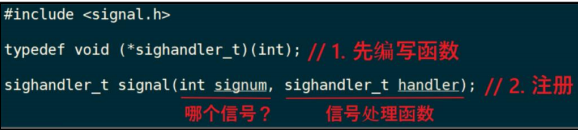
谁发:驱动程序发⚫ 发什么:信号⚫ 发什么信号:SIGIO⚫ 怎么发:内核里提供有函数⚫ 发给谁:APP,APP 要把自己告诉驱动⚫ APP 收到后做什么:执行信号处理函数⚫ 信号处理函数和信号,之间怎么挂钩:APP 注册信号处理函数
代码编写
事件处理函数,如果点击了屏幕,则会调用该函数进行事件处理
void my_sig_handler(int sig)
{
struct input_event event;
while (read(fd, &event, sizeof(event)) == sizeof(event))
{
printf("get event: type = 0x%x, code = 0x%x, value = 0x%x\n", event.type, event.code, event.value);
}
}
/* 注册信号处理函数 ,将该信号与 事件处理函数挂钩 */
SIGIO是当 某个文件描述符可进行 I/O 操作时,内核向进程发送的信号。事件处理函数用来在接收到SIGIO信号时执行。signal(SIGIO, my_sig_handler);
/* 打开驱动程序 */
fd = open(argv[1], O_RDWR | O_NONBLOCK);
err = ioctl(fd, EVIOCGID, &id);
len = ioctl(fd, EVIOCGBIT(0, sizeof(evbit)), &evbit);
//把当前进程的 PID 告诉内核,以便内核在该文件描述符
fd上发生异步事件(如 I/O 可读)时,能将SIGIO信号发送给这个进程。fcntl(fd, F_SETOWN, getpid());
/* 使能"异步通知" */
flags = fcntl(fd, F_GETFL);
fcntl(fd, F_SETFL, flags | FASYNC);
#include <linux/input.h>
#include <sys/types.h>
#include <sys/stat.h>
#include <fcntl.h>
#include <sys/ioctl.h>
#include <stdio.h>
#include <string.h>
#include <unistd.h>
#include <signal.h>
#include <sys/types.h>
#include <unistd.h>

int fd;

void my_sig_handler(int sig)
{
	struct input_event event;
	while (read(fd, &event, sizeof(event)) == sizeof(event))
	{
		printf("get event: type = 0x%x, code = 0x%x, value = 0x%x\n", event.type, event.code, event.value);
	}
}

/* ./05_input_read_fasync /dev/input/event0 */
int main(int argc, char **argv)
{
	int err;
	int len;
	int ret;
	int i;
	unsigned char byte;
	int bit;
	struct input_id id;
	unsigned int evbit[2];
	unsigned int flags;
	int count = 0;

	char *ev_names[] = {
		"EV_SYN ",
		"EV_KEY ",
		"EV_REL ",
		"EV_ABS ",
		"EV_MSC ",
		"EV_SW	",
		"NULL ",
		"NULL ",
		"NULL ",
		"NULL ",
		"NULL ",
		"NULL ",
		"NULL ",
		"NULL ",
		"NULL ",
		"NULL ",
		"NULL ",
		"EV_LED ",
		"EV_SND ",
		"NULL ",
		"EV_REP ",
		"EV_FF	",
		"EV_PWR ",
	};

	if (argc != 2)
	{
		printf("Usage: %s <dev>\n", argv[0]);
		return -1;
	}

	/* 注册信号处理函数 */
	signal(SIGIO, my_sig_handler);

	/* 打开驱动程序 */
	fd = open(argv[1], O_RDWR | O_NONBLOCK);
	if (fd < 0)
	{
		printf("open %s err\n", argv[1]);
		return -1;
	}

	err = ioctl(fd, EVIOCGID, &id);
	if (err == 0)
	{
		printf("bustype = 0x%x\n", id.bustype);
		printf("vendor	= 0x%x\n", id.vendor);
		printf("product = 0x%x\n", id.product);
		printf("version = 0x%x\n", id.version);
	}

	len = ioctl(fd, EVIOCGBIT(0, sizeof(evbit)), &evbit);
	if (len > 0 && len <= sizeof(evbit))
	{
		printf("support ev type: ");
		for (i = 0; i < len; i++)
		{
			byte = ((unsigned char *)evbit)[i];
			for (bit = 0; bit < 8; bit++)
			{
				if (byte & (1 << bit))
				{
					printf("%s ", ev_names[i * 8 + bit]);
				}
			}
		}
		printf("\n");
	}

	/* 把APP的进程号告诉驱动程序 */
	fcntl(fd, F_SETOWN, getpid());

	/* 使能"异步通知" */
	flags = fcntl(fd, F_GETFL);
	fcntl(fd, F_SETFL, flags | FASYNC);

	while (1)
	{
		printf("main loop count = %d\n", count++);
		sleep(2);
	}

	return 0;
}

openvela 操作系统专为 AIoT 领域量身定制,以轻量化、标准兼容、安全性和高度可扩展性为核心特点。openvela 以其卓越的技术优势,已成为众多物联网设备和 AI 硬件的技术首选,涵盖了智能手表、运动手环、智能音箱、耳机、智能家居设备以及机器人等多个领域。
更多推荐


 30
30 0
0- 0


 已为社区贡献4条内容

所有评论(0)