
S32DS for S32 Platform RTC输出时间
·
1、添加RTC组件
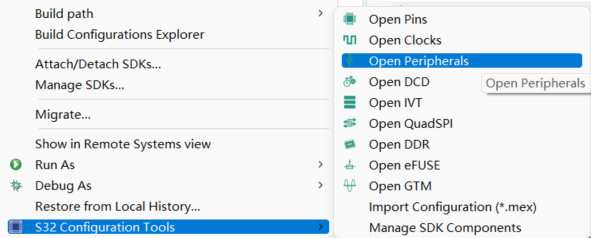
右键项目找到“S32 Configuration Tools”–》“Open Peripherals”进入外设组件界面
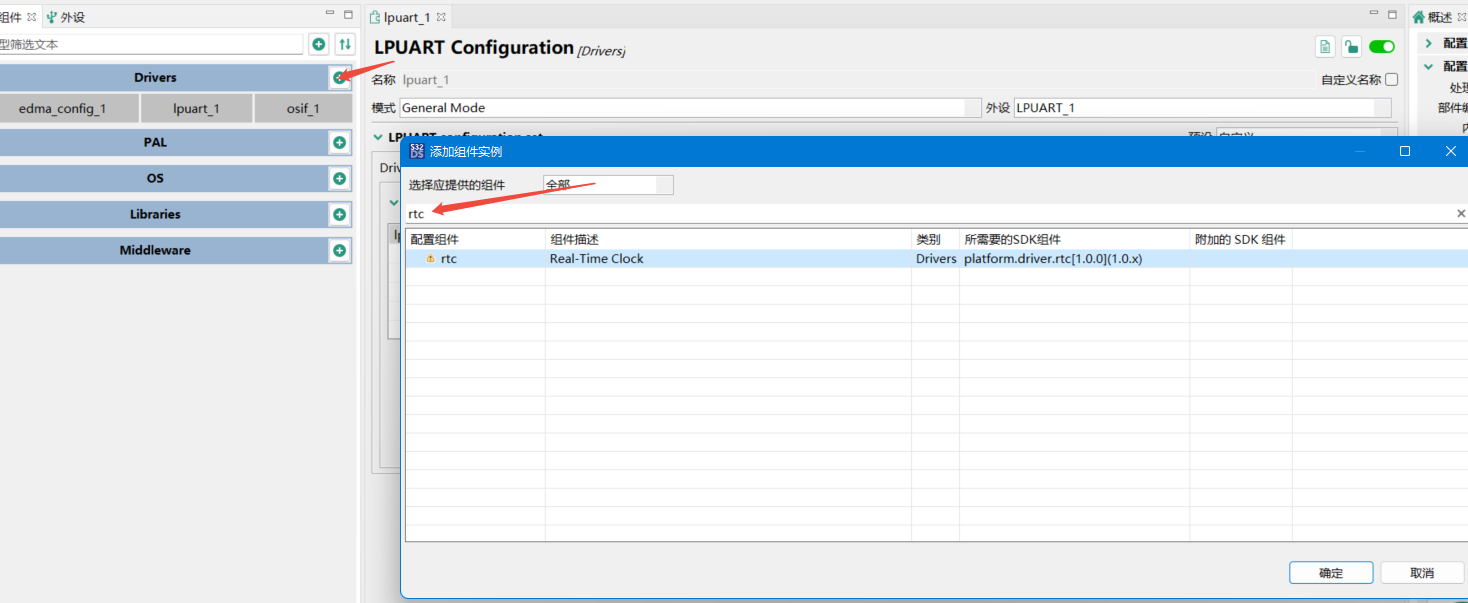
选择Drivers搜索“rtc”,添加完后双击rtc_1,配置rtc参数,更新代码
2、初始化
  status_t error;
  /* Configure clocks for PORT */
  error = CLOCK_DRV_Init(&clockMan1_InitConfig0);
  DEV_ASSERT(error == STATUS_SUCCESS);
  /* Set pins as GPIO */
  error = PINS_DRV_Init(NUM_OF_CONFIGURED_PINS0, g_pin_mux_InitConfigArr0);
  DEV_ASSERT(error == STATUS_SUCCESS);

  /* Initialize RTC instance
   *  - See RTC configuration component for options
   */
  RTC_DRV_Init(0, &rtc_1InitCfg0);
  /* Configure RTC Time Seconds Interrupt */
  RTC_DRV_ConfigureSecondsInt(0, &rtc_1SecIntCfg0);
  /* Set the time and date */
  RTC_DRV_SetTimeDate(0, &rtc_1InitCfg0_StartTime);
  /* Start the RTC counter */
  RTC_DRV_StartCounter(0);
3、中断函数
//如果在配置RTC参数时启动了“Alarm”中断和“Seconds”中断

/* Alarm interrupt handler */
void alarmISR(void * callbackParam)
{
	//到设定的时间则会进入此中断
	rtc_timedate_t Scurrent_time,tempTime;

	RTC_DRV_GetCurrentTimeDate(0, &tempTime);
	Scurrent_time=tempTime;
	Scurrent_time.day +=1;
	RTC_DRV_StopCounter(0);
	RTC_DRV_SetTimeDate(0, &Scurrent_time);
	RTC_DRV_StartCounter(0);
	RTC_DRV_GetCurrentTimeDate(0, &tempTime);

	x1=1;

}

/* Time Seconds interrupt handler */
void secondsISR(void * callbackParam)
{
	//每秒进入一次
	x++;
}
4、main函数
下面是我的main函数,程序里面开启uart,rtc功能;所有在main函数进行了对应的初始化;在循环中判断x1;如果x1等于1则获取当前时间并输出到uart,并将x1置0
int main(void)
{
  status_t error;
  /* Configure clocks for PORT */
  error = CLOCK_DRV_Init(&clockMan1_InitConfig0);
  DEV_ASSERT(error == STATUS_SUCCESS);
  /* Set pins as GPIO */
  error = PINS_DRV_Init(NUM_OF_CONFIGURED_PINS0, g_pin_mux_InitConfigArr0);
  DEV_ASSERT(error == STATUS_SUCCESS);

  /* Initialize LPUART instance */
  LPUART_DRV_Init(1, &lpUartState0, &lpuart_0_InitConfig0);
  /* Install the callback for rx events */
  LPUART_DRV_InstallRxCallback(1, rxCallback, NULL);
  LPUART_DRV_ReceiveData(1, (uint8_t *)rx_data, 1U);

  /* Initialize RTC instance
   *  - See RTC configuration component for options
   */
  RTC_DRV_Init(0, &rtc_1InitCfg0);
  /* Configure RTC Time Seconds Interrupt */
  RTC_DRV_ConfigureSecondsInt(0, &rtc_1SecIntCfg0);
  /* Set the time and date */
  RTC_DRV_SetTimeDate(0, &rtc_1InitCfg0_StartTime);
  /* Start the RTC counter */
  RTC_DRV_StartCounter(0);

  for (;;)
  {
	  if(x1==1){
		  rtc_timedate_t tempTime;
		  RTC_DRV_GetCurrentTimeDate(0,&tempTime);
		  uint8_t* Ctime=currentTimetoString(&tempTime);//时间转字符串
		  LPUART_DRV_SendDataBlocking(1,(uint8_t *)Ctime,strlen(Ctime),500U);
		  x1=0;
		  LPUART_DRV_SetRxBuffer(1, &rx_data[0], 1U);
	    LPUART_DRV_ReceiveData(1, (uint8_t *)rx_data, 1U);
	  }
  }
}
5、整个RTC程序

openvela 操作系统专为 AIoT 领域量身定制,以轻量化、标准兼容、安全性和高度可扩展性为核心特点。openvela 以其卓越的技术优势,已成为众多物联网设备和 AI 硬件的技术首选,涵盖了智能手表、运动手环、智能音箱、耳机、智能家居设备以及机器人等多个领域。
更多推荐

 1
1 0
0- 0


 已为社区贡献1条内容

所有评论(0)