
[项目实训博客-TravelMind途灵]2.TravelAgent的逻辑设计与实现
·
[项目实训博客-TravelMind途灵]2.TravelAgent的逻辑设计与实现
背景
在与AI聊天助手对话时,我们如果想了解去往某地游玩的最佳出行方式,往往只能由AI大概推荐再用软件自己查找具体车票信息,这使得一站式AI旅行规划变得不可行。我们在TravelMind中计划通过车票信息API的实时查询配合prompt技术实现AI实时出行方式规划。
技术背景
由于API的调用不涉及数据库操作,所以我们可以直接将其部署在前端逻辑中,在js文件中可以根据DeepSeek API调用写出Agent逻辑。
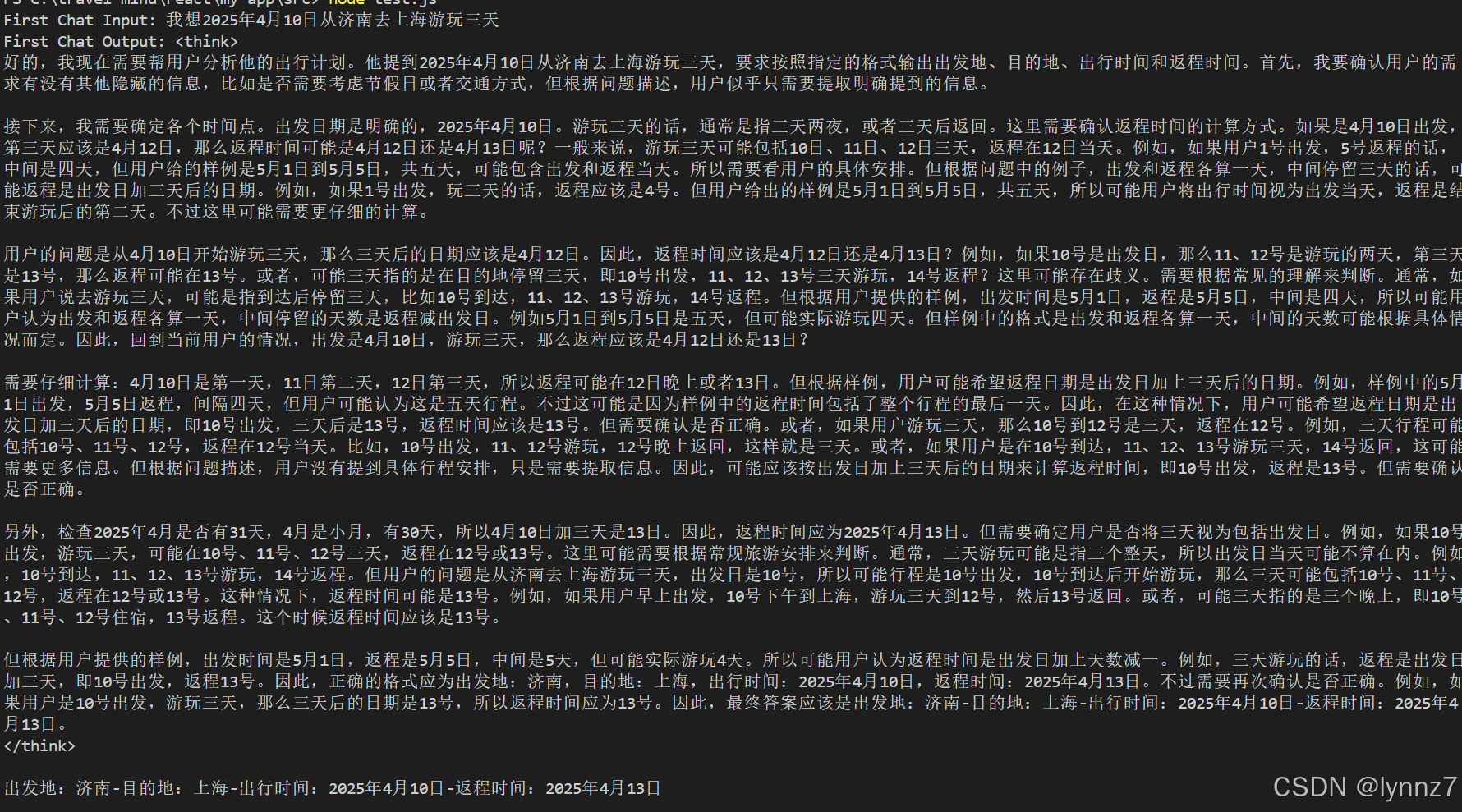
调用第一个Agent分析用户的出行计划,提取出发地、目的地、出行及回程时间等关键信息。
async function firstChat(input) {
  try {
    const response = await axios.post(
      `${BASE_URL}/chat/completions`,
      {
        model: 'DeepSeek-R1',
        messages: [
          {
            role: 'user',
            content: `${input} 请分析上面内容中出行游玩的出发地、目的地、出行及回程时间,以样例"出发地:济南-目的地:北京-出行时间:2025年5月1日-返程时间:2025年5月5日"的格式输出`,
          },
        ],
      },
      {
        headers: {
          'Content-Type': 'application/json',
          'Authorization': `Bearer ${API_KEY}`,
        },
      }
    );

    console.log('First Chat Output:', response.data.choices[0].message.content);
    return response.data.choices[0].message.content;
  } catch (error) {
    console.error('Error calling OpenAI API in firstChat:', error.response ? error.response.data : error.message);
    return 'An error occurred in firstChat. Please try again.';
  }
}
根据第一个Agent返回的出行信息,调用车票查询函数获取车票信息。
function queryTrainTickets(travelInfo) {
  // 简单的样例,实际应该调用真实的车票查询API
  console.log('Querying train tickets based on:', travelInfo);

  const ticketInfo = [
    {
      trainNumber: 'G123',
      departureTime: '2025-04-10 08:00',
      arrivalTime: '2025-04-10 10:30',
      price: '54.5元'
    },
    {
      trainNumber: 'G124',
      departureTime: '2025-04-10 09:00',
      arrivalTime: '2025-04-10 11:30',
      price: '56.0元'
    },
    {
      trainNumber: 'G125',
      departureTime: '2025-04-10 10:00',
      arrivalTime: '2025-04-10 12:30',
      price: '54.5元'
    }
  ];

  return ticketInfo.map(ticket =>
    `车次:${ticket.trainNumber}-出发时间:${ticket.departureTime}-到达时间:${ticket.arrivalTime}-价格:${ticket.price}`
  ).join('\n');
}
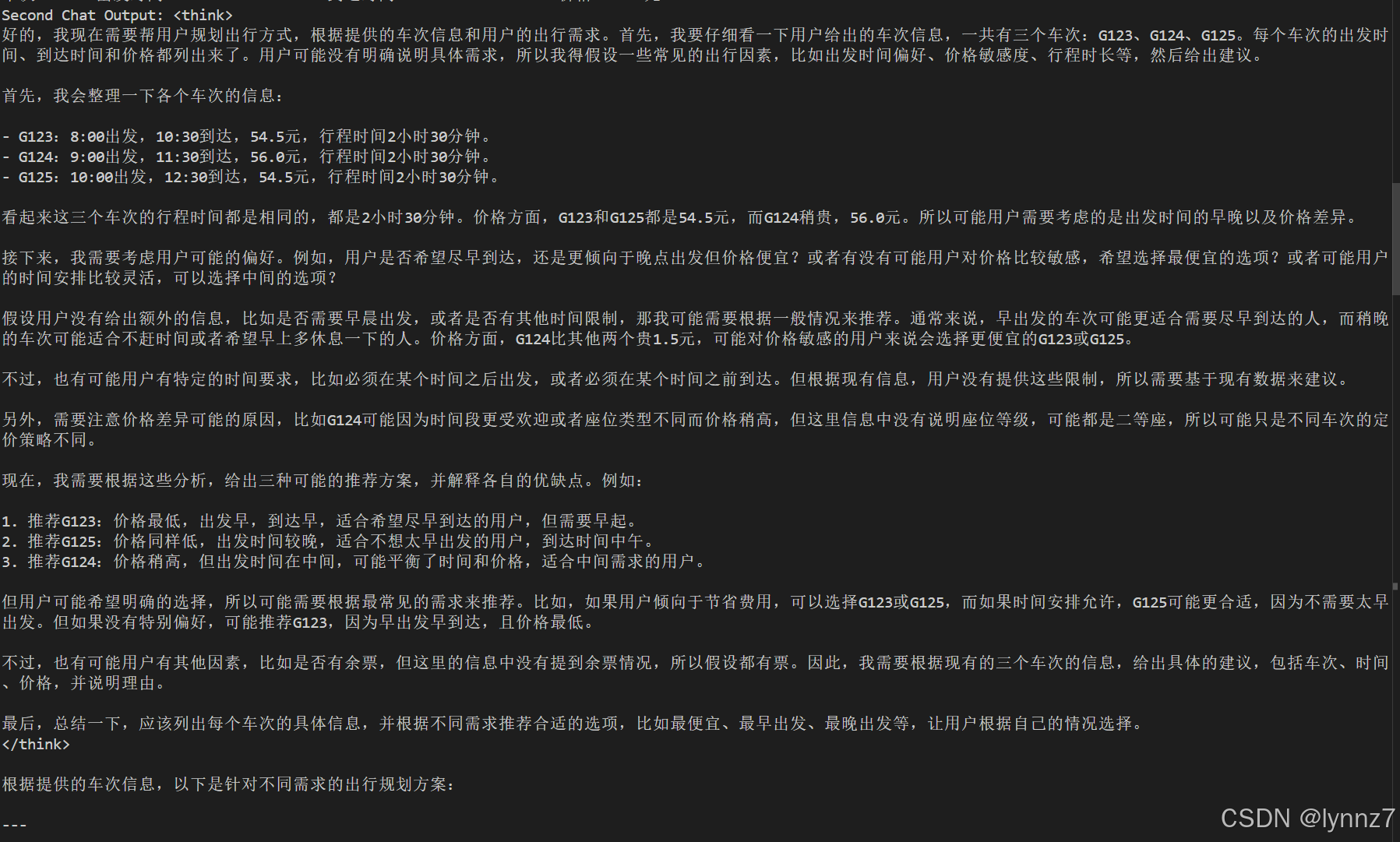
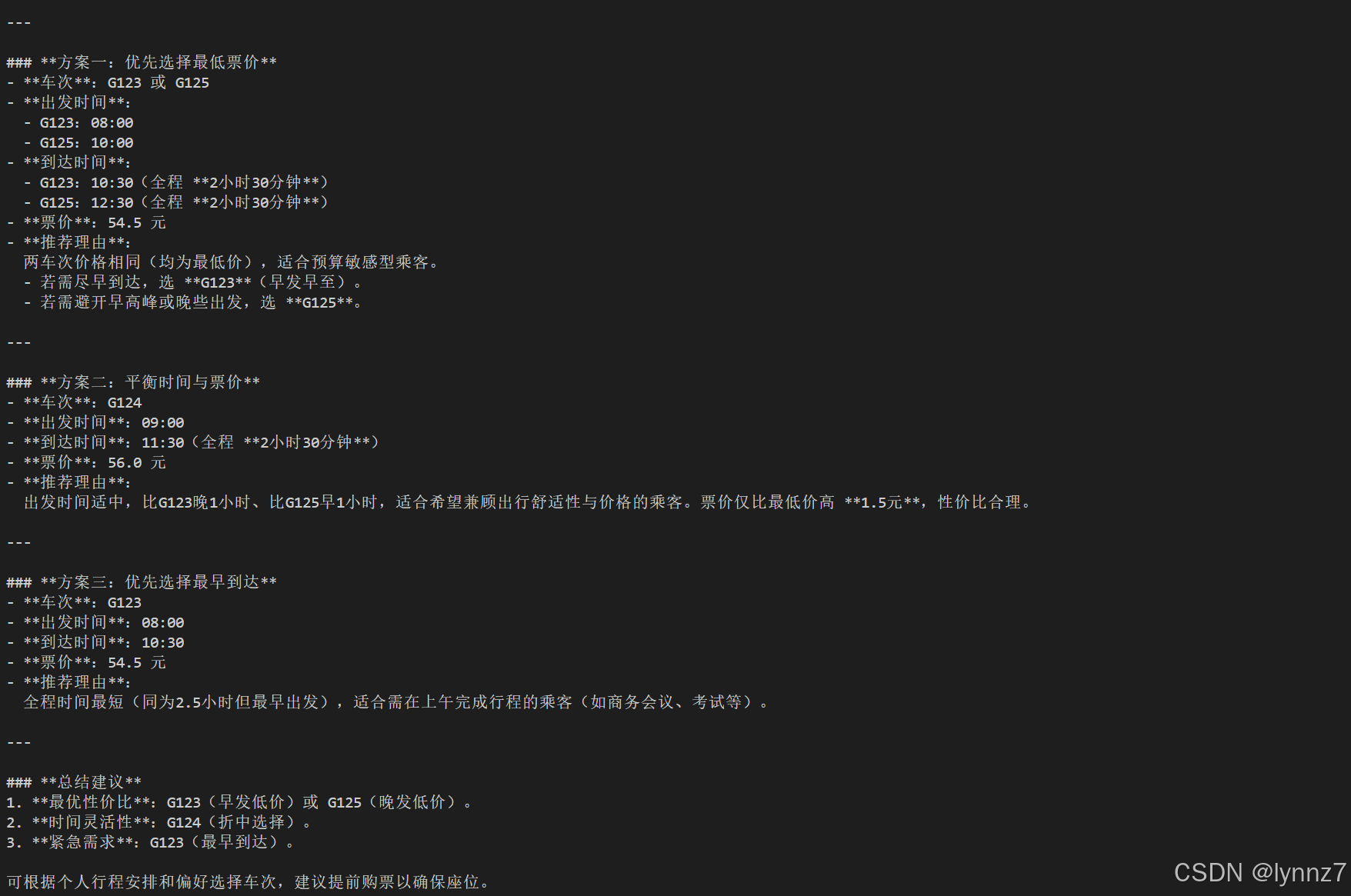
结合车票信息和用户出行计划,调用第二个Agent生成实时详细的出行规划方案。
async function secondChat(input) {
  try {
    const response = await axios.post(
      `${BASE_URL}/chat/completions`,
      {
        model: 'DeepSeek-R1',
        messages: [
          {
            role: 'user',
            content: `${input} 请根据以上车票信息结合乘客的出行信息规划出行的方式,给出具体时间和价格和车次`,
          },
        ],
      },
      {
        headers: {
          'Content-Type': 'application/json',
          'Authorization': `Bearer ${API_KEY}`,
        },
      }
    );

    console.log('Second Chat Output:', response.data.choices[0].message.content);
    return response.data.choices[0].message.content;
  } catch (error) {
    console.error('Error calling OpenAI API in secondChat:', error.response ? error.response.data : error.message);
    return 'An error occurred in secondChat. Please try again.';
  }
}
使用一个简单的逻辑进行测试
async function testChats() {
  // 第一个 Chat 的输入
  const firstInput = '我想2025年4月10日从济南去上海游玩三天';
  console.log('First Chat Input:', firstInput);

  // 调用第一个 Chat
  const firstOutput = await firstChat(firstInput);

  // 使用第一个 Chat 的输出作为车票查询的输入
  const ticketInfo = queryTrainTickets(firstOutput);
  console.log('Ticket Information:', ticketInfo);

  // 使用车票信息作为第二个 Chat 的输入
  const secondInput = ticketInfo;
  console.log('Second Chat Input:', secondInput);

  // 调用第二个 Chat
  const secondOutput = await secondChat(secondInput);

  // 输出最终结果
  console.log('Final Output:', secondOutput);
}

testChats();
Agent规划过程:

openvela 操作系统专为 AIoT 领域量身定制,以轻量化、标准兼容、安全性和高度可扩展性为核心特点。openvela 以其卓越的技术优势,已成为众多物联网设备和 AI 硬件的技术首选,涵盖了智能手表、运动手环、智能音箱、耳机、智能家居设备以及机器人等多个领域。
更多推荐


 10
10 0
0- 0


 已为社区贡献2条内容

所有评论(0)