
安卓开发 之 相对布局
·
下午学习了一下安卓布局中的先对布局,总体还是挺简单的,重要的是多多练习就不难了。
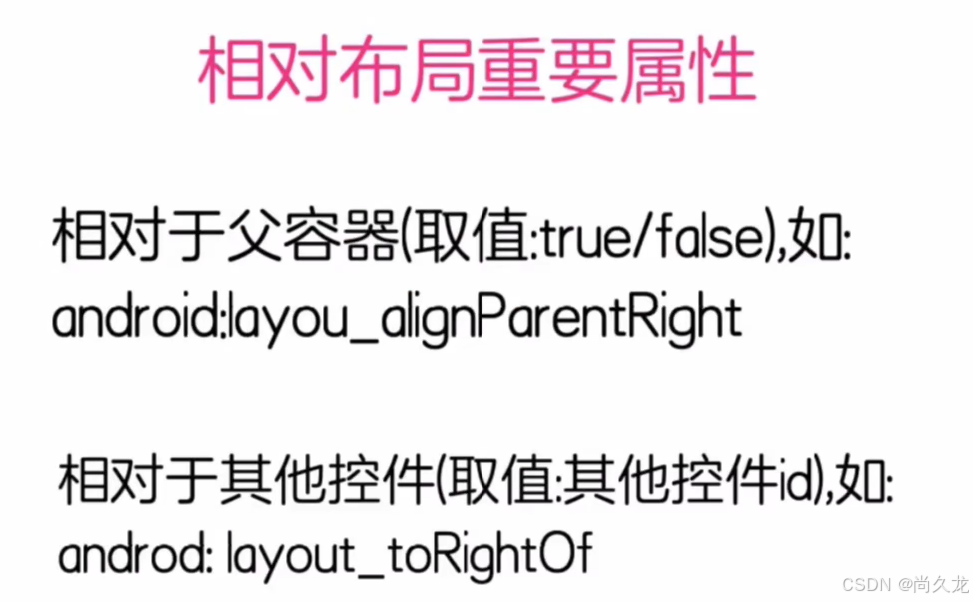
这只是一个例子,有左就有右,有上和下,感觉唯一的需要注意的就是上下了:
上是above 下是below
了解了这些就够了,来看代码吧:
<?xml version="1.0" encoding="utf-8"?>
<RelativeLayout xmlns:android="http://schemas.android.com/apk/res/android" //相对布局头
    android:layout_width="match_parent"
    android:layout_height="match_parent">

    <TextView              //文本控件
        android:id="@+id/zhong_yang"     //给中央的这个文本控件取个ID:zhong_yang
        android:layout_width="100dp"     //文本控件宽100像素
        android:layout_height="100dp"    //文本控件高100像素
        android:text="父容器正中央"       //文本控件的文本内容:父容器正中央
        android:background="#FF0000"    //文本框背景色16进制值
        android:textSize="28sp"         //文本框字体大小
        android:layout_centerInParent="true"/>  //父容器的中央位置

    <TextView              //文本控件
        android:layout_width="100dp"     //文本控件宽100像素
        android:layout_height="100dp"    //文本控件高100像素
        android:text="父容器右上角"       //文本控件的文本内容:父容器右上角
        android:background="#00FF00"    //文本框背景色16进制值
        android:textSize="28sp"         //文本框字体大小
        android:layout_alignParentRight="true"/>  //父容器的右侧

    <TextView              //文本控件
        android:layout_width="100dp"     //文本控件宽100像素
        android:layout_height="100dp"    //文本控件高100像素
        android:text="父容器左上角"       //文本控件的文本内容:父容器左上角
        android:background="#00FFEF"    //文本框背景色16进制值
        android:textSize="28sp"         //文本框字体大小
        android:layout_alignParentLeft="true"/>   //父容器的左侧

    <TextView              //文本控件
        android:layout_width="100dp"     //文本控件宽100像素
        android:layout_height="100dp"    //文本控件高100像素
        android:text="父容器左下角"       //文本控件的文本内容:父容器左下角
        android:background="#00EFAF"    //文本框背景色16进制值
        android:textSize="28sp"         //文本框字体大小
        android:layout_alignParentBottom="true"    //父容器的下侧
        android:layout_alignParentLeft="true"/>    //父容器的左侧    合起来就是左下侧

    <TextView              //文本控件
        android:layout_width="100dp"     //文本控件宽100像素
        android:layout_height="100dp"    //文本控件高100像素
        android:text="父容器右下角"       //文本控件的文本内容:父容器右下角
        android:background="#ECEFAF"    //文本框背景色16进制值
        android:textSize="28sp"         //文本框字体大小
        android:layout_alignParentBottom="true"     //父容器的下侧
        android:layout_alignParentRight="true"/>    //父容器的右侧  合起来就是右下侧

    <TextView              //文本控件
        android:layout_width="100dp"     //文本控件宽100像素
        android:layout_height="100dp"    //文本控件高100像素
        android:background="#AA00AA"     //文本框背景色16进制值
        android:text="ID的右上侧"       //文本控件的文本内容:ID的右上侧
        android:textSize="28sp"         //文本框字体大小
        android:layout_toEndOf="@+id/zhong_yang"/>      //id为zhong_yang控件右上侧
                                                        //上是默认的不用写

    <TextView              //文本控件
        android:layout_width="100dp"     //文本控件宽100像素
        android:layout_height="100dp"    //文本控件高100像素
        android:background="#00BBBB"    //文本框背景色16进制值
        android:text="ID的左上侧"       //文本控件的文本内容:ID的左上侧
        android:textSize="28sp"         //文本框字体大小
        android:layout_toLeftOf="@+id/zhong_yang"/>      //id为zhong_yang控件左上侧

    <TextView              //文本控件
        android:layout_width="100dp"     //文本控件宽100像素
        android:layout_height="100dp"    //文本控件高100像素
        android:background="#EEEE00"    //文本框背景色16进制值
        android:text="ID的左下侧"       //文本控件的文本内容:ID的左下侧
        android:textSize="28sp"         //文本框字体大小
        android:layout_alignParentBottom="true"      //父容器的下侧
        android:layout_toLeftOf="@+id/zhong_yang"//id为zhong_yang控件的左侧合起来:左下
        />

    <TextView              //文本控件
        android:layout_width="100dp"     //文本控件宽100像素
        android:layout_height="100dp"    //文本控件高100像素
        android:background="#EE00EE"    //文本框背景色16进制值
        android:text="ID的右下侧"       //文本控件的文本内容:ID的右下侧
        android:textSize="28sp"         //文本框字体大小
        android:layout_alignParentBottom="true"      //父容器的下侧
        android:layout_toRightOf="@+id/zhong_yang"/>//id为zhong_yang控件的右侧  右下侧

    <TextView              //文本控件
        android:layout_width="100dp"     //文本控件宽100像素
        android:layout_height="100dp"    //文本控件高100像素
        android:background="#AAEE00"    //文本框背景色16进制值
        android:text="ID的左上侧"       //文本控件的文本内容:ID的左上侧
        android:textSize="28sp"         //文本框字体大小
        android:layout_toLeftOf="@+id/zhong_yang"   //id为zhong_yang控件的左侧
        android:layout_above="@+id/zhong_yang"      //id为zhong_yang控件的上侧  左上侧
        />

    <TextView              //文本控件
        android:layout_width="100dp"     //文本控件宽100像素
        android:layout_height="100dp"    //文本控件高100像素
        android:background="#EE00EE"    //文本框背景色16进制值
        android:text="ID的右上侧"       //文本控件的文本内容:ID的右上侧
        android:textSize="28sp"         //文本框字体大小
        android:layout_toRightOf="@+id/zhong_yang"  //id为zhong_yang控件的右侧
        android:layout_above="@+id/zhong_yang"      //id为zhong_yang控件的上侧   右上侧
        />

    <TextView              //文本控件
        android:layout_width="100dp"     //文本控件宽100像素
        android:layout_height="100dp"    //文本控件高100像素
        android:background="#EEEE00"    //文本框背景色16进制值
        android:text="ID的左下侧"       //文本控件的文本内容:ID的左下侧
        android:textSize="28sp"         //文本框字体大小
        android:layout_toLeftOf="@+id/zhong_yang"   //id为zhong_yang控件的左侧
        android:layout_below="@+id/zhong_yang"      //id为zhong_yang控件的下侧  左下侧
        />

    <TextView              //文本控件
        android:layout_width="100dp"     //文本控件宽100像素
        android:layout_height="100dp"    //文本控件高100像素
        android:background="#00FFFF"    //文本框背景色16进制值
        android:text="ID的右下侧"       //文本控件的文本内容:ID的右下侧
        android:textSize="28sp"         //文本框字体大小
        android:layout_toRightOf="@+id/zhong_yang"  //id为zhong_yang控件的右侧
        android:layout_below="@+id/zhong_yang"      //id为zhong_yang控件的下侧  右下侧
        />

</RelativeLayout>          //相对布局尾
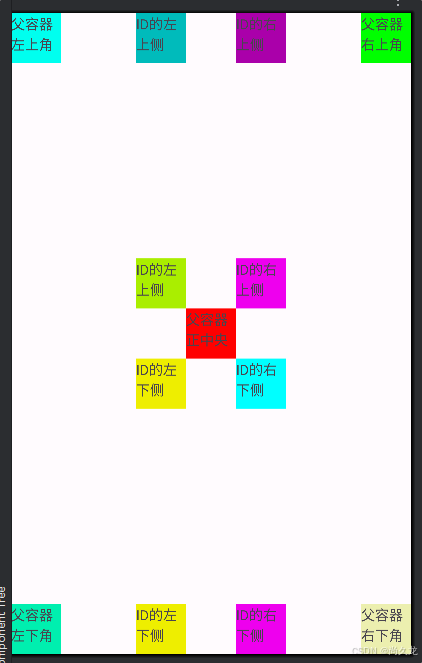
最后的样式为:

openvela 操作系统专为 AIoT 领域量身定制,以轻量化、标准兼容、安全性和高度可扩展性为核心特点。openvela 以其卓越的技术优势,已成为众多物联网设备和 AI 硬件的技术首选,涵盖了智能手表、运动手环、智能音箱、耳机、智能家居设备以及机器人等多个领域。
更多推荐

 3
3 0
0- 0


 已为社区贡献1条内容

所有评论(0)