
自学嵌入式 day30 IPC:进程间通信
进程间通信:类别、管道:有名与无名、信号通信
IPC 进程间通信 :
一、类别:
1、古老的通信方式:无名管道 有名管道 信号
2、IPC对象通信: system v (系统Ⅴ进程间通信)
消息队列(消息都有类型,用的相对少,这里不讨论)
共享内存(在内核malloc一个空间,最高效)
信号量集 (一组信号量)
3、socket通信:网络通信(本地套接字、网络套接字)
注:管道、信号、system Ⅴ、消息队列、共享内存、信号量集,本地套接字为同台主机间进程的通信
二、管道
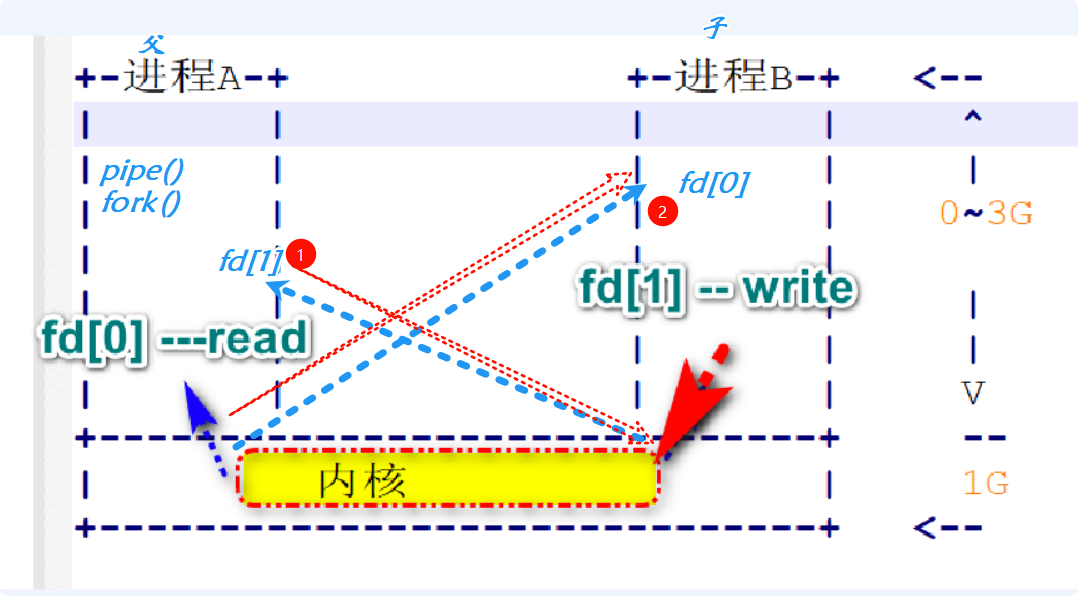
1、特性:(1)、管道是 半双工的工作模式
(2)、所有的管道都是特殊的文件不支持定位操作。
(3)、管道是特殊文件,读写使用文件IO。
注:(1)单工:方向唯一
(2)半双工:左右错开收发
(3)全双工:任意时刻收发
2、无名管道:pipe ,只能给有亲缘关系进程通信
(1)特性: ①、读端存在,一直向管道中去写,超过64k(系统给的管道大小),写会阻塞(取走4k后取消阻塞)。
②、写端是存在的,读管道,如果管道为空的话,读会阻塞。
③、管道破裂,,读端关闭,写管道。
④、read 0 ,写端关闭,如果管道没有内容,read 0 ;
(2)使用步骤:创建管道 --》读写管道 --》关闭管道
(3)创建并打开管道: pipe函数
int pipe(int pipefd[2]);
功能:创建并打开一个无名管道
参数: pipefd[0] ==>无名管道的固定读端
pipefd[1] ==>无名管道的固定写端
返回值:成功 0
失败 -1;
①、写慢读快,会阻塞
#include<stdio.h>
#include<stdlib.h>
#include<unistd.h>
#include<string.h>int main()
{
int fd[2] = {0};
int ret = pipe(fd);
if(-1 == ret)
{
perror("pipe\n");
return 1;
}
pid_t pid = fork();
if(pid > 0)
{
close(fd[0]);
sleep(3);
write(fd[1],"hello",5);
close(fd[1]);
}
else if(0 == ret)
{
close(fd[1]);
char buf[10] = {0};read(fd[0],buf,sizeof(buf));
printf("father:%s\n",buf);
close(fd[0]);
}
else
{
perror("fork\n");
return 1;
}
return 0;
}
②、写快读慢,会阻塞
#include <stdio.h>
#include <stdlib.h>
#include <unistd.h>
#include <string.h>
int main()
{
int fd[2]={0};
int ret = pipe(fd);
if(ret == -1)
{
perror("pipe");
return 1;
}
pid_t pid = fork();
if(pid>0)
{
// fd[0] read fd[1] write
close(fd[0]); //close read end
char buf[1024]={0};
memset(buf,'a',sizeof(buf));
int i = 0 ;
for(i =0;i<65;i++)
{
write(fd[1],buf,1024);
printf("%d\n",i);
}
close(fd[1]);
}else if (0 == pid)
{
close(fd[1]);
char buf[10]={0};
while(1)sleep(1);
close(fd[0]);
}
else
{
perror("fork");
return 1;
}
return 0;
}
③、管道破碎
include <stdio.h>
#include <stdlib.h>
#include <unistd.h>
#include <strings.h>
int main()
{
int fd[2]={0};
int ret = pipe(fd);
if(ret == -1)
{
perror("pipe");
return 1;
}
pid_t pid = fork();
if(pid>0)
{
// fd[0] read fd[1] write
close(fd[0]); //close read end
sleep(3);
write(fd[1],"hello",5); //触发管道破裂 gdb 观察
printf("aaaa\n");
close(fd[1]);
}else if (0 == pid)
{
close(fd[1]);
close(fd[0]);
}
else
{
perror("fork");
return 1;
}
return 0;
}

注:set-fork-mode child:gdb调试中走子进程,在fork函数前使用
④、read 0
#include <stdio.h>
#include <stdlib.h>
#include <strings.h>
#include <unistd.h>int main(int argc, char **argv)
{
int fd[2] = {0};
int ret = pipe(fd);
if (ret == -1)
{
perror("pipe");
return 1;
}
pid_t pid = fork();
if (pid > 0)
{
// fd[0] read fd[1] write
close(fd[0]); // close read end
write(fd[1], "hello", 5);
close(fd[1]);
exit(0);
}else if (0 == pid)
{
close(fd[1]);
sleep(3);
while (1)
{
char buf[10] = {0};
int ret = read(fd[0], buf, sizeof(buf));
if(0 == ret) // read ==0 表示进程通信结束
{
printf("read 0\n");
break;
}
printf("father:%s\n", buf);
}
close(fd[0]);
}
else
{
perror("fork");
return 1;
}
return 0;
}
练习:复制文件:
#include <stdio.h>
#include <stdlib.h>
#include <unistd.h>
#include <strings.h>
#include <fcntl.h>int main()
{
int fd[2]={0};
int ret = pipe(fd);
if(ret == -1)
{
perror("pipe");
return 1;
}
pid_t pid = fork();
if(pid>0)
{
// fd[0] read fd[1] write
close(fd[0]); //close read end
int srcfd = open("/home/linux/1.png",O_RDONLY);
if(-1 == srcfd)
{
perror("open");
exit(1);
}while(1)
{
char buf[4096]={0};
int ret = read(srcfd,buf,sizeof(buf));//从图片里读
if(0 == ret)
{
break;
}
write(fd[1],buf,ret); //sizeof(buf) strlen(buf) //写到管道去
}
close(fd[1]);
close(srcfd);
}else if (0 == pid)
{
close(fd[1]);
int dstfd = open("2.png",O_WRONLY|O_CREAT|O_TRUNC,0666);
if(-1 == dstfd)
{
perror(" child open");
return 1;
}
while(1)
{
char buf[4096]={0};
int ret = read(fd[0],buf,sizeof(buf));//从管道里读
if(0 == ret)
{
break;
}
write(dstfd,buf,ret);//写到图片里去
}
close(fd[0]);
close(dstfd);}
else
{
perror("fork");
return 1;
}
return 0;
}
3、有名管道:fifo,有文件名称的管道
(1)使用步骤:创建有名管道 ==》打开有名管道 ==》读写管道
==》关闭管道 ==》卸载有名管道
(2)创建:int mkfifo(const char *pathname, mode_t mode);
功能:在指定的pathname路径+名称下创建一个权限为mode的有名管道文件。
参数:pathname要创建的有名管道路径+名称
mode 8进制文件权限。(默认0666)
返回值:成功 0
失败 -1;
(3)卸载管道:remove();
功能:将指定的pathname管道文件卸载,同时从文件系统中删除。
参数: ptahtname 要卸载的有名管道
返回值:成功 0
失败 -1;
①、write_fifo.c
#include <errno.h>
#include <fcntl.h>
#include <stdio.h>
#include <stdlib.h>
#include <strings.h>
#include <sys/stat.h>
#include <sys/types.h>
#include <unistd.h>int main()
{int ret = mkfifo("fifo",0666);
if(-1 == ret)
{
if(EEXIST != errno)
{
perror("mkfifo");
return 1;
}
}
int fd = open("fifo",O_WRONLY);
if(-1 == fd)
{
perror("open");
return 1;
}
write(fd,"hello",5);
close(fd);
return 0;}
②、read_fifo.c
#include <errno.h>
#include <fcntl.h>
#include <stdio.h>
#include <stdlib.h>
#include <strings.h>
#include <sys/stat.h>
#include <sys/types.h>
#include <unistd.h>int main()
{
int ret = mkfifo("fifo",0666);
if(-1 == ret)
{
if(EEXIST != errno)
{
perror("mkfifo");
return 1;
}
}
char buf[10] = {0};
int fd = open("fifo",O_RDONLY);
if(-1 == fd)
{
perror("open");
return 1;
}
read(fd,buf,sizeof(buf));
printf("r:%s\n",buf);
close(fd);
remove("fifo");
return 0;
}
注:(1)有名管道在执行open时会阻塞
(2)相同管道名不能二次创造,可用设置 if(EEXIST==erron)避免
(4)特性: (1)需要同步,位置在open函数
(2)可在父子进程中使用
(3)能手工操作有名管道实现数据传送
练习:用有名管道实现复制功能:
①、read_fifo.c
#include <errno.h>
#include <fcntl.h>
#include <stdio.h>
#include <stdlib.h>
#include <strings.h>
#include <sys/stat.h>
#include <sys/types.h>
#include <unistd.h>
int main(int argc, char **argv)
{
int ret = mkfifo("fifo", 0666);
if (-1 == ret)
{
if (EEXIST != errno)
{
perror("mkfifo");
return 1;
}
}int fd = open("fifo", O_RDONLY);
if (-1 == fd)
{
perror("open fifo");
return 1;
}
int dstfd = open("2.png",O_WRONLY|O_CREAT|O_TRUNC,0666);
if(-1 == dstfd)
{
perror("open 2.png");
return 1;
}while(1)
{
char buf[4096]={0};
int ret = read(fd,buf,sizeof(buf));
if(0 == ret)
{
break;
}write(dstfd,buf,ret);
}
close(fd);
close(dstfd);
remove("fifo");
// system("pause");
return 0;
}
②、write_fifo.c
#include <errno.h>
#include <fcntl.h>
#include <stdio.h>
#include <stdlib.h>
#include <strings.h>
#include <sys/stat.h>
#include <sys/types.h>
#include <unistd.h>
int main(int argc, char **argv)
{
int ret = mkfifo("fifo", 0666);
if (-1 == ret)
{
if (EEXIST != errno)
{
perror("mkfifo");
return 1;
}
}int fd = open("fifo", O_WRONLY);
if (-1 == fd)
{
perror("open fifo");
return 1;
}int srcfd= open("/home/linux/1.png",O_RDONLY);
if(-1 == srcfd)
{
perror("open 1.png");
return 1;
}
while(1)
{
char buf[4096]={0};
int ret = read(srcfd,buf,sizeof(buf));
if(0 == ret)
{
break;
}
write(fd,buf,ret);
}
close(fd);
close(srcfd);
// system("pause");
return 0;
}
三、信号通信
1、应用:异步通信
2、如何响应:man 7 signal
term:结束进程
lgn:忽略信号
core:进程结束,保存关键点的信息
stop:暂停
cont:继续
3、信号:kill -l


4、发信号:
(1)kill:int kill(pid_t pid, int sig);
功能:通过该函数可以给pid进程发送信号为sig的系统信号。
参数:pid 要接收信号的进程pid
sig 当前程序要发送的信号编号
返回值:成功 0
失败 -1;
#include <sys/types.h>
#include <signal.h>
#include <errno.h>
#include <fcntl.h>
#include <stdio.h>
#include <stdlib.h>
#include <strings.h>
#include <sys/stat.h>
#include <sys/types.h>
#include <unistd.h>
int main(int argc, char **argv)
{
if(argc<3)
{
printf("usage: ./a.out pid signum\n");
return 1;
}
pid_t pid = atoi(argv[1]);
int num = atoi(argv[2]);
int ret = kill(pid,num);
if(-1 == ret)
{
perror("kill");
return 1;
}
//system("pause");
return 0;
}
(2)unsigned int alarm(unsigned int seconds)
功能:定时由系统给当前进程发送信号,也称为闹钟函数
参数:second:秒数
#include <sys/types.h>
#include <signal.h>
#include <errno.h>
#include <fcntl.h>
#include <stdio.h>
#include <stdlib.h>
#include <strings.h>
#include <sys/stat.h>
#include <sys/types.h>
#include <unistd.h>int main()
{
alarm(5);
while(1)
{
printf("sleep...\n");
sleep(1);
}
return 0;
}
(3)int pause(void);
功能:进程暂停,不再继续执行,除非收到其他信号。
#include <sys/types.h>
#include <signal.h>
#include <errno.h>
#include <fcntl.h>
#include <stdio.h>
#include <stdlib.h>
#include <strings.h>
#include <sys/stat.h>
#include <sys/types.h>
#include <unistd.h>int main()
{
int i = 0;
while(1)
{
printf("work...\n");
i++;
sleep(1);
if(5 == i)
{
pause();
}
}
return 0;
}
(4)信号注册函数:typedef void (*sighandler_t)(int);
sighandler_t signal(int signum, sighandler_t handler);
功能L:改变原有信号的功能
参数: signum:几号命令(不能改9,10号命令)
handler:函数名
①闹钟函数:
#include <sys/types.h>
#include <signal.h>
#include <errno.h>
#include <fcntl.h>
#include <stdio.h>
#include <stdlib.h>
#include <strings.h>
#include <sys/stat.h>
#include <sys/types.h>
#include <unistd.h>
int flag = 0 ;
void handle(int num)
{
flag =1;
}
int main(int argc, char **argv)
{
signal(SIGALRM,handle);
alarm(5);
while(1)
{
if(0 == flag)
{
printf("sleep...\n");
}
else
{
printf("working...\n");
}
sleep(1);
}system("pause");
return 0;
}

②、暂停函数的继续:
#include <errno.h>
#include <fcntl.h>
#include <signal.h>
#include <stdio.h>
#include <stdlib.h>
#include <strings.h>
#include <sys/stat.h>
#include <sys/types.h>
#include <sys/types.h>
#include <unistd.h>
void handle(int num)
{
}
int main(int argc, char **argv)
{
signal(SIGCONT,handle);
int i = 0 ;
while(1)
{
printf("work... pid:%d\n",getpid());
sleep(1);
i++;
if(5 == i )
{
printf("暫停\n");
pause();
}
}
system("pause");
return 0;
}

③、用户自定义命令:
#include <errno.h>
#include <fcntl.h>
#include <signal.h>
#include <stdio.h>
#include <stdlib.h>
#include <strings.h>
#include <sys/stat.h>
#include <sys/types.h>
#include <sys/types.h>
#include <unistd.h>void handle1(int num)
{
static int i = 0;
printf("老爸叫你...\n");
i++;
if(i ==3)
{
signal(SIGUSR1,SIG_IGN); //忽略信号
}}
void handle2(int num)
{
static int i = 0;
printf("老妈叫你...\n");
i++;
if(i ==3)
{
signal(SIGUSR2,SIG_DFL); //回复默认信号
}}
int main(int argc, char **argv)
{
signal(SIGUSR1,handle1);
signal(SIGUSR2,handle2);
while(1)
{printf("i'm playing pid:%d\n",getpid());
sleep(1);
}system("pause");
return 0;
}


openvela 操作系统专为 AIoT 领域量身定制,以轻量化、标准兼容、安全性和高度可扩展性为核心特点。openvela 以其卓越的技术优势,已成为众多物联网设备和 AI 硬件的技术首选,涵盖了智能手表、运动手环、智能音箱、耳机、智能家居设备以及机器人等多个领域。
更多推荐
 53
53 0
0- 0


 已为社区贡献20条内容

所有评论(0)